
MCP server · Finance and crypto
Trayd MCP server for Robinhood
by trayders
Ask your AI about your Robinhood portfolio, get live quotes, and place buy or sell orders in plain words.
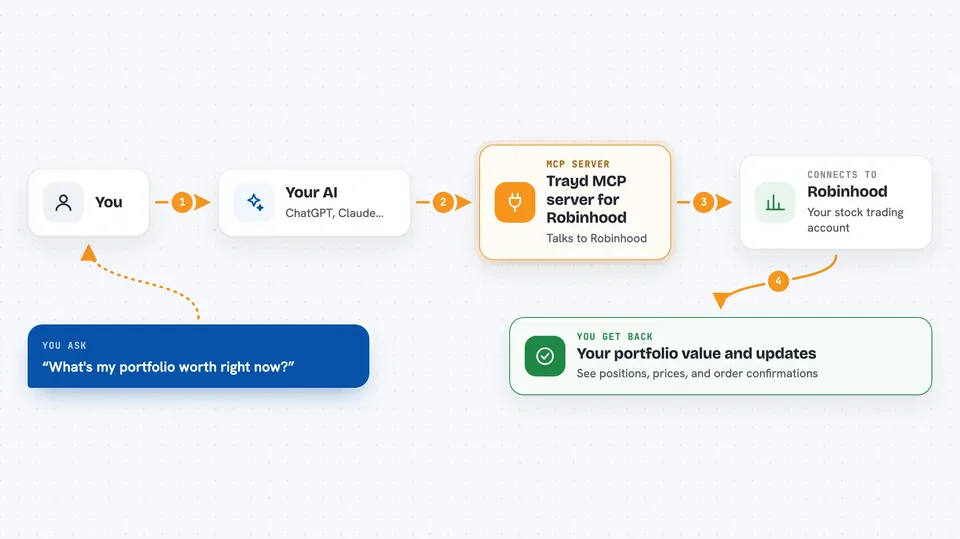
Trayd is a helper that connects your AI assistant to your Robinhood account. Once it is set up, you can ask things like what your portfolio is worth or buy 10 shares of Apple, and the AI does it for you. It is handy for anyone who trades on Robinhood and would rather type a sentence than tap through screens.
What is an MCP server? The 30-second version
On its own, your AI can only chat. It cannot see your Robinhood account or place a trade. An MCP server is a small helper that gives your AI a new skill, and here that skill is talking to Robinhood. Trayd sits between your AI and Robinhood, so when you ask a question or give an order, the AI passes it to Trayd and Trayd handles it with Robinhood for you.
What this MCP server does
You ask your AI something in normal words, like what your portfolio is worth or what NVDA is trading at. The AI sends that request to Trayd, which talks to Robinhood on your behalf. Trayd brings back the answer, like a list of your positions or a current price. If you ask it to buy or sell, Trayd places the order with Robinhood and tells you what happened. It can also remember notes you give it, like your strategy, so you do not have to repeat yourself next time.
 Click to zoom
What you can do with it
- Check what your portfolio is worth and which positions are up or down
- Get live quotes for stocks, even outside market hours
- Buy or sell shares, including short selling
- Place limit orders and ladder orders in one sentence
- Run batch orders across several tickers at once
- Cancel open orders or list your accounts
- Save notes about your strategy so the AI remembers them later
Try asking your AI
- “What's my portfolio worth right now?”
- “What's NVDA trading at?”
- “Buy 10 shares of AAPL”
- “Set 5 ladder buys for NVDA from $180 to $175”
- “Remember my cost basis on NVDA is $140”
What it gives back to you
You get answers right in the chat: your portfolio value, a list of positions, a current price, or a short note that an order was placed or cancelled. For orders, it tells you what it sent to Robinhood so you can check your Robinhood app. Notes you ask it to remember are saved and come back in later conversations.
Before you start
What you need
- A Robinhood account
- The Claude app on the web (claude.ai) or Claude Code in a terminal
- Your phone with the Robinhood app, to approve the login
Good to know
This can place real trades and move real money in your Robinhood account, so double check what you ask before you send it.
Install it with your AI
Add Trayd MCP server for Robinhood to your AI, no technical skills needed
You don't install anything by hand. You copy one prompt, paste it into an AI that can work on your computer, and it checks, installs and connects the server for you, asking you when it needs something.
Sign in to get the install prompt
Members get a ready-made prompt that lets the Claude desktop app check Trayd MCP server for Robinhood, install it and connect it for them, step by step. You don't need any technical skills: you copy, paste and answer a few questions. Your connected AI can also find and install any of the 4,609 MCP servers here for you.
Who it's for
Robinhood users who want to check their portfolio, get quotes, or place trades by typing instead of tapping.



