
MCP server · Gaming
TrueTick MCP server
by truetick-gg
Let your AI manage your TrueTick Minecraft servers: start, stop, check performance, edit files and add mods.
This is a helper that connects your AI assistant to TrueTick, a service that hosts Minecraft servers. Once it is set up, you can ask your AI in plain words to start a server, check how it is running, or add a mod, and it will do it for you. It is handy if you run a Minecraft server and would rather type a sentence than click around a dashboard.
What is an MCP server? The 30-second version
On its own, your AI can only chat. It cannot touch your Minecraft server or any other app. An MCP server is a small helper program that gives your AI a new skill or a connection to a service. This one connects your AI to TrueTick, so when you ask about your server, the AI can actually look it up or change it for you.
What this MCP server does
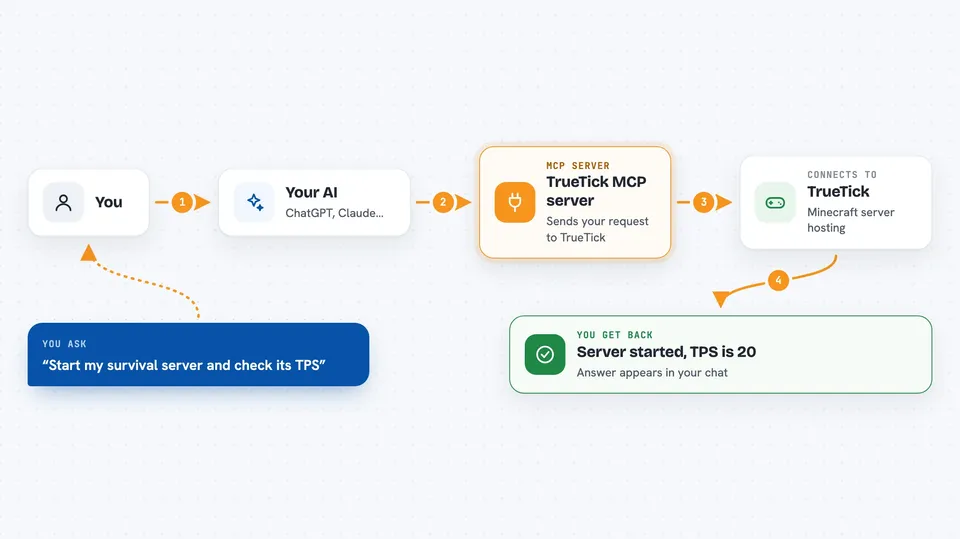
You type a request in your AI chat, like asking it to start your server or add a mod. The AI passes that request to this helper program. The helper then talks to TrueTick using your account key. TrueTick does the work, and the answer comes back into your chat as a short reply, a list, or a confirmation that something changed.
 Click to zoom
What you can do with it
- List all your Minecraft servers and see their details
- Start, stop, or restart a server
- Create a new server or one from a template
- Check live performance like TPS, MSPT and player count
- Read recent log lines from a server
- Browse, read, write, or delete files on a server
- Add or remove mods and plugins from Modrinth or CurseForge
- Create and restore backups
Try asking your AI
- “List my TrueTick servers and tell me which ones are running”
- “Start my survival server and check its TPS”
- “Add the JourneyMap mod to my server”
- “Show me the last 50 log lines from my server”
- “Create a backup of my server before I update the version”
What it gives back to you
You get answers right in the chat. Sometimes it is a simple confirmation, like "server started". Sometimes it is a list, like your servers or your installed mods. Sometimes it is numbers, like the current TPS or player count. If you asked to read a file, the file contents show up as text.
Before you start
What you need
- A TrueTick account
- A TrueTick API key (a kind of password for apps; you create one on the TrueTick dashboard and pick what it is allowed to do)
- The Claude desktop app or another AI app that supports MCP servers
- Node.js installed on your computer (the helper runs through a tool called npx)
Good to know
Some actions are permanent or destructive, like deleting a server, deleting files, or restoring a backup, which overwrites the current data, so double-check before you say yes.
Install it with your AI
Add TrueTick MCP server to your AI, no technical skills needed
You don't install anything by hand. You copy one prompt, paste it into an AI that can work on your computer, and it checks, installs and connects the server for you, asking you when it needs something.
Sign in to get the install prompt
Members get a ready-made prompt that lets the Claude desktop app check TrueTick MCP server, install it and connect it for them, step by step. You don't need any technical skills: you copy, paste and answer a few questions. Your connected AI can also find and install any of the 4,361 MCP servers here for you.
Who it's for
People who run Minecraft servers on TrueTick and want to manage them by chatting with an AI instead of clicking through a dashboard.





