
MCP server · Security · official
TrustScoreAgent MCP server
by trustscoreagent · official
Let your AI check how trustworthy an online service is before using it, and leave a rating afterward.
TrustScoreAgent is a free, open registry that keeps track of how reliable different online services are. Once you connect it to your AI, your AI can look up a service's reputation before calling it, and add a rating after. It is handy if you or your AI rely on outside services and want to know which ones actually work well.
What is an MCP server? The 30-second version
On its own, your AI can only chat with you. An MCP server is a small helper program that gives your AI a new skill or a connection to an app or service. This one connects your AI to TrustScoreAgent, a public registry of trust scores for online services. So when you ask your AI to check or rate a service, it can actually go and do that for you.
What this MCP server does
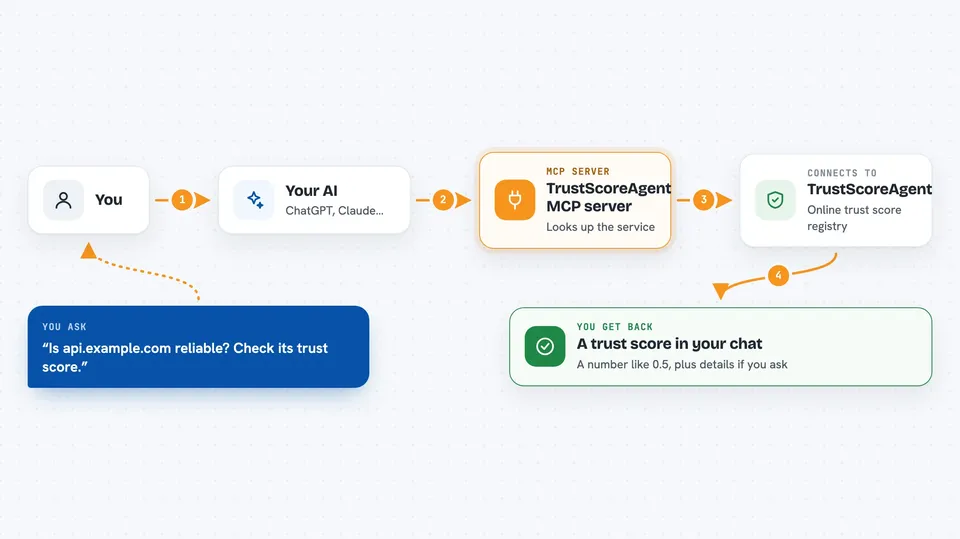
You ask your AI something like whether a particular service is reliable. Your AI passes that question to this helper, which talks to the TrustScoreAgent registry online. The registry looks up the service and sends back a trust score, usually a number between 0 and 1. If you want, your AI can also send in a rating after you have used a service, and the registry records it. You then see the answer or confirmation right in your chat.
 Click to zoom
What you can do with it
- Check the trust score of a service before your AI calls it
- Submit a rating for a service after using it
- List the top-rated services in the registry
- Look up your own agent's trust score
- See the daily score history for a service
- Get detailed stats like latency and quality for a service
- Check up to 100 services in one go
Try asking your AI
- “Is api.example.com reliable? Check its trust score.”
- “Rate this service as working well with low latency.”
- “Show me the top-rated services with at least 10 ratings.”
- “What is the trust score history for this service over the last week?”
What it gives back to you
You get back a trust score, usually a number like 0.5 for unknown services or higher for well-rated ones. You might also see a list of services with their scores, or a confirmation that your rating was recorded. For detailed lookups, you can get latency numbers and quality breakdowns. It all shows up as a normal answer in your chat.
Before you start
What you need
- The Claude desktop app or another app that supports MCP servers
- Node.js installed on your computer (the setup uses a tool called npx)
Good to know
The registry is still early and the public dataset is small, so a neutral score of 0.5 just means nobody has rated that service yet, not that it is bad.
Install it with your AI
Add TrustScoreAgent MCP server to your AI, no technical skills needed
You don't install anything by hand. You copy one prompt, paste it into an AI that can work on your computer, and it checks, installs and connects the server for you, asking you when it needs something.
Sign in to get the install prompt
Members get a ready-made prompt that lets the Claude desktop app check TrustScoreAgent MCP server, install it and connect it for them, step by step. You don't need any technical skills: you copy, paste and answer a few questions. Your connected AI can also find and install any of the 4,609 MCP servers here for you.
Who it's for
Anyone whose AI calls outside services and wants a quick way to check if those services are trustworthy, especially people working with AI agents or automation.



