
MCP server · Finance and crypto
LPXPoly MCP server
Let your AI look at Polymarket prediction markets and point out ones that look mispriced.
This is a small helper that connects your AI assistant to LPXPoly, a service that studies Polymarket prediction markets. It is handy if you follow prediction markets and want a second opinion on which ones look off. You pay a tiny amount in Bitcoin for each analysis.
What is an MCP server? The 30-second version
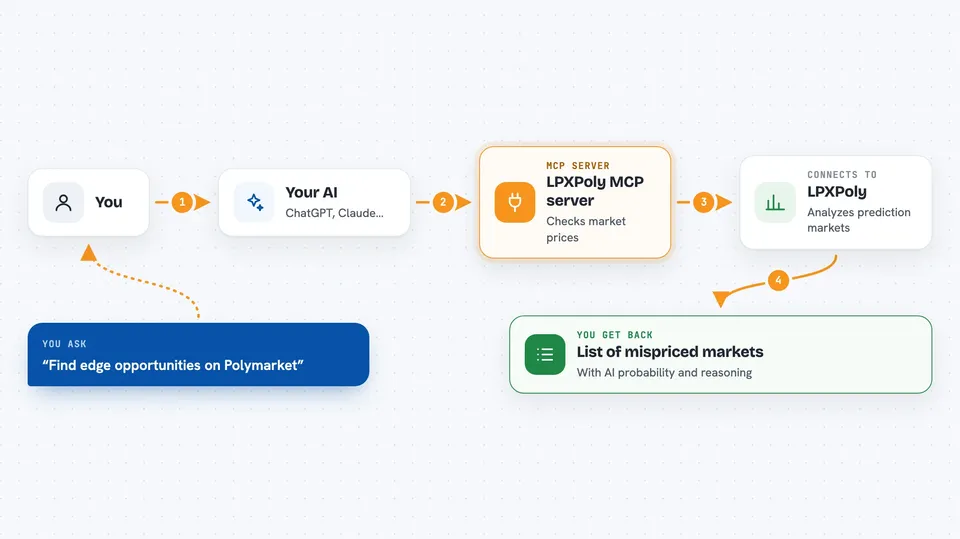
On its own, your AI can only chat with you using what it already knows. An MCP server is a little helper program that gives your AI a new skill or a connection to an app or service. This one connects your AI to LPXPoly, which watches Polymarket. Once it is set up, you can just ask your AI about prediction markets and it will go ask LPXPoly for you.
What this MCP server does
You ask your AI something like find edge opportunities on Polymarket. Your AI passes that request to this helper. The helper talks to LPXPoly, which looks at the markets and works out where its own probability estimate differs from the market price. You get a short answer back in the chat with the markets it thinks look mispriced, plus its reasoning. Each analysis costs a small amount of Bitcoin, taken from a balance you top up first.
 Click to zoom
What you can do with it
- Find prediction markets that look mispriced
- Get a deep analysis of one specific market
- Browse the top markets by trading volume
- Filter markets by category, like crypto
- Check how much balance you have left
Try asking your AI
- “Find edge opportunities on Polymarket”
- “Analyze the Fed rate cut market”
- “What are the top crypto markets on Polymarket?”
- “Check my Lightning balance”
What it gives back to you
You get short written answers in the chat. For edge opportunities, that is a list of markets with the AI's probability next to the market's probability. For a single market, you get an assessment, the reasoning behind it, and a suggested position. You can also ask for your remaining balance, which comes back as a number.
Before you start
What you need
- A spend token from lightningprox.com (you fund it by paying a Bitcoin Lightning invoice)
- The Claude desktop app, or another AI tool that supports MCP servers
- Node.js installed on your computer so npx works
Good to know
Each analysis costs about 50 sats from your Lightning balance, so it can spend your money as you use it.
Install it with your AI
Add LPXPoly MCP server to your AI, no technical skills needed
You don't install anything by hand. You copy one prompt, paste it into an AI that can work on your computer, and it checks, installs and connects the server for you, asking you when it needs something.
Sign in to get the install prompt
Members get a ready-made prompt that lets the Claude desktop app check LPXPoly MCP server, install it and connect it for them, step by step. You don't need any technical skills: you copy, paste and answer a few questions. Your connected AI can also find and install any of the 4,609 MCP servers here for you.
Who it's for
People who follow Polymarket or prediction markets and want a quick, AI-assisted read on where the prices might be wrong.



