
MCP server · Developer tools
DotNet Types Explorer MCP server
by V0v1kkk
Lets your AI look inside a .NET project and explain its types, namespaces, and NuGet packages.
This is a helper for people who work with .NET code and want their AI assistant to actually understand it. It lets the AI look inside your project's compiled code and tell you what classes, methods, and packages are there. It is handy if you write or read .NET code and want fewer wrong guesses from your AI.
What is an MCP server? The 30-second version
On its own, your AI can only chat with you. An MCP server is a small helper program that gives your AI a new skill or a connection to something else. This one connects your AI to your .NET project, so it can look up real types and packages instead of guessing. You ask a question, and the AI uses this helper to check your actual code and answer.
What this MCP server does
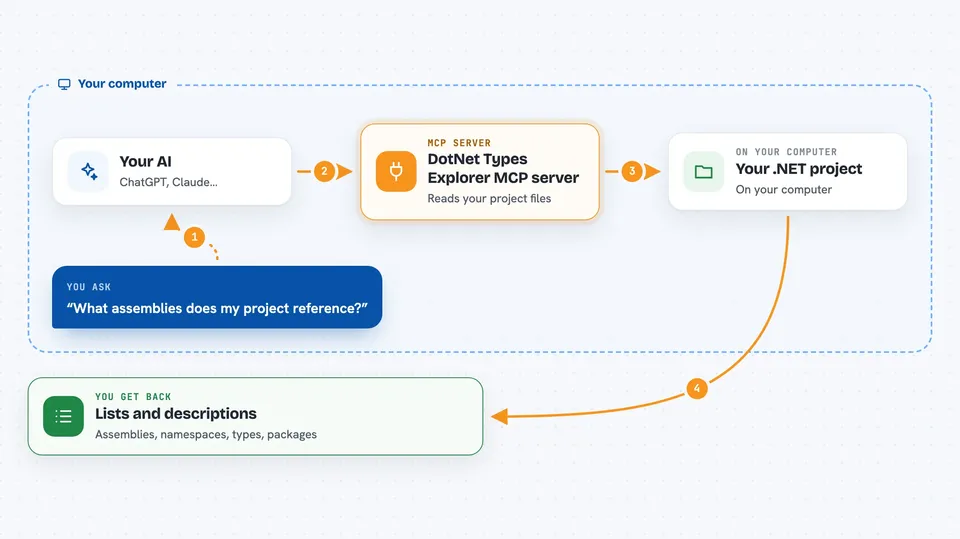
You point the helper at a .NET project on your computer. When you ask your AI something about that project, the AI sends the question to this helper. The helper opens the compiled code and reads the list of assemblies, namespaces, and types inside. It can also search nuget.org for packages and check their versions. Then it sends the details back, and your AI explains them to you in the chat.
 Click to zoom
What you can do with it
- List all the assemblies your .NET project uses
- Show every namespace inside a chosen assembly
- Describe the classes, methods, properties, and events in a namespace
- Search nuget.org for packages by name or keyword
- Check the version history and dependencies of a NuGet package
- Narrow results with filters and page through large lists
Try asking your AI
- “What assemblies does my project reference?”
- “Show me the namespaces inside the Newtonsoft.Json assembly.”
- “List the public methods of the types in the System.Text.Json.Serialization namespace.”
- “Search NuGet for a package called Serilog and show me its recent versions.”
What it gives back to you
You get back plain lists and descriptions in the chat: assembly names, namespace names, and details about types like their methods, properties, and constructors. NuGet searches come back as a list of matching packages with version details. Nothing in your code is changed; it only reads and reports.
Before you start
What you need
- The .NET 10.0 SDK or newer installed
- A .NET project you want to explore, built at least once (or just restored if you use NuGetCache mode)
- An AI assistant that supports MCP, like Roo Code in Visual Studio
Good to know
It reads your project's compiled files and project settings, so only point it at projects you are comfortable sharing with your AI assistant.
Install it with your AI
Add DotNet Types Explorer MCP server to your AI, no technical skills needed
You don't install anything by hand. You copy one prompt, paste it into an AI that can work on your computer, and it checks, installs and connects the server for you, asking you when it needs something.
Sign in to get the install prompt
Members get a ready-made prompt that lets the Claude desktop app check DotNet Types Explorer MCP server, install it and connect it for them, step by step. You don't need any technical skills: you copy, paste and answer a few questions. Your connected AI can also find and install any of the 4,609 MCP servers here for you.
Who it's for
Developers and anyone who reads or writes .NET code and wants their AI assistant to give accurate answers about a specific project.




