
MCP server · Finance and crypto
CryptoDataAPI MCP server
Lets your AI pull live crypto market data: prices, funding rates, ETF flows, sentiment and cycle signals.
This is a small helper that connects your AI assistant to CryptoDataAPI, a service that tracks the crypto market in real time. Once it is set up, you can just ask your AI questions about Bitcoin, Ethereum, funding rates or ETF flows and it will fetch the numbers for you. It is handy if you follow crypto markets at work or for your own research and do not want to hop between ten websites.
What is an MCP server? The 30-second version
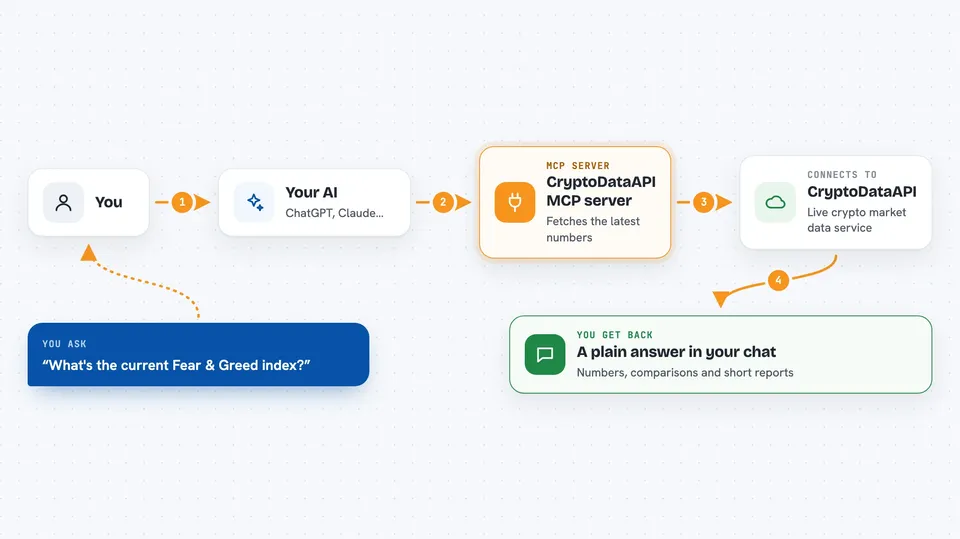
On its own, your AI can only chat with you using what it already learned. An MCP server is a small helper program that gives your AI a new skill or a connection to an outside service. This one connects your AI to CryptoDataAPI, a live crypto market data service. So when you ask about funding rates or ETF flows, your AI asks this helper, the helper asks CryptoDataAPI, and the answer comes back into your chat.
What this MCP server does
You ask your AI a question about the crypto market, like how funding rates look or where we are in the Bitcoin cycle. Your AI passes that request to this MCP server, which is running quietly in the background. The server then calls CryptoDataAPI, the live data service, and gets the latest numbers. It hands those numbers back to your AI, which turns them into a readable answer in your chat. You never have to open a dashboard or copy numbers around yourself.
 Click to zoom
What you can do with it
- Get a full daily crypto market snapshot in one go
- Check the Fear & Greed index and market health scores
- Compare funding rates and open interest across exchanges
- See Bitcoin and Ethereum ETF daily flows
- Look up where we are in the Bitcoin cycle with indicators like MVRV and NUPL
- Search for a coin and pull its profile, price and market cap
- Ask for a structured crypto market briefing
Try asking your AI
- “Give me a crypto market briefing”
- “What's the current Fear & Greed index?”
- “Show me BTC funding rates across exchanges”
- “What are the ETF flows looking like for Bitcoin today?”
What it gives back to you
You get answers in plain text right in your chat: numbers, short summaries, comparisons and short reports. For example, a market briefing comes back as a structured write-up with regime, derivatives, sentiment and takeaways. If you ask about a coin, you get its price, market cap and recent changes. It does not change anything on your computer; it only reads data and reports back.
Before you start
What you need
- A CryptoDataAPI account and an API key (a kind of password for apps; you get one free when you sign up at cryptodataapi.com)
- Node.js installed on your computer (the free program that lets npx commands run)
- An AI client that supports MCP, like the Claude desktop app, Claude Code or Cursor
Good to know
It only reads market data, but it needs your CryptoDataAPI key, so keep that key private and do not share it in chats or screenshots.
Install it with your AI
Add CryptoDataAPI MCP server to your AI, no technical skills needed
You don't install anything by hand. You copy one prompt, paste it into an AI that can work on your computer, and it checks, installs and connects the server for you, asking you when it needs something.
Sign in to get the install prompt
Members get a ready-made prompt that lets the Claude desktop app check CryptoDataAPI MCP server, install it and connect it for them, step by step. You don't need any technical skills: you copy, paste and answer a few questions. Your connected AI can also find and install any of the 4,609 MCP servers here for you.
Who it's for
Anyone who follows crypto markets for work or research and wants quick answers without opening several dashboards, from analysts to curious office workers.



