
MCP server · Security
Aletheia MCP server
by vikasny30
Checks your AI's commands before they run and blocks dangerous ones like deleting files or reading passwords.
Aletheia MCP is a small guard program that sits between your AI assistant and the tools it wants to use. Before the AI runs a command, this server quickly looks at it and stops the ones that look destructive or sneaky. It's handy for anyone letting an AI agent run shell commands, database queries, or file operations on their behalf.
What is an MCP server? The 30-second version
On its own, your AI can only chat with you. An MCP server is a small helper program that gives your AI a new skill or a connection to something. This one gives your AI a safety check: every time the AI is about to run a command, Aletheia looks at it first and decides whether to let it through or block it. You don't have to do anything special, it just quietly watches in the background.
What this MCP server does
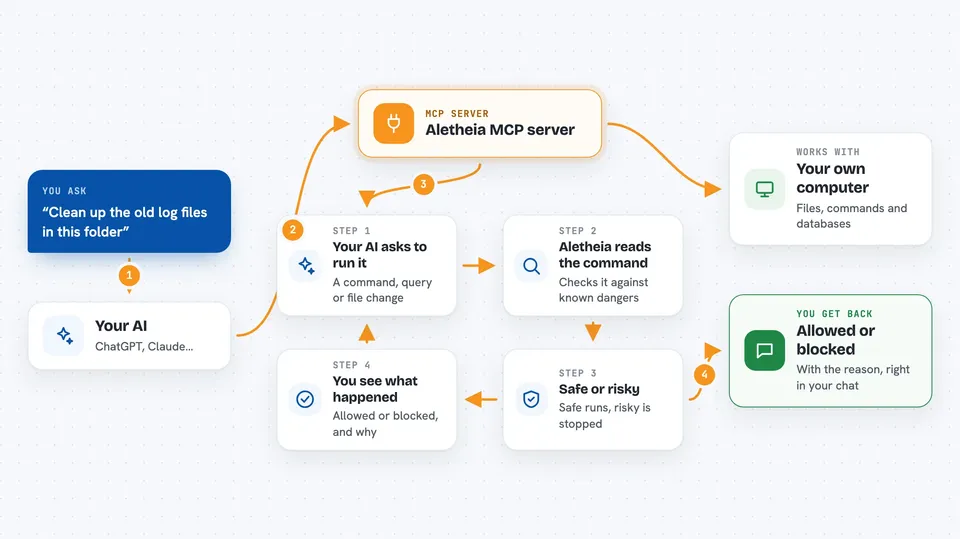
When your AI wants to run a command, like a shell command, a database query, or a file operation, it first asks Aletheia. Aletheia reads the command and compares it against a long list of known dangerous patterns, like deleting everything, reading your secret keys, or reaching into private network addresses. If the command looks safe, it passes through and runs normally. If it looks risky, Aletheia blocks it and tells you why. The whole check takes less than a thousandth of a second, so you never notice it happening.
 Click to zoom
What you can do with it
- Block shell commands that try to delete or overwrite your files
- Stop the AI from reading your password files or secret keys
- Catch database queries that would wipe or change every row
- Prevent the AI from reaching hidden cloud addresses or private networks
- Flag sneaky tricks like hidden characters or encoded commands
- Show you a live log of what got blocked and how often
- Wrap other MCP servers so everything they do gets checked first
Try asking your AI
- “Run the tests and fix any failures”
- “Clean up the old log files in this folder”
- “Check the database and remove any duplicate user accounts”
- “Fetch the config from the internal server at 169.254.169.254”
What it gives back to you
You get a simple answer: allowed or blocked. When something is blocked, Aletheia tells you which rule it matched and why, so you understand what the AI was about to do. You can also ask for a summary of recent activity, which shows how many commands were checked, how many were blocked, and how fast the checks were. It all shows up right in your chat.
Before you start
What you need
- Node.js 18 or newer installed on your computer
- The Claude desktop app or Claude Code (or another AI tool that supports MCP servers)
- The Aletheia MCP package, which you add through your AI tool's settings
Good to know
This is a fast pattern-based filter, not a full sandbox, so a cleverly disguised or brand-new attack could still slip past it; use it alongside normal safety measures like limited permissions and containers.
Install it with your AI
Add Aletheia MCP server to your AI, no technical skills needed
You don't install anything by hand. You copy one prompt, paste it into an AI that can work on your computer, and it checks, installs and connects the server for you, asking you when it needs something.
Sign in to get the install prompt
Members get a ready-made prompt that lets the Claude desktop app check Aletheia MCP server, install it and connect it for them, step by step. You don't need any technical skills: you copy, paste and answer a few questions. Your connected AI can also find and install any of the 4,609 MCP servers here for you.
Who it's for
Anyone who lets an AI agent run shell commands, database queries, or file operations and wants a cheap safety net against obvious mistakes.



