
MCP server · Analytics
Token Meter MCP server
See how many tokens and dollars your Claude Code and Codex sessions cost, right inside your AI chat.
Token Meter is a small program that reads the usage logs Claude Code and Codex already keep on your computer and turns them into a dashboard. It shows what your sessions cost, which tools used the most tokens, and which hours were the most expensive. It is handy if you use Claude Code or Codex often and want to know where your usage is going, without sending anything to the cloud.
What is an MCP server? The 30-second version
On its own, your AI can only chat with you. An MCP server is a small helper program that gives your AI a new skill or a connection to something on your machine. This one connects your AI to Token Meter, which reads your local Claude Code and Codex logs. Once it is connected, you can just ask your AI about your token usage and it will look it up for you.
What this MCP server does
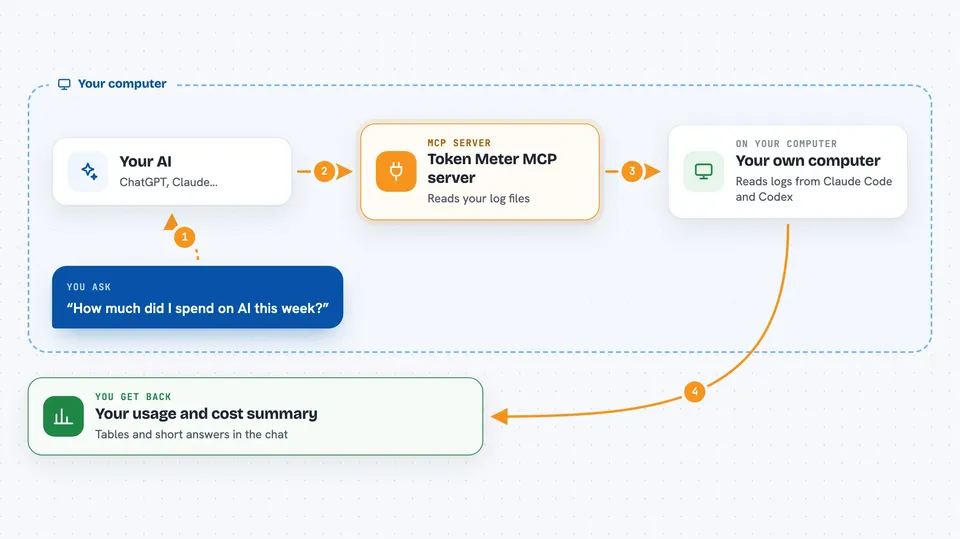
You ask your AI something like how much you spent this week. Your AI passes that question to Token Meter through this MCP connection. Token Meter reads the log files Claude Code and Codex already wrote on your computer, counts the tokens, and estimates the cost. Then your AI shows you the answer in the chat, as a table or a short summary. Everything happens on your machine, and the four tools it offers are read-only.
 Click to zoom
What you can do with it
- See your token counts and estimated cost per day and per model
- List your recent sessions with the exact resume command to copy
- Break down a single session by tool, showing calls, tokens, and latency
- Refresh the data so new activity shows up in the next summary
- Spot which MCP server or tool is using the most tokens
- Check which hour of the day costs you the most
Try asking your AI
- “Show me my token usage and cost for the last 7 days.”
- “List my recent sessions so I can pick one to resume.”
- “Show the tool breakdown for my most recent session. Which tool used the most tokens?”
- “Refresh token-meter data, then tell me which model cost the most this week.”
What it gives back to you
You get back tables and short answers in the chat. For example, a daily table of token counts, estimated dollar cost, and number of calls, split by day and model. It can also list your recent sessions with ready-to-paste resume commands, or show a per-tool breakdown inside one session. The numbers are estimates based on local logs, not your real invoice.
Before you start
What you need
- Node.js installed on your computer (the free runtime that runs npx commands)
- Claude Code or Codex already used on this machine, so there are logs to read
- An AI client that supports MCP, such as Claude Code, Cursor, or Claude Desktop
Good to know
The dollar figures are estimates from local logs, not billing-grade numbers, so do not use them to check your real Anthropic or OpenAI invoice.
Install it with your AI
Add Token Meter MCP server to your AI, no technical skills needed
You don't install anything by hand. You copy one prompt, paste it into an AI that can work on your computer, and it checks, installs and connects the server for you, asking you when it needs something.
Sign in to get the install prompt
Members get a ready-made prompt that lets the Claude desktop app check Token Meter MCP server, install it and connect it for them, step by step. You don't need any technical skills: you copy, paste and answer a few questions. Your connected AI can also find and install any of the 4,609 MCP servers here for you.
Who it's for
People who use Claude Code or Codex regularly and want to keep an eye on their token usage and estimated cost without leaving their AI chat.




