MCP server · Analytics · official
Beamtrace MCP server
by elfsight · official
See how visible your website is in AI answers and get content fixes to improve it.
Beamtrace is a service that tracks how often AI tools mention your website when people ask questions. This MCP server connects your AI assistant to your Beamtrace account so it can pull those numbers and suggest what to fix. It is handy if you work on marketing, content, or SEO and want quick answers without opening another dashboard.
What is an MCP server? The 30-second version
On its own, your AI can only chat with you using what it already knows. An MCP server is a small helper that gives your AI a new skill or a connection to another service. This one connects your AI to Beamtrace, so when you ask about your AI visibility, the AI can look up your real numbers there and explain them. You do not install anything on your computer; it runs online and you sign in with your Beamtrace account.
What this MCP server does
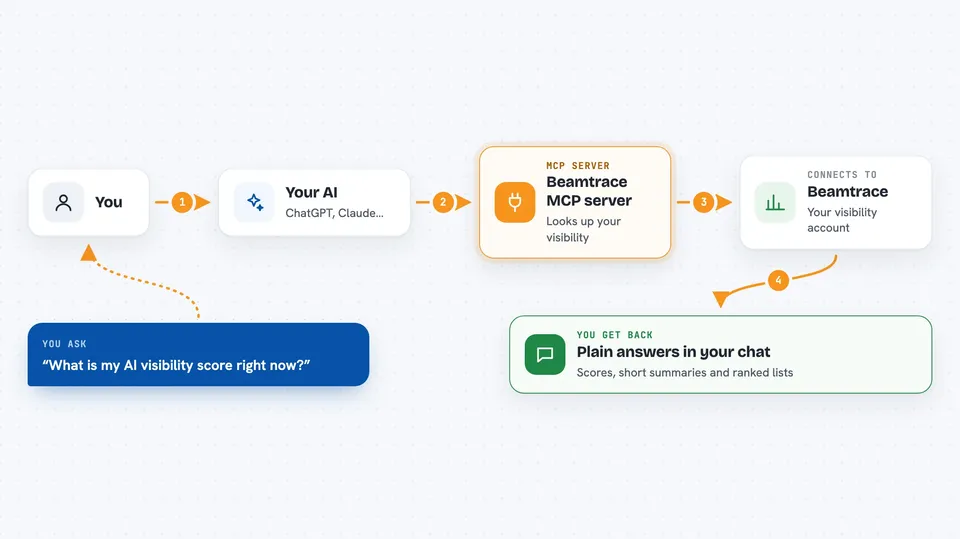
You ask your AI something about how your site shows up in AI answers. The AI sends that question to this helper, which talks to Beamtrace using your account. Beamtrace looks up your visibility score, your topics, your prompts, your competitors, and its suggested improvements. The AI then explains the results to you in plain words, right in the chat.
 Click to zoom
What you can do with it
- Check your overall AI visibility score and what it means
- See which topics your site is doing well or poorly on
- Find prompts where your site is missing from AI answers
- Compare your visibility with competitors
- Get a prioritized list of content improvements
- Ask follow-up questions about any of these numbers
Try asking your AI
- “What is my AI visibility score right now?”
- “Which topics am I losing on compared to my competitors?”
- “Show me the prompts where my site is not being mentioned”
- “What content should I fix first to improve my visibility?”
What it gives back to you
You get answers in the chat, not files to download. Expect scores, short summaries, and lists, such as a leaderboard of competitors or a ranked list of improvements. The AI phrases these in everyday language and can explain what each number means. This server only reads data; it does not change anything in your Beamtrace account.
Before you start
What you need
- A Beamtrace account with a website set up at beamtrace.com/setup
- An AI tool that supports MCP, such as Cursor
- Signing in to Beamtrace when your tool asks
Good to know
It only reads your Beamtrace data, so it will not change or delete anything, but the numbers it shows are private to your account.
Install it with your AI
Add Beamtrace MCP server to your AI, no technical skills needed
You don't install anything by hand. You copy one prompt, paste it into an AI that can work on your computer, and it checks, installs and connects the server for you, asking you when it needs something.
Sign in to get the install prompt
Members get a ready-made prompt that lets the Claude desktop app check Beamtrace MCP server, install it and connect it for them, step by step. You don't need any technical skills: you copy, paste and answer a few questions. Your connected AI can also find and install any of the 4,361 MCP servers here for you.
Who it's for
Marketing, content, and SEO people who want to know how their site appears in AI answers without leaving their AI assistant.