MCP server · Analytics · official
Linkly MCP server
by Linkly-HQ · official
Let your AI create short links, check click stats, and manage your Linkly domains and webhooks.

Linkly is a service that turns long web addresses into short, branded links and tracks who clicks them. This MCP server is the official connector that lets your AI assistant work with your Linkly account for you. It is handy if you share links in emails, posts, or campaigns and want to see how they perform without clicking around a dashboard.
What is an MCP server? The 30-second version
On its own, your AI can only chat with you. An MCP server is a small helper that gives your AI a new skill or a connection to an app. This one connects your AI to Linkly, so it can look up your links, create new ones, and pull click numbers when you ask. You stay in the chat, and the helper does the running around.
What this MCP server does
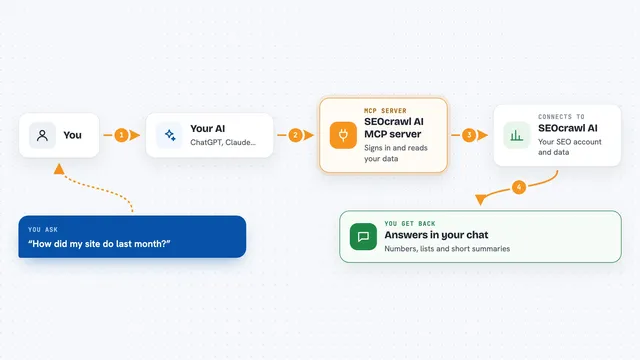
You ask your AI something like "make a short link for this page" or "how many clicks did my launch link get last week?". The AI passes your request to this Linkly helper. The helper talks to your Linkly account and does the work, like creating the short link or counting clicks by country. Then it sends the answer back, and your AI shows it to you in plain words.
 Click to zoom
What you can do with it
- Create a new short link from a long web address
- Update or delete an existing link
- Look up details for one link or list all links in your workspace
- Search your links by name, address, or note
- See click totals over time and grouped by country, platform, or referrer
- Export detailed click records
- Add or remove custom domains and update their favicon
- Set up or remove webhooks that fire when someone clicks
Try asking your AI
- “Create a short link for https://example.com/spring-sale and name it spring sale”
- “How many clicks did my newsletter link get in the last 30 days?”
- “Show me my top five links by clicks this month”
- “List my custom domains and tell me which one has the most links”
What it gives back to you
You get answers in the chat: a new short link with its address, a list of your links, or numbers like total clicks and a breakdown by country or platform. Exports come back as detailed click records you can read or save. When it changes something, like creating or deleting a link, it tells you what it did.
Before you start
What you need
- A Linkly account
- An AI app that can connect to MCP servers, like Claude Desktop, Claude Code, or ChatGPT Desktop
- A browser to sign in to Linkly when it opens during setup
Good to know
It can create, change, and delete links, domains, and webhooks in your Linkly account, so double check before telling your AI to remove something.
Install it with your AI
Add Linkly MCP server to your AI, no technical skills needed
You don't install anything by hand. You copy one prompt, paste it into an AI that can work on your computer, and it checks, installs and connects the server for you, asking you when it needs something.
Sign in to get the install prompt
Members get a ready-made prompt that lets the Claude desktop app check Linkly MCP server, install it and connect it for them, step by step. You don't need any technical skills: you copy, paste and answer a few questions. Your connected AI can also find and install any of the 4,361 MCP servers here for you.
Who it's for
Marketers, community managers, and anyone who shares links often and wants quick answers about how they perform.