MCP server · Analytics · official
LLM Pulse MCP server
by LLM-Pulse · official
Check how your brand shows up in AI answers: mentions, citations, sentiment and share of voice.
LLM Pulse is a service that tracks how your brand appears in answers from AI search engines. This MCP server is the bridge that lets your AI assistant read that data for you. It is handy if you do marketing, SEO or brand work and want quick answers about your AI visibility without opening a dashboard.
What is an MCP server? The 30-second version
On its own, your AI can only chat with you using what it already knows. An MCP server is a small helper program that gives your AI a new skill or a connection to an app or service. This one connects your AI to LLM Pulse, so it can look up your brand's mentions, citations and sentiment there when you ask. You stay in your chat window, and the helper does the fetching behind the scenes.
What this MCP server does
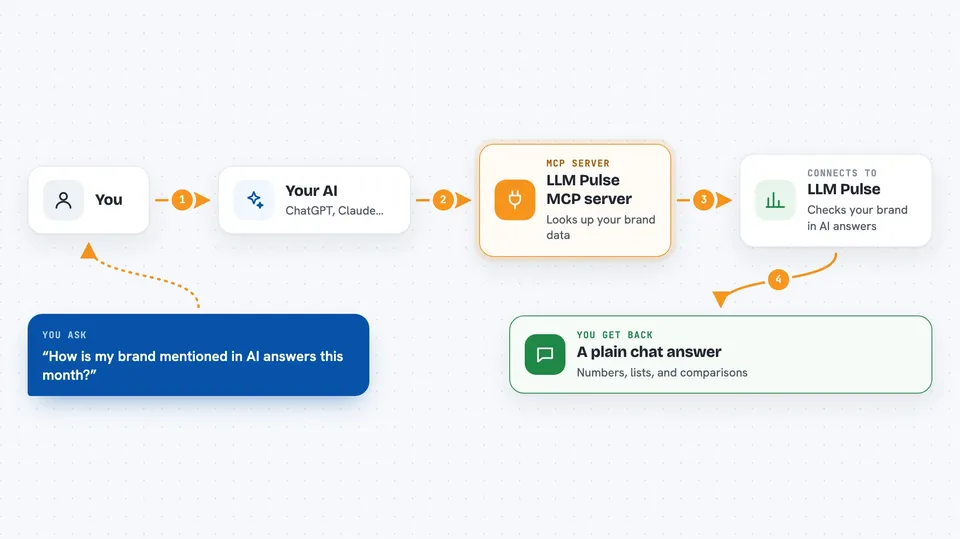
You ask your AI a question about your brand's AI visibility. The AI passes that request to this helper. The helper talks to the LLM Pulse service using your account key. LLM Pulse looks up the numbers, mentions or sources you asked about and sends them back. Your AI then turns that into a normal reply in the chat.
 Click to zoom
What you can do with it
- Check how often your brand is mentioned in AI answers
- See which sources AI engines cite for your brand
- Compare your share of voice against competitors
- Read the sentiment around your brand in AI replies
- Look at which prompts trigger mentions of you
- Review top sources and recommendation data
- Pull Search Console and AI traffic numbers where your plan allows
Try asking your AI
- “How is my brand mentioned in AI answers this month?”
- “Which sources do AI engines cite most for my brand?”
- “Compare my share of voice with my top two competitors.”
- “What is the sentiment around my brand in AI replies lately?”
What it gives back to you
You get answers in plain chat text: numbers, short lists of mentions, lists of sources, sentiment summaries and comparisons. Some replies may include tables or bullet lists of prompts and citations. If you ask for a comparison, you get a side by side view of your brand and competitors. Nothing is changed in your LLM Pulse account; it is read only from your side.
Before you start
What you need
- An LLM Pulse account on a Scale plan or above (API keys are only available there)
- An API key from your LLM Pulse app (a kind of password for apps; you create it in the app)
- Node.js 18 or newer if you want to run the local wrapper, or Docker if you prefer that route
- A chat app that can connect to MCP servers, such as Gemini CLI, VS Code with GitHub Copilot, or Kiro
Good to know
It reads your LLM Pulse analytics data, so only connect it in apps you trust with that information.
Install it with your AI
Add LLM Pulse MCP server to your AI, no technical skills needed
You don't install anything by hand. You copy one prompt, paste it into an AI that can work on your computer, and it checks, installs and connects the server for you, asking you when it needs something.
Sign in to get the install prompt
Members get a ready-made prompt that lets the Claude desktop app check LLM Pulse MCP server, install it and connect it for them, step by step. You don't need any technical skills: you copy, paste and answer a few questions. Your connected AI can also find and install any of the 4,361 MCP servers here for you.
Who it's for
Marketing, SEO and brand teams who want to track how their brand appears in AI search engines without leaving their chat tool.