
MCP server · Coding
xlide MCP server
Lets your AI read, edit and check the VBA code and sheets inside Excel, Word, PowerPoint and Access files.
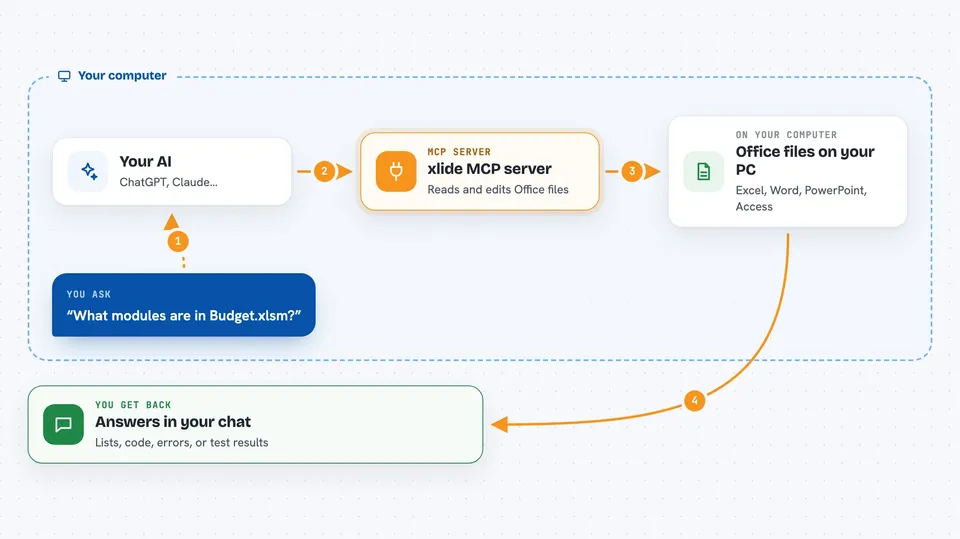
This is a helper that lets your AI assistant look inside Office files, the ones with macros in them, and work with the code and the sheets directly. It can read modules, write small changes, check for problems, and even run tests. It is handy if you maintain spreadsheets or databases with VBA and want help without exporting and pasting code back and forth.
What is an MCP server? The 30-second version
On its own, your AI can only chat. An MCP server is a small helper program that gives your AI a new skill or a connection to an app or service. This one connects your AI to the inside of Office files, so it can read the VBA code, look at sheets and queries, and make changes when you ask. You point it at a folder of files, and it stays inside that folder.
What this MCP server does
You ask your AI something like what is in this workbook or fix the error in this module. The AI sends that request to this helper. The helper opens the Office file directly, without needing Excel or Word to be running for most tasks, reads the code and the sheets, and sends back what it found. If you asked for a change, it writes it into the file, but only after checking the module has not changed since it was read. For running macros or tests, it needs Windows and the desktop app.
 Click to zoom
What you can do with it
- List all the Office files in a folder and see what is inside each one
- Read the VBA code in a module and search across all modules
- Make small edits to a module, with a preview before saving
- Check the code for errors and warnings
- Run the macros or tests in a workbook on Windows
- Read and write cells, sheets, tables and Power Query steps
- See what changed in a file compared to an earlier version
Try asking your AI
- “What modules are in Budget.xlsm and what does each one do?”
- “Read the Helpers module and show me the first 50 lines.”
- “Add a Debug.Print line at the end of the Greet procedure in Module1.”
- “Analyze Budget.xlsm and list any errors or warnings.”
- “Run the tests in Budget.xlsm and tell me how many passed.”
What it gives back to you
You get back plain answers in the chat: lists of files or modules, the source code of a module, a summary of errors and warnings, or the number of tests that passed. When it makes a change, it tells you what it changed and whether it saved. For diffs, it can show you a line by line comparison of what is different.
Before you start
What you need
- Python 3.10 or newer if you install it with pip
- The folder path where your Office files live
- Windows with the desktop Office app if you want to run macros or tests
- The Trust Center setting in Office that allows module injection, for writing code on Windows
Good to know
It can change or delete code and cell contents in your files, so keep backups and use the read-only mode when you only want to look.
Install it with your AI
Add xlide MCP server to your AI, no technical skills needed
You don't install anything by hand. You copy one prompt, paste it into an AI that can work on your computer, and it checks, installs and connects the server for you, asking you when it needs something.
Sign in to get the install prompt
Members get a ready-made prompt that lets the Claude desktop app check xlide MCP server, install it and connect it for them, step by step. You don't need any technical skills: you copy, paste and answer a few questions. Your connected AI can also find and install any of the 4,609 MCP servers here for you.
Who it's for
People who work with Excel, Word, PowerPoint or Access files that contain VBA code, like analysts, report builders and anyone who maintains macros.




