MCP server · Chat
Zulip MCP server
by windborne
Let your AI read and send Zulip messages, and even run as a bot that replies when mentioned.
This is a helper that connects your AI assistant to Zulip, the team chat app. Once it is set up, your AI can read messages from your Zulip channels and topics, send replies, and keep an eye on conversations for you. It is handy if your team lives in Zulip and you want an AI helper that can join in without you copying and pasting everything by hand.
What is an MCP server? The 30-second version
On its own, your AI can only chat with you. An MCP server is a small helper program that gives your AI a new skill or a connection to another app. This one connects your AI to Zulip, so it can look up messages, send replies, and follow topics there when you ask. Think of it as giving your AI a Zulip account and a pair of hands.
What this MCP server does
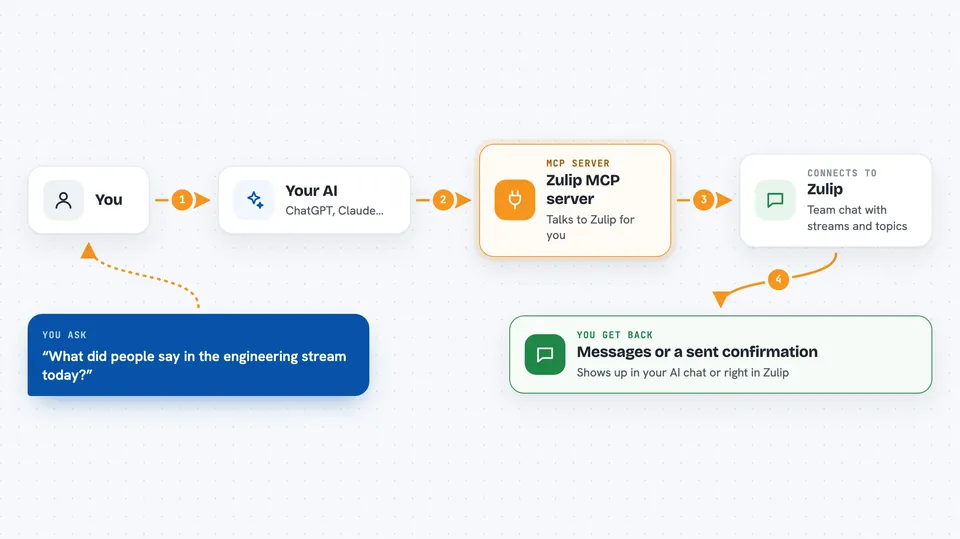
You ask your AI something about your Zulip conversations, or you mention a bot in Zulip. The AI uses this helper to talk to Zulip behind the scenes. The helper fetches messages, sends your reply, or watches a topic for new messages. Then you get the answer or the sent message back, either in your chat with the AI or right inside Zulip.
 Click to zoom
What you can do with it
- Read recent messages from a Zulip channel or topic
- Send a message to a stream and topic
- Watch a topic and reply when someone mentions the bot
- Show a typing indicator while the AI is working
- Let users stop the bot by reacting with a stop sign emoji
- Hide topics marked with /nobots so humans can talk privately
- Run as a bot that answers @mentions in Zulip
Try asking your AI
- “What did people say in the engineering stream today?”
- “Send a message to the general topic in engineering saying the deploy is done.”
- “Summarize the last 24 hours of messages in the design channel.”
- “Start watching the support topic and reply when someone mentions me.”
What it gives back to you
You get back lists of messages, short summaries, or a confirmation that your message was sent. If the AI was watching a topic, it can also show you new messages that arrived while it was thinking. Everything appears as normal text in your chat with the AI, or as a real message inside Zulip.
Before you start
What you need
- A Zulip account and a bot set up in Zulip (the bot type must be generic)
- A .zuliprc file with your bot credentials
- Python 3.10 or newer, managed with uv
- For bot mode: a coding assistant command line tool like claude, codex, or opencode installed and logged in
Good to know
This bot can read messages in the streams it is in and send messages on your behalf, so make sure it only joins channels where that is okay.
Install it with your AI
Add Zulip MCP server to your AI, no technical skills needed
You don't install anything by hand. You copy one prompt, paste it into an AI that can work on your computer, and it checks, installs and connects the server for you, asking you when it needs something.
Sign in to get the install prompt
Members get a ready-made prompt that lets the Claude desktop app check Zulip MCP server, install it and connect it for them, step by step. You don't need any technical skills: you copy, paste and answer a few questions. Your connected AI can also find and install any of the 4,609 MCP servers here for you.
Who it's for
Teams that use Zulip for work chat and want an AI helper that can read, reply, and watch conversations for them.