
MCP server · Finance and crypto
Multichain MCP server
by wkalidev
Lets your AI check crypto wallet balances and prices on Stacks, Celo and Base, and prepare transfers.
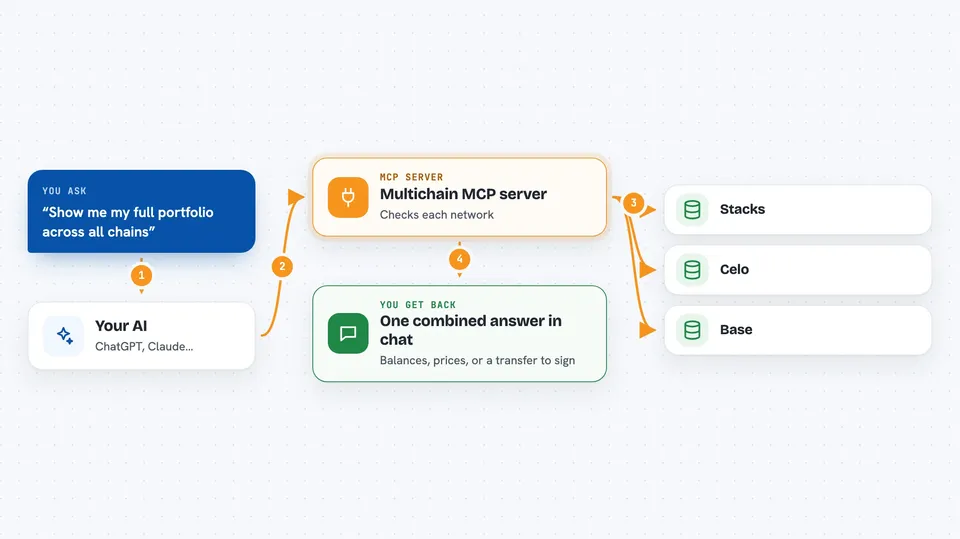
This is a small helper that connects your AI assistant to three blockchains: Stacks, Celo and Base. Once it is set up, you can just ask your AI things like what a wallet holds or what a coin costs, and it will go and look it up for you. It is handy if you follow crypto wallets and want quick answers without opening several websites.
What is an MCP server? The 30-second version
On its own, your AI can only chat with you. An MCP server is a small helper program that gives your AI a new skill, here the ability to talk to Stacks, Celo and Base. When you ask a question about a wallet or a price, your AI passes the request to this helper, and the helper fetches the answer from those blockchains. You never touch the technical parts yourself.
What this MCP server does
You ask your AI a question in normal words, like what a wallet holds or how much a coin costs. The AI sends that request to this helper program running quietly in the background. The helper then talks to the Stacks, Celo or Base networks and collects the numbers or details. It sends them back to your AI, and your AI shows you the answer in the chat. For transfers and token deployments, it only prepares the transaction for you to sign yourself, it does not send anything.
 Click to zoom
What you can do with it
- Check the balance of a wallet on Stacks, Celo or Base
- Look up live prices and 24 hour changes for coins like STX, CELO, ETH and USDC
- See a combined portfolio view across all three chains in one go
- Prepare an unsigned transfer of a coin or token for you to sign
- Prepare an unsigned token deployment on Celo or Base
Try asking your AI
- “What tokens does SP2C2YFP12AJZB4MABJBAJ55XECVS7E4PMMZ89YZR hold on Stacks?”
- “Show me my full portfolio across all chains”
- “What are the current prices of STX, CELO and ETH?”
- “Prepare a transfer of 10 USDC on Base from my wallet”
What it gives back to you
You get back plain answers in the chat: balances as a list of coins and amounts, prices with the 24 hour change, or a combined portfolio across the three chains. When you ask for a transfer or a token deployment, it gives you an unsigned transaction that you still need to sign with your own wallet. Nothing is sent or changed on the blockchain by the helper itself.
Before you start
What you need
- The Claude desktop app, Cursor or another AI tool that supports MCP servers
- Node.js installed on your computer
- A license key if you want the paid tools (the free tier works without one)
Good to know
The paid tools need a license key, and anything that prepares a transfer or token deployment still needs your own wallet to sign it, so check the details before you approve.
Install it with your AI
Add Multichain MCP server to your AI, no technical skills needed
You don't install anything by hand. You copy one prompt, paste it into an AI that can work on your computer, and it checks, installs and connects the server for you, asking you when it needs something.
Sign in to get the install prompt
Members get a ready-made prompt that lets the Claude desktop app check Multichain MCP server, install it and connect it for them, step by step. You don't need any technical skills: you copy, paste and answer a few questions. Your connected AI can also find and install any of the 4,361 MCP servers here for you.
Who it's for
People who follow crypto wallets and want quick balance and price checks without opening several blockchain websites.




