MCP server · Developer tools
mcp-cli MCP tester
by wong2
A command-line helper that lets you try out other MCP servers and see what they can do.
This is a small tool that runs in a terminal window and helps you test other MCP servers. It is handy if you have heard about MCP servers and want to see what one actually does before you connect it to your AI. You do not need to be a programmer to read the results, but you do need to be comfortable typing a command.
What is an MCP server? The 30-second version
On its own, your AI can only chat with you. An MCP server is a small helper program that gives your AI a new skill or a connection to an app or service. Normally you add these helpers to an AI app like Claude Desktop so the AI can use them. This tool, mcp-cli, is a helper for testing those helpers. It lets you peek inside an MCP server, list what it offers, and try its actions yourself, without involving your AI at all.
What this MCP server does
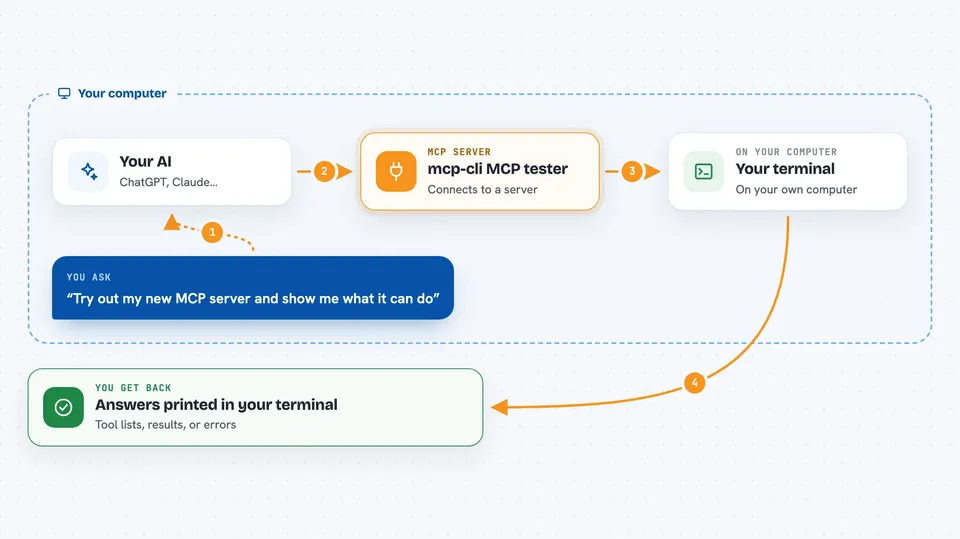
You type a command in your terminal to start this tool. It then connects to an MCP server you point it at, either one already set up in your Claude Desktop config or one you name directly. It asks that server what tools, resources, and prompts it has. You can then pick one and run it, and the tool shows you the answer right there in the terminal. It also works without any back-and-forth typing if you want to script it.
 Click to zoom
What you can do with it
- List all the tools an MCP server offers
- Run a specific tool and see its result
- Read a resource that a server exposes, like a file or a page
- Use a prompt that a server provides
- Connect to a server running over the web with HTTP or SSE
- Test a server you built yourself before sharing it
- Clear saved login tokens for servers that need them
Try asking your AI
- “npx @wong2/mcp-cli”
- “npx @wong2/mcp-cli -c config.json”
- “npx @wong2/mcp-cli call-tool filesystem:read_file --args '{"path": "package.json"}'”
- “npx @wong2/mcp-cli --url http://localhost:8000/mcp”
What it gives back to you
It shows you lists of what a server offers, like tool names and descriptions. When you run a tool or read a resource, it prints the answer in your terminal, which could be text, numbers, or a file path. If something goes wrong, it shows an error message so you can see what happened. Everything appears right in the terminal window, not in a chat.
Before you start
What you need
- A terminal or command prompt on your computer
- Node.js installed (the tool runs with npx, which comes with Node.js)
- An MCP server you want to test, or a config file listing one
Good to know
This tool can run actions on other MCP servers, so be careful when testing servers that can change or delete things, and only point it at servers you trust.
Install it with your AI
Add mcp-cli MCP tester to your AI, no technical skills needed
You don't install anything by hand. You copy one prompt, paste it into an AI that can work on your computer, and it checks, installs and connects the server for you, asking you when it needs something.
Sign in to get the install prompt
Members get a ready-made prompt that lets the Claude desktop app check mcp-cli MCP tester, install it and connect it for them, step by step. You don't need any technical skills: you copy, paste and answer a few questions. Your connected AI can also find and install any of the 4,361 MCP servers here for you.
Who it's for
This is most useful for people who build or test MCP servers, or curious users who want to see what an MCP server can do before adding it to their AI app.