MCP server · Music
Spotify MCP server
Ask your AI to play music, queue songs, and manage your Spotify playlists and library by talking.

This is a small helper that lets your AI control Spotify for you. You say what you want in plain words, like play something like early Bill Evans, and it finds the music and starts it. It is handy if you use Claude or Cursor and want to skip clicking around the Spotify app.
What is an MCP server? The 30-second version
On its own, your AI can only chat. An MCP server is a small helper program that gives your AI a new skill. This one connects your AI to Spotify, so it can search, play, and change things in your account when you ask. You install it once, and after that your AI just knows how to talk to Spotify.
What this MCP server does
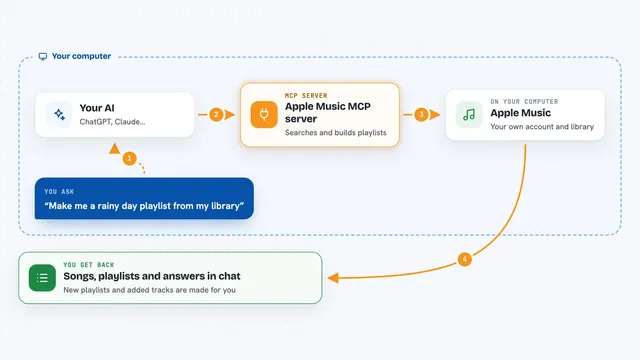
You type a request in your AI chat, like play some Radiohead. Your AI passes that to this helper, which searches Spotify and picks the best match. The helper then tells Spotify to start playing and reports back what it chose, so you can say no, the other one if it guessed wrong. For other jobs, like queueing a song or saving an album, it does that step and tells you it is done.
 Click to zoom
What you can do with it
- Play music by describing it in plain words
- Pause, skip, change volume, shuffle, or repeat
- See what is playing right now and on which device
- Add songs to the queue and see what is up next
- Search for tracks, albums, artists, and playlists
- Create playlists and add tracks to them
- Save or remove items from your Spotify library
Try asking your AI
- “Play something like early Bill Evans”
- “Queue the whole album Everybody Digs Bill Evans”
- “Save this song to my library”
- “What is playing right now, and on which device”
- “Make a new playlist called Sunday morning and add these three songs”
What it gives back to you
You get short, readable answers in the chat, like Now playing: Peace Piece by Bill Evans. It also tells you what it queued, saved, or changed, and it includes Spotify links so you can ask follow-ups like queue that without repeating yourself. If something goes wrong, it explains the fix in plain words instead of showing an error code.
Before you start
What you need
- A Spotify Premium account (playback control needs it)
- Node.js version 20 or newer on your computer
- A free Spotify developer app you create yourself (the setup wizard walks you through it)
Good to know
It can change your playlists and library and start playback on your devices, so check what it says it did before assuming it got it right.
Install it with your AI
Add Spotify MCP server to your AI, no technical skills needed
You don't install anything by hand. You copy one prompt, paste it into an AI that can work on your computer, and it checks, installs and connects the server for you, asking you when it needs something.
Sign in to get the install prompt
Members get a ready-made prompt that lets the Claude desktop app check Spotify MCP server, install it and connect it for them, step by step. You don't need any technical skills: you copy, paste and answer a few questions. Your connected AI can also find and install any of the 4,361 MCP servers here for you.
Who it's for
Anyone who uses Claude or Cursor and wants to control Spotify by typing instead of clicking, especially people who like to describe music loosely rather than search for exact titles.