
MCP server · Security
JobVerify MCP server
by yessGlory17
Check a recruiter or job offer for scam signs before you reply, right inside your AI chat.
JobVerify is a free helper that checks whether a recruiter message, company name, link, or email looks like a scam. You paste what you got into your AI chat and ask if it is real. It is handy for anyone job hunting, especially for remote roles, who gets messages from strangers.
What is an MCP server? The 30-second version
On its own, your AI can only chat with you. An MCP server is a small helper program that gives your AI a new skill or a connection to an outside service. This one connects your AI to JobVerify, which looks things up in public records and scam databases for you. So when you ask your AI about a suspicious job offer, it can actually go check instead of just guessing.
What this MCP server does
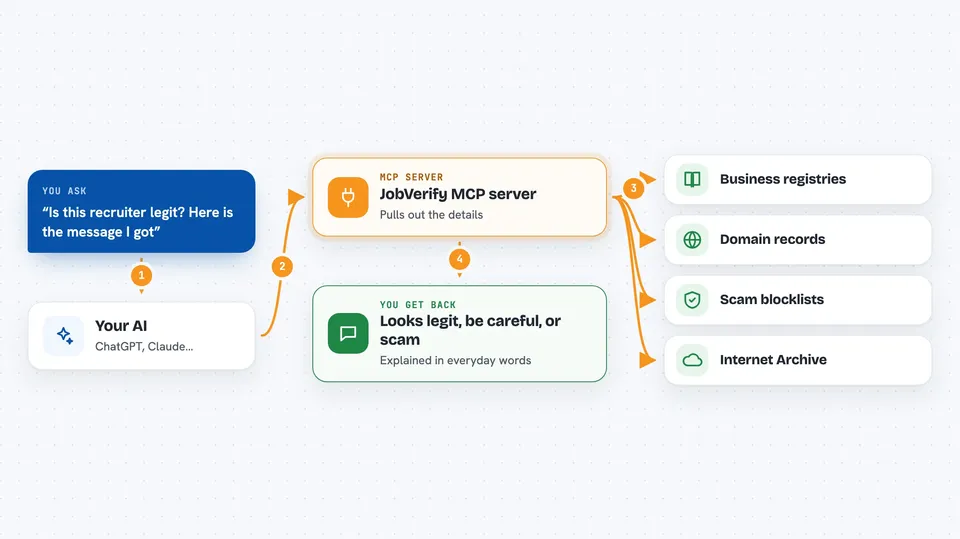
You paste a recruiter message, a company name, a link, or an email into your AI chat. Your AI passes it to JobVerify, which pulls out the details like the company, links, email, phone, and crypto wallet addresses. JobVerify then quietly checks each one against free public sources: business registries, domain records, scam blocklists, the Internet Archive, and more. It combines the clues into one clear verdict: looks legit, be careful, or almost certainly a scam. Then it explains why in everyday words so you can decide what to do next.
 Click to zoom
What you can do with it
- Check if a company is a real, registered business
- Spot classic scam scripts like upfront fees or moving the chat to Telegram
- Flag brand-new or look-alike websites pretending to be real brands
- See if an email address is real and deliverable
- Check if a phone number is valid and where it is from
- Look up whether a crypto wallet has been flagged in scam databases
- See how long a website or profile has really been online
Try asking your AI
- “Is this recruiter legit? Here is the message I got: Hi, I'm a talent partner at Example Corp. We loved your profile and want to offer you a remote role at $45/hr. To get started, please purchase $200 of onboarding equipment through this link. Let's continue on Telegram.”
- “Can you check if examplecorp.com is a real company website?”
- “Is this email address real: hr@examplecorp-jobs.com”
- “Check this crypto wallet address they sent me: 1A2B3C4D5E6F”
What it gives back to you
You get a short, plain-English verdict in the chat: how risky it looks, which signals are reassuring, and which are red flags. It explains its reasoning in everyday language, so you can see why it reached that conclusion. It may also list the specific details it checked, like the company registration, domain age, or blocklist results. It is guidance, not a final judgment, so you still decide what to do.
Before you start
What you need
- The uv helper tool (a small free program that runs JobVerify for you; the README shows a one-line install for Mac, Linux, and Windows)
- An AI assistant that supports MCP servers, like Claude Desktop or Claude Code
Good to know
JobVerify gives you signals and guidance, not a final verdict, so always use your own judgment and never treat a result as a definite statement about a real person or company.
Install it with your AI
Add JobVerify MCP server to your AI, no technical skills needed
You don't install anything by hand. You copy one prompt, paste it into an AI that can work on your computer, and it checks, installs and connects the server for you, asking you when it needs something.
Sign in to get the install prompt
Members get a ready-made prompt that lets the Claude desktop app check JobVerify MCP server, install it and connect it for them, step by step. You don't need any technical skills: you copy, paste and answer a few questions. Your connected AI can also find and install any of the 4,609 MCP servers here for you.
Who it's for
Job seekers, especially those looking for remote work, and anyone who gets unexpected recruiter messages and wants a quick reality check.



