MCP server · Research
Chinese Almanac MCP server
by yonlandwu
Lets your AI look up Chinese almanac dates, lucky hours, and auspicious days for events like weddings or moves.
This is a helper that connects your AI to a Chinese almanac, the kind of traditional calendar used for picking good days and times. You can ask in plain words about lucky dates, lucky hours, or the daily reading for any zodiac sign. It is handy if you plan weddings, moves, openings, or just enjoy checking the almanac.
What is an MCP server? The 30-second version
On its own, your AI can only chat with you. An MCP server is a small helper program that gives your AI a new skill or a connection to a service. This one connects your AI to a Chinese almanac engine, so when you ask about a lucky date or hour, the AI can actually look it up and answer you. You do not need to know how it works inside; you just ask, and the AI uses this helper behind the scenes.
What this MCP server does
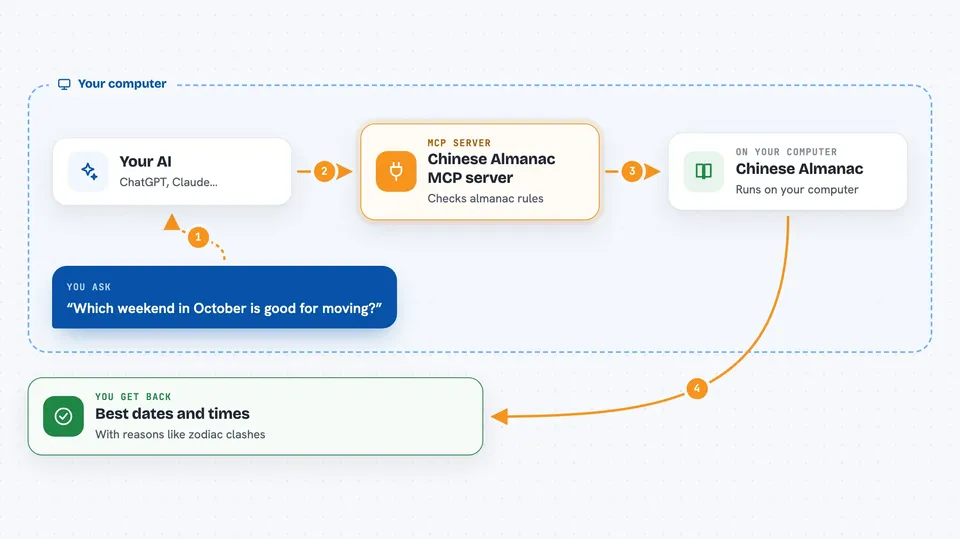
You ask your AI something like which weekend in October is good for moving. The AI sends that question to this helper, which talks to the almanac engine. The engine checks the traditional rules, the lunar calendar, and the astronomy data, then sends back a ranked list of dates or hours. Your AI shows you the answer in the chat, with reasons like clashes or good matches for your zodiac.
 Click to zoom
What you can do with it
- Get the full almanac for any date, including lunar date, zodiac clash, and what to do or avoid
- Find the best dates for events like weddings, moves, openings, or signing contracts
- Check the luck rating for each of the twelve two-hour time slots in a day
- Get your personal lucky hours based on your zodiac sign
- Read the daily horoscope for all twelve zodiac signs
- Look up the twenty-four solar terms for a year with minute-level precision
- List all the event types the almanac supports
Try asking your AI
- “I want to move house in October, preferably on a weekend. I was born in the year of the horse. Which day and time is best?”
- “When should we get married in 2026? Show me only the best dates.”
- “What is the almanac for today? What should I do and what should I avoid?”
- “What are my lucky hours today? I am a dragon.”
What it gives back to you
You get back clear lists and short explanations in the chat. For date picking, you see a ranked list of dates with a score and a short reason for each. For daily readings, you get the lunar date, zodiac clash, and a list of things that are good or bad to do that day. For lucky hours, you get the time slots sorted from best to worst.
Before you start
What you need
- Node.js 18 or newer installed on your computer
- The Claude desktop app or another app that supports MCP servers
- Optional: a free API key from 12Zodiacs.com if you want to look further than 90 days from today
Good to know
The data comes from 12Zodiacs.com and must be credited when you share it, and commercial use needs permission from the author.
Install it with your AI
Add Chinese Almanac MCP server to your AI, no technical skills needed
You don't install anything by hand. You copy one prompt, paste it into an AI that can work on your computer, and it checks, installs and connects the server for you, asking you when it needs something.
Sign in to get the install prompt
Members get a ready-made prompt that lets the Claude desktop app check Chinese Almanac MCP server, install it and connect it for them, step by step. You don't need any technical skills: you copy, paste and answer a few questions. Your connected AI can also find and install any of the 4,609 MCP servers here for you.
Who it's for
Anyone who plans life events like weddings, moves, or openings, or who enjoys checking the Chinese almanac and daily zodiac horoscopes.