
MCP server · Developer tools
dotnet new template MCP server
Let your AI search, preview, and create .NET projects from templates just by describing what you want.
This is a helper that connects your AI assistant to the .NET template engine, the same tool behind the dotnet new command. Instead of remembering command flags, you describe the project you want and the AI sets it up for you. It is handy for developers and anyone who creates .NET projects but finds the command line fiddly.
What is an MCP server? The 30-second version
On its own, your AI can only chat. An MCP server is a small helper program that gives your AI a new skill or a connection to another tool. This one connects your AI to the .NET template engine, so it can look up templates, check their options, and create real project files on your computer. You just ask in plain words, and the helper does the technical part.
What this MCP server does
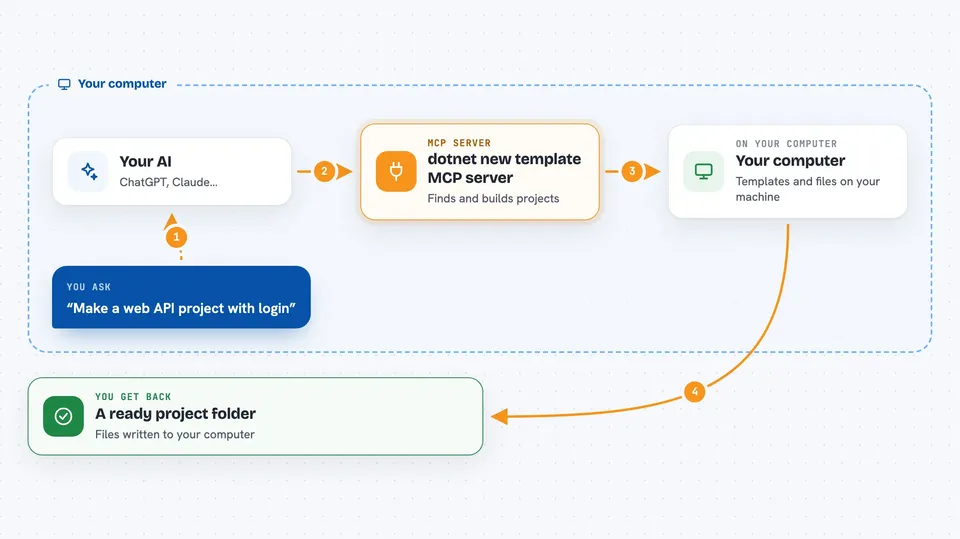
You tell your AI what kind of project you want, for example a web API with authentication. The AI passes that to this helper, which searches the templates installed on your machine and on NuGet.org. It picks the right template, works out the settings you likely want, and previews or creates the project files. If something required is missing, it can ask you a quick question to fill the gap. Then you get a ready project folder.
 Click to zoom
What you can do with it
- Search for templates both locally and on NuGet.org
- Inspect a template to see its options and settings
- Preview the files a template would create without writing anything
- Create a new project from a template, installing it first if needed
- Turn a plain request like web API with auth into the right template and settings
- Validate a custom template before you publish it
- Compare two or more templates side by side
Try asking your AI
- “Create a new web API project with authentication and controllers”
- “What templates do I have installed for C#?”
- “Preview what files a console app template would create”
- “Check my custom template folder for mistakes before I publish it”
What it gives back to you
You get back lists of templates, details about a template's options, or a preview of the files it would make. When you create a project, it writes the files to your computer and tells you where they are. For validation, it returns a clear report split into errors, warnings, and suggestions.
Before you start
What you need
- The .NET SDK installed (version 8 or newer for the global tool, 10 or newer for the zero-install dnx option)
- An AI app that supports MCP servers, like VS Code with GitHub Copilot, Claude Desktop, or Cursor
Good to know
This server writes project files and installs packages on your computer, so only run it with AI tools you trust.
Install it with your AI
Add dotnet new template MCP server to your AI, no technical skills needed
You don't install anything by hand. You copy one prompt, paste it into an AI that can work on your computer, and it checks, installs and connects the server for you, asking you when it needs something.
Sign in to get the install prompt
Members get a ready-made prompt that lets the Claude desktop app check dotnet new template MCP server, install it and connect it for them, step by step. You don't need any technical skills: you copy, paste and answer a few questions. Your connected AI can also find and install any of the 4,609 MCP servers here for you.
Who it's for
Developers and teams who create .NET projects and want to skip memorizing dotnet new command flags.




