
MCP server · Finance and crypto
Solinkify MCP server
by Zenidp
Lets your AI pay for online content, datasets and products on Solana, with spending limits you set.
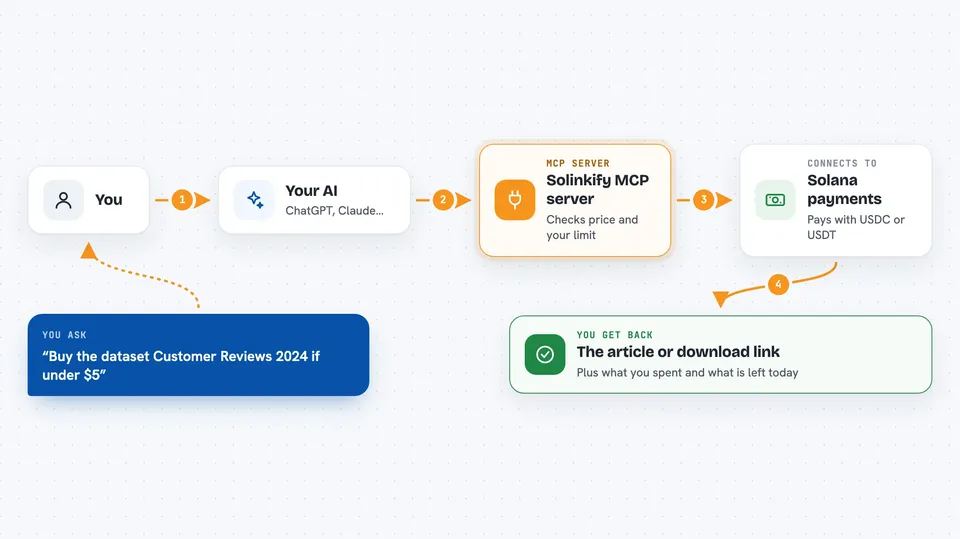
Solinkify is a helper that lets your AI assistant pay for things on the internet using Solana, a cryptocurrency network. It is handy if you want your AI to buy access to paid articles, datasets, or products without you doing the checkout yourself. You set the spending limits, so the AI can only spend what you allow.
What is an MCP server? The 30-second version
On its own, your AI can only chat. An MCP server is a small helper program that gives your AI a new skill. This one connects your AI to Solinkify, which handles payments on the Solana network. Once it is set up, your AI can look up prices, pay for content, and buy things when you ask it to.
What this MCP server does
You ask your AI to find or buy something, like a paid article or a dataset. The AI uses this helper to check the price first. If you agree, the helper pays from a small wallet you set up, using USDC or USDT stablecoins. Then it brings back what you paid for, like the article text or a download link. It also keeps track of how much it has spent each day and stops if it hits your limit.
 Click to zoom
What you can do with it
- Find paid web pages and see their prices before buying
- Pay for access to a paid article or file and get the content
- Search a marketplace for datasets and buy one
- Buy products from special links shared on social media
- Check your wallet balance and how much you have left to spend today
- Set up a subscription to a creator or a recurring dataset
- Pay for a shopping cart checkout on a store
Try asking your AI
- “Find paid articles about AI and tell me the prices”
- “Buy the dataset called 'Customer Reviews 2024' if it costs less than $5”
- “Pay for this checkout link and confirm the order”
- “What is my remaining daily spending limit?”
What it gives back to you
You get answers in the chat, like a list of paid pages with prices, a confirmation that a payment went through, or a download link for what you bought. It can also show your wallet balance and how much you have left to spend today. If something is too expensive or over your limit, it tells you in plain words.
Before you start
What you need
- A Solana wallet file with a little SOL for fees and USDC or USDT to spend
- The Claude desktop app or another AI tool that supports MCP servers
- Node.js installed on your computer (the helper runs with npx)
Good to know
This server can spend real money from your wallet, so set your spending caps carefully and only fund the wallet with what you are willing to spend.
Install it with your AI
Add Solinkify MCP server to your AI, no technical skills needed
You don't install anything by hand. You copy one prompt, paste it into an AI that can work on your computer, and it checks, installs and connects the server for you, asking you when it needs something.
Sign in to get the install prompt
Members get a ready-made prompt that lets the Claude desktop app check Solinkify MCP server, install it and connect it for them, step by step. You don't need any technical skills: you copy, paste and answer a few questions. Your connected AI can also find and install any of the 4,609 MCP servers here for you.
Who it's for
People who want their AI to handle small online payments for content, data, or products without doing it manually.



