
MCP server · Privacy
Proofport AI MCP server
by zkproofport
Let your AI create privacy-friendly proofs of identity claims, like country or KYC, without sharing your personal details.
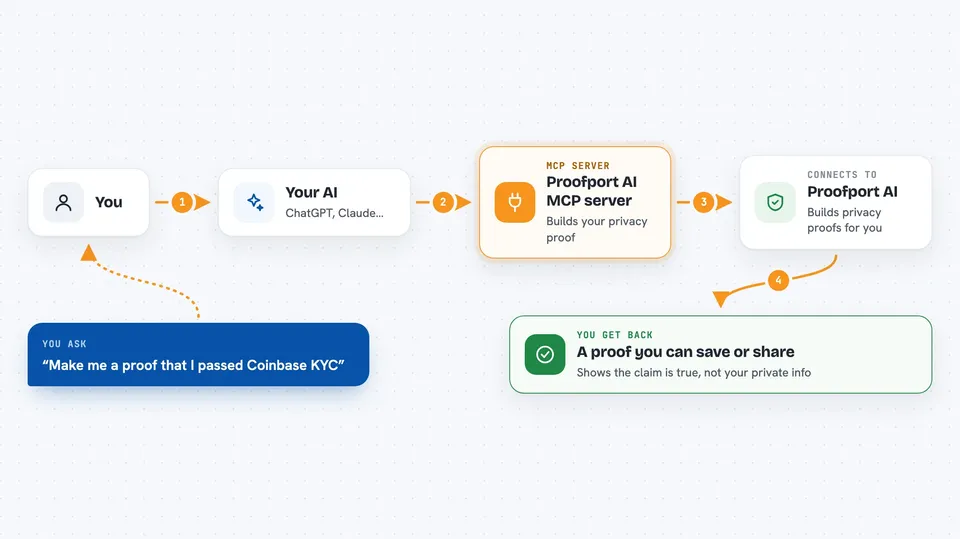
Proofport AI is a helper that lets your AI create special privacy proofs about you. A privacy proof is a small digital receipt that says something is true, like "this person passed Coinbase identity checks" or "this person is from a certain country", without showing the underlying documents or personal data. It is handy if you work with identity checks, compliance, or privacy-focused projects and want your AI to handle the technical parts for you.
What is an MCP server? The 30-second version
On its own, your AI can only chat and write text. An MCP server is a small helper program that gives your AI a new skill or a connection to an outside service. This one connects your AI to Proofport AI, a service that builds privacy proofs about identity claims. Once it is connected, you can ask your AI in plain words to make or check a proof, and it will talk to Proofport AI for you.
What this MCP server does
You ask your AI something like "make me a proof that I passed Coinbase KYC". Your AI uses this helper, which talks to the Proofport AI service over the internet. The service builds a privacy proof and, depending on the setup, may ask for a small USDC payment first. The proof comes back to your AI, and your AI shows it to you in the chat, often as a block of text or a link you can save.
 Click to zoom
What you can do with it
- Generate a privacy proof that you passed Coinbase KYC
- Create a proof about which country you are in, without revealing your address
- Make a proof based on a Google or Microsoft 365 sign-in
- Check whether an existing proof is valid on the blockchain
- List which kinds of proofs the service currently supports
- Walk through the proof steps one at a time if you want more control
- Read or top up your prepaid balance for paying proof fees
Try asking your AI
- “Make me a zero-knowledge proof that I passed Coinbase KYC.”
- “Create a proof that I am in the United States without sharing my address.”
- “Check if this proof is still valid on chain.”
- “What kinds of proofs can you make for me right now?”
What it gives back to you
You get back a proof, which is a long block of text your AI can save or pass on to another service. You also get a short answer about whether a proof checked out, or a list of supported proof types. Sometimes you get a payment or balance message, telling you what was charged or what is left in your prepaid balance.
Before you start
What you need
- Node.js 18 or newer, if you install the local helper on your computer
- An account or API key from Proofport AI, if the service asks for one
- A crypto wallet with a small amount of USDC on a supported network, because proofs may cost a tiny fee
- The Claude desktop app or another AI tool that supports MCP servers
Good to know
Making proofs can cost a small amount of USDC from your wallet, and the helper needs your wallet private key, so keep that key secret and only approve payments you understand.
Install it with your AI
Add Proofport AI MCP server to your AI, no technical skills needed
You don't install anything by hand. You copy one prompt, paste it into an AI that can work on your computer, and it checks, installs and connects the server for you, asking you when it needs something.
Sign in to get the install prompt
Members get a ready-made prompt that lets the Claude desktop app check Proofport AI MCP server, install it and connect it for them, step by step. You don't need any technical skills: you copy, paste and answer a few questions. Your connected AI can also find and install any of the 4,361 MCP servers here for you.
Who it's for
People who work with identity checks, compliance, privacy, or crypto projects and want their AI to handle privacy proofs without learning the technical details.





