MCP server · Finance and crypto
x402 DEX Intel MCP server
by Zydanny
Lets your AI check live DEX token momentum, liquidity and whale flows on Base, paying a few cents per lookup.
This is a small helper that plugs into your AI so it can pull live market data about tokens trading on DEXes on the Base network. It is handy for people who follow crypto prices and want quick, on-demand reads without opening a dozen tabs. Each lookup costs a tiny amount of USDC, paid automatically.
What is an MCP server? The 30-second version
On its own, your AI can only chat with you. An MCP server is a small helper program that gives your AI a new skill or a connection to an outside service. This one connects your AI to a DEX market data service on Base, so when you ask about a token, the AI can go fetch fresh numbers for you. You do not need to understand the plumbing. You just ask, and the helper does the work behind the scenes.
What this MCP server does
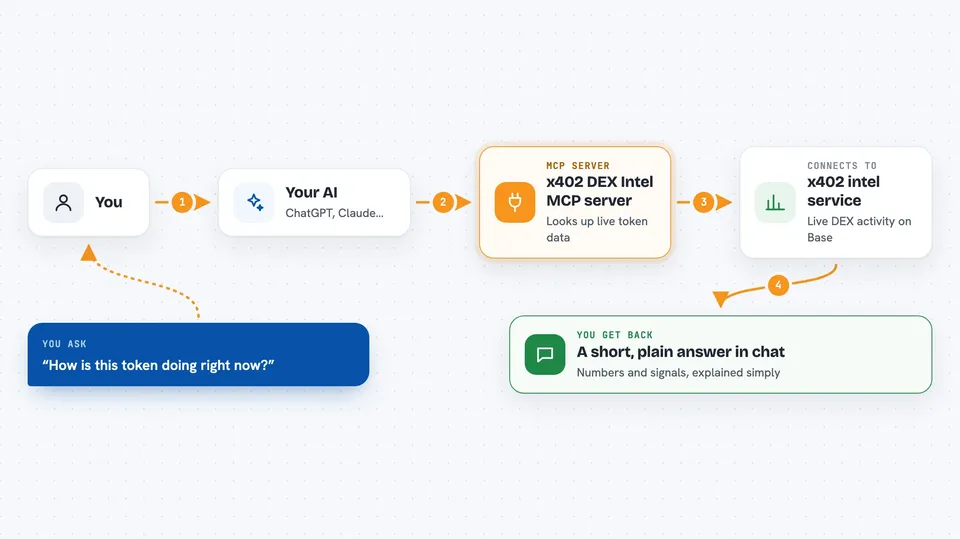
You ask your AI something like how a token is doing right now. The AI passes your question to this helper. The helper calls the x402 intel service, which looks at live DEX activity on Base. It comes back with things like recent volume, buy pressure, liquidity depth and whale wallet activity. Your AI then explains the result to you in the chat, in plain words.
 Click to zoom
What you can do with it
- Check a token's 5 minute volume and buy pressure
- See a momentum score for a token
- Look at DEX liquidity depth and turnover
- Spot whale accumulation or distribution over the last hour
- Compare how a few tokens are behaving right now
- Get a quick read before you decide to dig deeper
Try asking your AI
- “What is the momentum on this token right now?”
- “Show me the order book depth for this token on Base.”
- “Are whales accumulating or selling this token in the last hour?”
- “Give me a quick pulse check on this token's 5 minute activity.”
What it gives back to you
You get back short, readable answers in the chat: numbers like 5 minute volume, buy pressure, a momentum score, liquidity depth, turnover ratio, and whale flow signals. The AI usually summarises them in a sentence or two, sometimes with a small list. It does not change anything on your accounts. It only reads data and reports it.
Before you start
What you need
- The Claude desktop app or Cursor, with MCP support
- Python installed on your computer
- A Base wallet with a small amount of USDC to pay for lookups
- The private key of that wallet, set as an environment variable
Good to know
Each lookup spends a small amount of real USDC from the wallet whose private key you provide, so keep that wallet small and treat the key like a password.
Install it with your AI
Add x402 DEX Intel MCP server to your AI, no technical skills needed
You don't install anything by hand. You copy one prompt, paste it into an AI that can work on your computer, and it checks, installs and connects the server for you, asking you when it needs something.
Sign in to get the install prompt
Members get a ready-made prompt that lets the Claude desktop app check x402 DEX Intel MCP server, install it and connect it for them, step by step. You don't need any technical skills: you copy, paste and answer a few questions. Your connected AI can also find and install any of the 4,066 MCP servers here for you.
Who it's for
Crypto traders, analysts and anyone who follows DEX tokens on Base and wants fast answers from their AI.