MCP server · Developer tools
SPARDA MCP server
by zyx77550
Turns your running web app into AI-callable tools, with safe reads by default and writes you must confirm.
SPARDA is a helper that plugs your own running web app into your AI assistant. Once it is connected, your AI can look at your app's routes and call them for you, but only in a safe way: reading is allowed, changing things needs your OK. It is handy for developers and technical teams who already have an app built with Express, FastAPI, Flask, Next.js, NestJS or Medusa.
What is an MCP server? The 30-second version
On its own, your AI can only chat. An MCP server is a small helper program that gives your AI a new skill or a connection to an app. This one connects your AI to your own running web app, so it can look up what your app can do and call those actions when you ask. SPARDA does this by scanning your app, adding a small marked piece, and then acting as the bridge between your AI and your app.
What this MCP server does
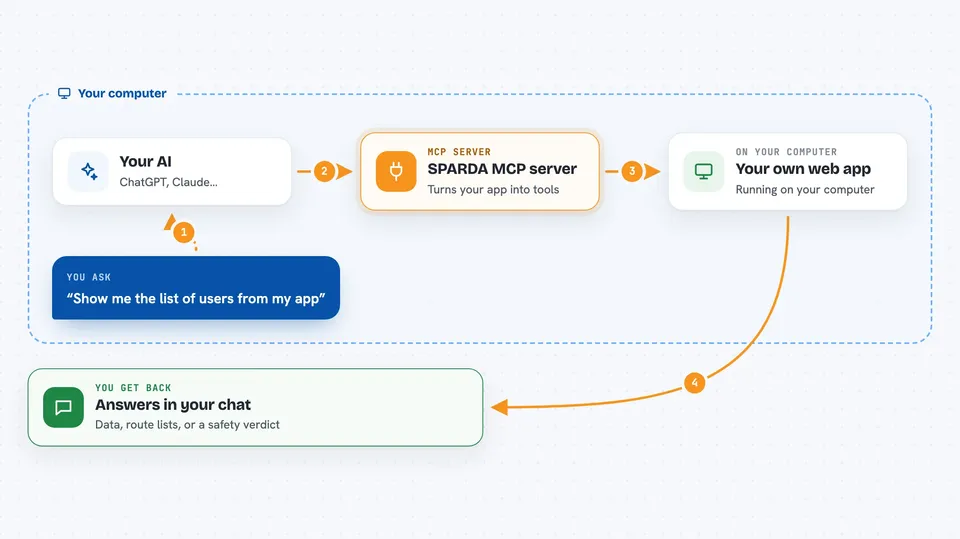
You run one command in your app's folder, and SPARDA reads your routes and adds a small marked part to your app (it keeps a backup). Then you start your app and start the SPARDA bridge. Your AI assistant connects to that bridge and sees your app's routes as tools it can use. When you ask your AI something, it picks the right tool, the bridge calls your app, and the answer comes back into the chat. By default it only reads; anything that changes data is held back until you confirm.
 Click to zoom
What you can do with it
- List the routes and actions your app exposes
- Read data from your app through your AI chat
- Call an app action after you confirm it
- Check what SPARDA has remembered and what tools are exposed
- Run a full demo of the setup in a temporary folder
- Prove your backend is safe to deploy before shipping
- Catch an AI edit that removes a security guard
Try asking your AI
- “What routes does my app expose?”
- “Show me the list of users from my app”
- “Call the create-order route with these details, and ask me before you do it”
- “Is my backend safe to deploy right now?”
What it gives back to you
You get answers in your chat: lists of routes, data your app returned, or a short note that an action was done. For the safety commands, you get a clear verdict like proven, not proven, or a warning that a guard was removed. Some commands also give you a badge, an HTML report, or a JSON file you can share.
Before you start
What you need
- A web app built with Express, FastAPI, Flask, Next.js, NestJS or Medusa
- Node.js installed on your computer
- Your app running locally when you use the bridge
- An AI client that supports MCP, like the Claude desktop app or Claude Code
Good to know
It can call actions in your app, so keep writes behind confirmation and only run it on apps you trust.
Install it with your AI
Add SPARDA MCP server to your AI, no technical skills needed
You don't install anything by hand. You copy one prompt, paste it into an AI that can work on your computer, and it checks, installs and connects the server for you, asking you when it needs something.
Sign in to get the install prompt
Members get a ready-made prompt that lets the Claude desktop app check SPARDA MCP server, install it and connect it for them, step by step. You don't need any technical skills: you copy, paste and answer a few questions. Your connected AI can also find and install any of the 4,609 MCP servers here for you.
Who it's for
Developers and technical teams who build web apps and want their AI assistant to safely read and act on those apps.