AI agent for elearning developers
Accessibility Compliance Sweep Agent
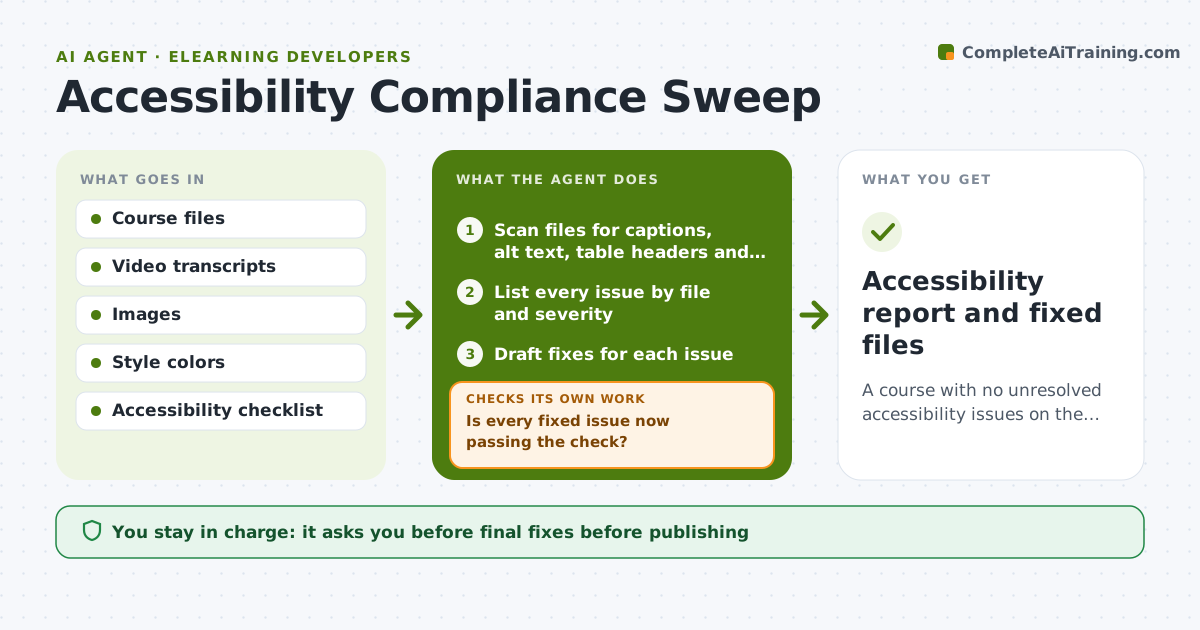
A course with no unresolved accessibility issues on the checked list.
What it does
A learner emails that your video has no captions. This agent finds such problems before launch. It reads your course files and lists videos without captions, images without alt text, tables without headers and color pairs with low contrast. For each problem it drafts a fix, such as caption text from the transcript, an alt text suggestion or a darker color. It then re-checks each file after the fix. Anything it cannot fix, such as a chart whose meaning is unclear, is routed to a person with the reason. Edge case: a decorative image is marked decorative instead of getting long alt text. The owner approves everything before publishing.
How it works
Follow the arrows from top to bottom. The orange dashed arrow is the loop: when a check fails, the agent goes back and tries again.
Read the steps as a list
- Course ready for pre-publish check
- Scan files for captions, alt text, table headers and contrast
- List every issue by file and severity
- Draft fixes for each issue
- Re-scan each fixed file
- Is every fixed issue now passing the check?If not: revise the fix and rescan. Back to step 4.
- Are any issues left that need human judgment?If not: route them to the owner with the reason. Back to step 3.
- Owner approves fixes and exceptionsThe agent waits here for your OK.
- Accessibility report and fixed files
How it decides
It fixes what is clear from the source and sends anything that needs human judgment to the owner.
- Contrast ratio must be at least 4.5 to 1 for body text.
- Every video needs captions that match the transcript.
- Decorative images get empty alt text, not descriptions.
- Complex charts need a text description by a person.
Make it yours
Every agent is a starting point. You choose these settings for your own situation.
- Standards level (such as WCAG AA)
- File types to scan
- Contrast threshold
- Who handles unfixable items
- Severity levels
What keeps you in control
It always asks you first
- Final fixes before publishing
- Any exception or waiver
Hard limits
- Never publish the course itself.
- Do not invent alt text for charts it cannot interpret.
It stops when
- Done: all issues fixed or approved as exceptions
- Stop: files cannot be read, so the agent asks the owner for another format
Set it up
We guide you through the set-up, step by step
Members get the full set-up guide for this agent. No technical skills needed: you copy, paste and upload.
- One set of instructions to paste into your AI, with the clicks for ChatGPT, Claude, Microsoft 365 Copilot, Gemini and Grok
- The agent then walks you through connecting your own data, one source at a time
- A downloadable copy with the flow chart, the rules and the full guide