AI agent for customer onboarding specialists
Account Setup Verification Agent
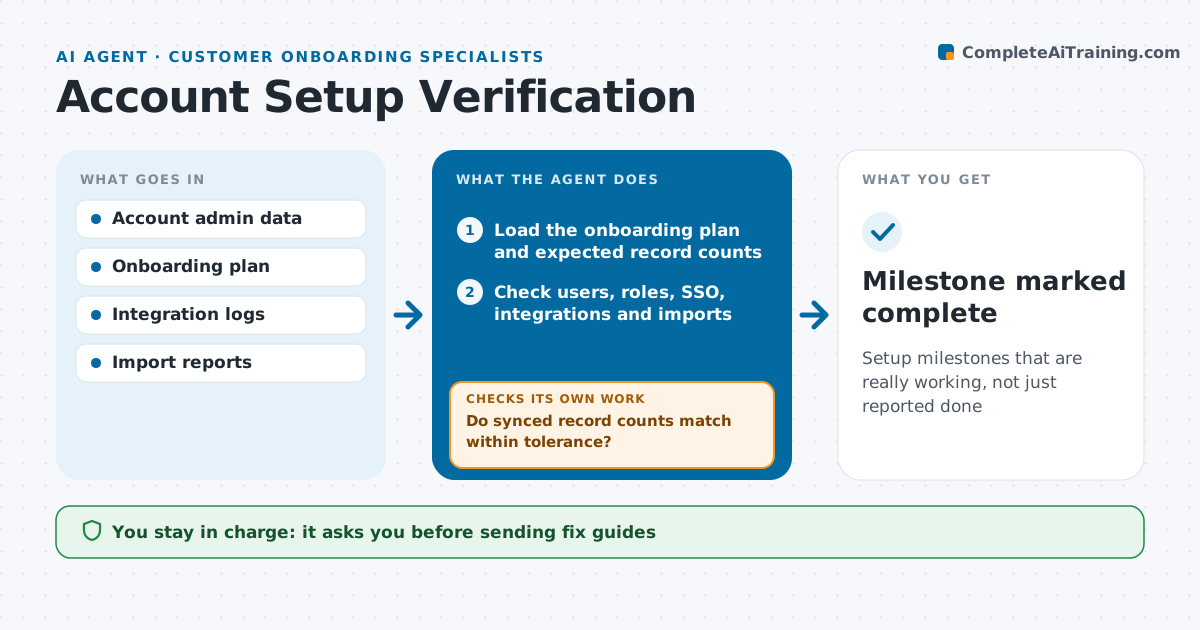
Setup milestones that are really working, not just reported done
What it does
Customers often say setup is done when key pieces are quietly broken, which surfaces weeks later as poor adoption. At each setup milestone this agent checks the customer's account directly: users invited and active, roles set, single sign-on working, integrations connected and syncing, and data imported with the expected record counts. It compares what it finds with the onboarding plan. Each failed check gets a plain fix guide for the customer's admin, which the specialist approves before sending. After the admin reports a fix, the agent runs the checks again. Repeated failures go to the specialist with logs. The specialist decides when to mark a milestone complete. Edge case: an integration that connects but syncs zero records is treated as failed, not done.
How it works
Follow the arrows from top to bottom. The orange dashed arrow is the loop: when a check fails, the agent goes back and tries again.
Read the steps as a list
- Setup milestone reached
- Load the onboarding plan and expected record counts
- Check users, roles, SSO, integrations and imports
- Compare results with the plan
- Do synced record counts match within tolerance?If not: mark the item failed even if it shows connected. Back to step 3.
- Draft fix guides for failed checks
- Specialist approves sending fix guidesThe agent waits here for your OK.
- Do all checks pass after the customer's fixes?If not: rerun the checks and send logs to the specialist after two failures. Back to step 3.
- Milestone marked complete
How it decides
A milestone passes only if every technical check passes in the live account.
- Zero-record syncs count as failed
- Import counts must be within 2% of the source
- Two repeated failures trigger a working session
Make it yours
Every agent is a starting point. You choose these settings for your own situation.
- Checks per milestone
- Import tolerance (default 2%)
- Fix guide style
- When to escalate
What keeps you in control
It always asks you first
- Sending fix guides
- Marking milestones complete
Hard limits
- Read-only access to customer accounts
- Never changes customer settings
It stops when
- Done: all milestones verified
- Stop: customer pauses onboarding
Set it up
We guide you through the set-up, step by step
Members get the full set-up guide for this agent. No technical skills needed: you copy, paste and upload.
- One set of instructions to paste into your AI, with the clicks for ChatGPT, Claude, Microsoft 365 Copilot, Gemini and Grok
- The agent then walks you through connecting your own data, one source at a time
- A downloadable copy with the flow chart, the rules and the full guide