AI agent for chief digital officers
AI Use Case Intake and Risk Review Agent
Every AI use case gets a consistent risk classification and a clear approve, change or reject decision
What it does
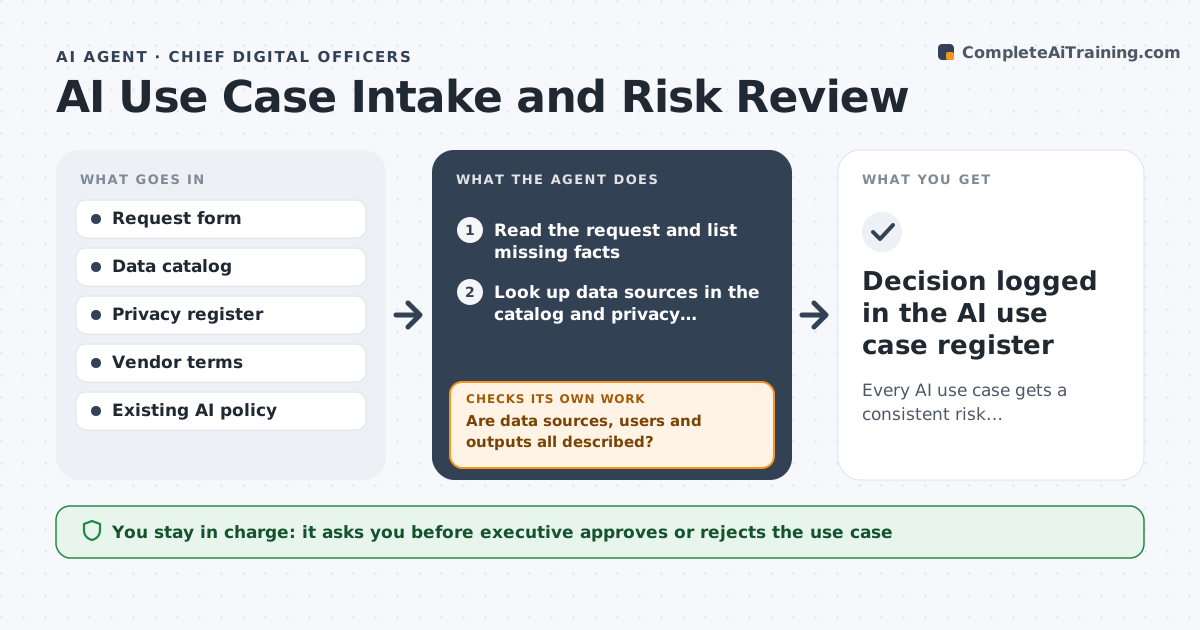
Business teams keep proposing AI tools and automations, and nobody checks them the same way twice. This agent takes each request form, checks it for missing facts, and asks the requester for anything absent, such as which data is used and who sees the output. It then classifies the use case by risk: personal data, decisions about people, customer-facing output and vendor data use. It checks the data sources against the data catalog and privacy register. If a source is not registered or lacks a legal basis, it sends the request back with the specific gap. It drafts a review summary with required controls such as human review steps or bias testing. The executive and privacy lead decide approval. Edge case: a tool that makes decisions about hiring or credit is always routed to full review, even if small.
How it works
Follow the arrows from top to bottom. The orange dashed arrow is the loop: when a check fails, the agent goes back and tries again.
Read the steps as a list
- Use case request submitted
- Read the request and list missing facts
- Are data sources, users and outputs all described?If not: send the requester specific questions and wait. Back to step 2.
- Look up data sources in the catalog and privacy register
- Is every source registered with a legal basis?If not: return the request with the unregistered sources listed. Back to step 4.
- Assign risk tier and required controls
- Draft the review summary
- Executive and privacy lead decideThe agent waits here for your OK.
- Decision logged in the AI use case register
How it decides
Risk tier is set by data type, impact on people and exposure to customers; higher tiers require more controls and a full review.
- Any decision about people (hiring, credit, discipline) is high risk
- Customer-facing generated content needs a human review step
- Vendors that train on company data need legal sign-off
- Missing facts after 10 days close the request as incomplete
Make it yours
Every agent is a starting point. You choose these settings for your own situation.
- Risk tier rules
- Required controls per tier
- Days before an incomplete request closes (default 10)
- Who signs off at each tier
What keeps you in control
It always asks you first
- Executive approves or rejects the use case
- Privacy lead signs off for personal data
Hard limits
- Never approves a use case itself
- Never sends personal data to a vendor for testing
It stops when
- Done: decision logged
- Stop: request withdrawn or incomplete after 10 days
Set it up
We guide you through the set-up, step by step
Members get the full set-up guide for this agent. No technical skills needed: you copy, paste and upload.
- One set of instructions to paste into your AI, with the clicks for ChatGPT, Claude, Microsoft 365 Copilot, Gemini and Grok
- The agent then walks you through connecting your own data, one source at a time
- A downloadable copy with the flow chart, the rules and the full guide