AI agent for team leads
Animation Shot Production Tracker Agent
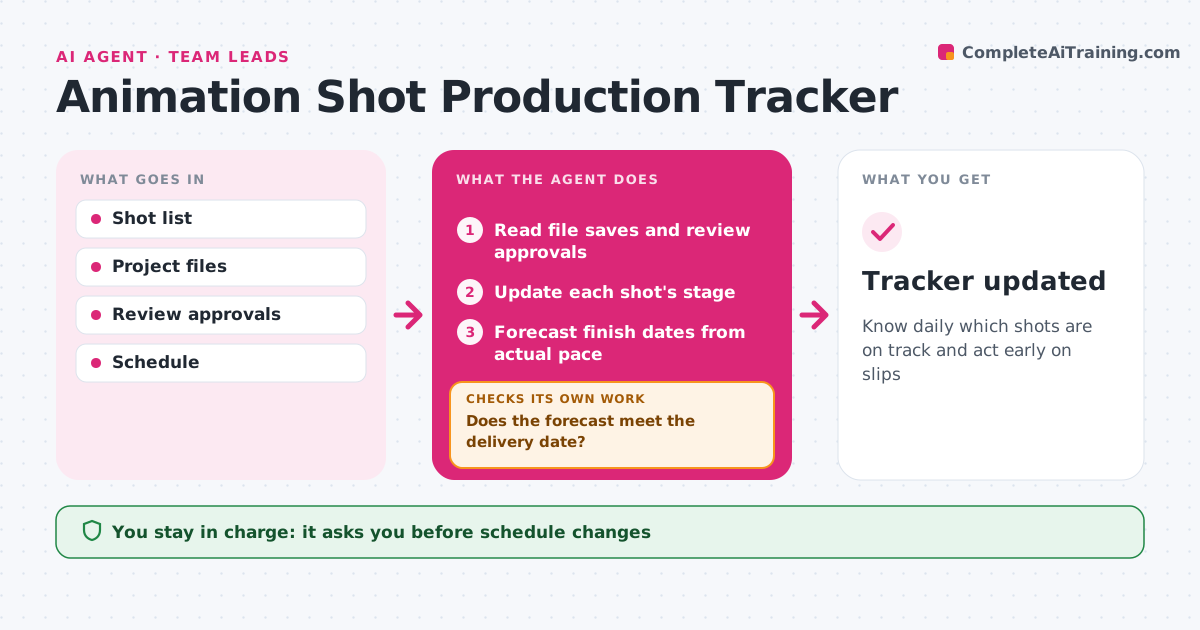
Know daily which shots are on track and act early on slips
What it does
Animation leads often learn a delivery is at risk only days before it is due. This agent keeps a shot list with stages: layout, blocking, spline, polish, lighting and render. Each day it reads file save times and review approvals to update stages. It compares progress with the schedule and estimates finish dates from the team's actual pace. When a shot falls behind, it checks whether the cause is waiting on notes, waiting on assets or rework, and drafts a nudge or a schedule change. It then checks the forecast against the delivery date. If it misses, it suggests which shots to simplify or move. The lead approves every schedule change. Edge case: a shot sent back for rework resets to the right stage, not to the start.
How it works
Follow the arrows from top to bottom. The orange dashed arrow is the loop: when a check fails, the agent goes back and tries again.
Read the steps as a list
- Daily update
- Read file saves and review approvals
- Update each shot's stage
- Forecast finish dates from actual pace
- Does the forecast meet the delivery date?If not: find blockers and suggest shots to simplify or move. Back to step 4.
- Draft daily status and nudges
- Lead approves schedule changesThe agent waits here for your OK.
- Tracker updated
How it decides
It forecasts finish from actual pace per stage and flags shots whose forecast passes their due date.
- Rework resets to the stage that failed
- Waiting on notes for two days triggers a nudge
- Forecast uses the last two weeks' pace
Make it yours
Every agent is a starting point. You choose these settings for your own situation.
- Stages
- Pace window
- Nudge timing
- Status report format
What keeps you in control
It always asks you first
- Schedule changes
- Nudges to clients
Hard limits
- Never contacts clients without approval
- Never reassigns shots itself
It stops when
- Done: all shots delivered
- Stop: project cancelled
Set it up
We guide you through the set-up, step by step
Members get the full set-up guide for this agent. No technical skills needed: you copy, paste and upload.
- One set of instructions to paste into your AI, with the clicks for ChatGPT, Claude, Microsoft 365 Copilot, Gemini and Grok
- The agent then walks you through connecting your own data, one source at a time
- A downloadable copy with the flow chart, the rules and the full guide