AI agent for podcasters
Audience Question and Listener Mail Triage Agent
Every message sorted, corrections checked and good questions ready for episodes
What it does
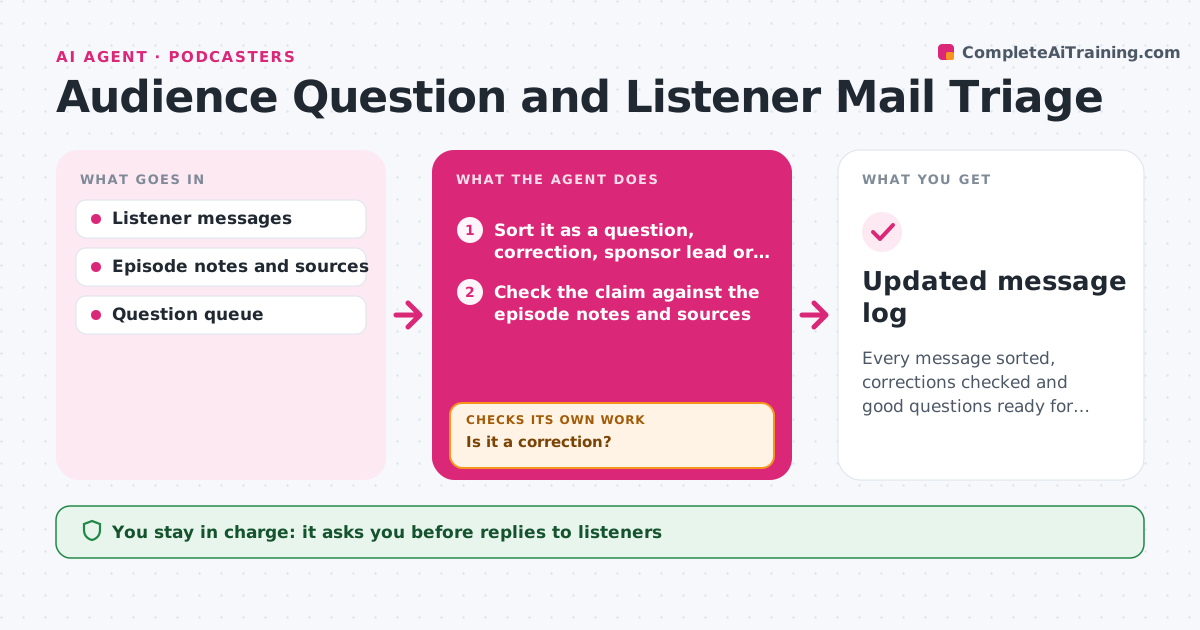
Messages with good questions, corrections or complaints are lost in the inbox. This agent sorts messages into questions, corrections, sponsor leads and complaints. For corrections, it checks the facts against the episode and sources, and tells the host whether the listener is right. It queues the questions for upcoming episodes and drafts replies. It tracks which messages were used on air, and checks the queue for duplicates and for the same question asked several times. The host approves replies. Edge case: a complaint that includes a safety or legal concern is flagged for the host straight away.
How it works
Follow the arrows from top to bottom. The orange dashed arrow is the loop: when a check fails, the agent goes back and tries again.
Read the steps as a list
- New message arrives
- Sort it as a question, correction, sponsor lead or complaint
- Is it a correction?If not: skip the fact check and continue to the queue. Back to step 2.
- Check the claim against the episode notes and sources
- Mark the correction as valid, invalid or unclear
- Add questions to the queue and merge duplicates
- Draft a reply for each message
- Host approves repliesThe agent waits here for your OK.
- Send replies and log which were used on air
- Updated message log
How it decides
Messages are sorted by content. A correction is marked valid only when a source supports it. Safety and legal complaints go to the host first.
- Treat a correction as valid only with a source
- Escalate safety and legal complaints immediately
- Merge questions that ask the same thing
- Mark a message as used after it airs
Make it yours
Every agent is a starting point. You choose these settings for your own situation.
- Categories
- Sources to trust
- Escalation topics
- Reply tone
What keeps you in control
It always asks you first
- Replies to listeners
- Reading a message on air
Hard limits
- Never sends a reply without approval
- Never states a correction is valid without a source
It stops when
- Done: messages sorted and replies approved
- Stop: the inbox is not accessible
Set it up
We guide you through the set-up, step by step
Members get the full set-up guide for this agent. No technical skills needed: you copy, paste and upload.
- One set of instructions to paste into your AI, with the clicks for ChatGPT, Claude, Microsoft 365 Copilot, Gemini and Grok
- The agent then walks you through connecting your own data, one source at a time
- A downloadable copy with the flow chart, the rules and the full guide