AI agent for call center supervisors
Call Volume Forecast and Staffing Agent
Staff levels that meet service level with the fewest idle hours
What it does
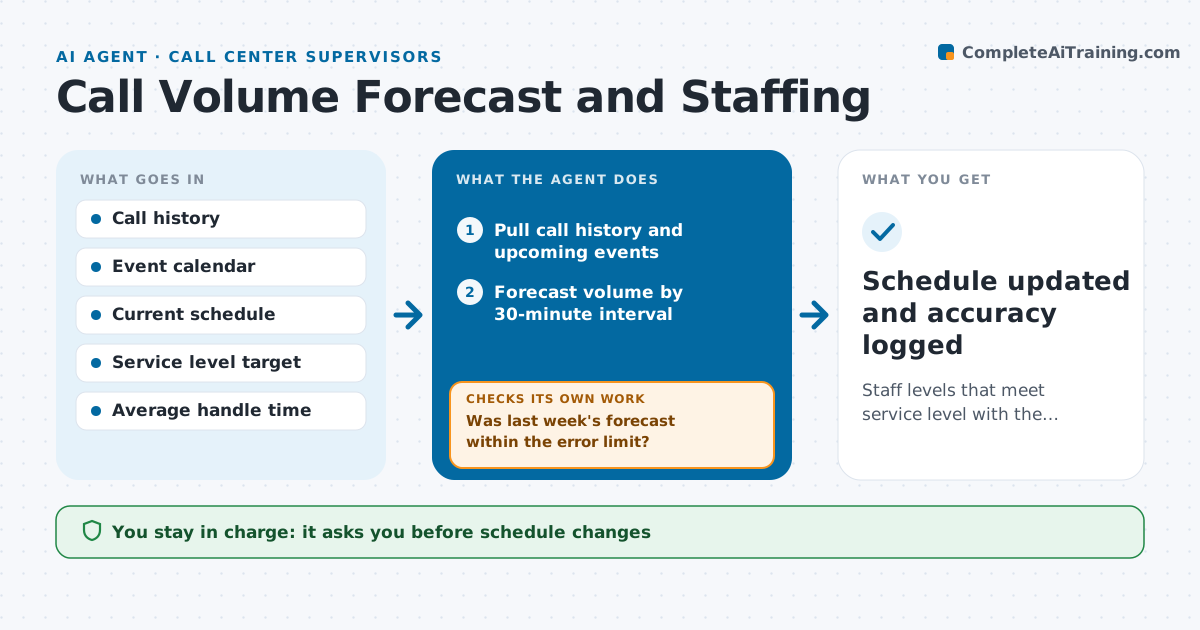
Call centers that guess staffing end up with long queues on busy mornings and idle agents in the afternoon. Each week this agent forecasts call volume by 30-minute interval for the next two weeks, using past volume, seasonality and known events like bill runs, marketing sends and holidays. It converts the forecast into the staff needed to hit the service level. It compares that with the current schedule and drafts changes, such as shift swaps, overtime offers or moving training sessions. After each week, it checks forecast accuracy. If the error is above the limit, it looks for the missed driver and adds it to the model before the next forecast. The supervisor approves every schedule change. Edge case: a planned system outage lowers handling capacity, not volume, and is modeled that way.
How it works
Follow the arrows from top to bottom. The orange dashed arrow is the loop: when a check fails, the agent goes back and tries again.
Read the steps as a list
- Weekly forecast run
- Pull call history and upcoming events
- Forecast volume by 30-minute interval
- Calculate staff needed per interval
- Draft schedule changes for gaps
- Supervisor approves changesThe agent waits here for your OK.
- Was last week's forecast within the error limit?If not: find the missed driver and add it to the forecast. Back to step 3.
- Schedule updated and accuracy logged
How it decides
It staffs each interval to the service level target and proposes the cheapest change first: swaps, then moved training, then overtime.
- Prefer shift swaps over overtime
- Move training out of peak intervals
- Model outages as lower capacity
Make it yours
Every agent is a starting point. You choose these settings for your own situation.
- Service level target (default 80% in 20 seconds)
- Forecast error limit (default 10%)
- Overtime rules
- Planning horizon
What keeps you in control
It always asks you first
- Schedule changes
- Overtime offers
Hard limits
- Never changes schedules without approval
- Never contacts staff directly
It stops when
- Done: schedule approved
- Stop: call data missing for over a day
Set it up
We guide you through the set-up, step by step
Members get the full set-up guide for this agent. No technical skills needed: you copy, paste and upload.
- One set of instructions to paste into your AI, with the clicks for ChatGPT, Claude, Microsoft 365 Copilot, Gemini and Grok
- The agent then walks you through connecting your own data, one source at a time
- A downloadable copy with the flow chart, the rules and the full guide