AI agent for hr business partners
Change Communication Readiness Agent
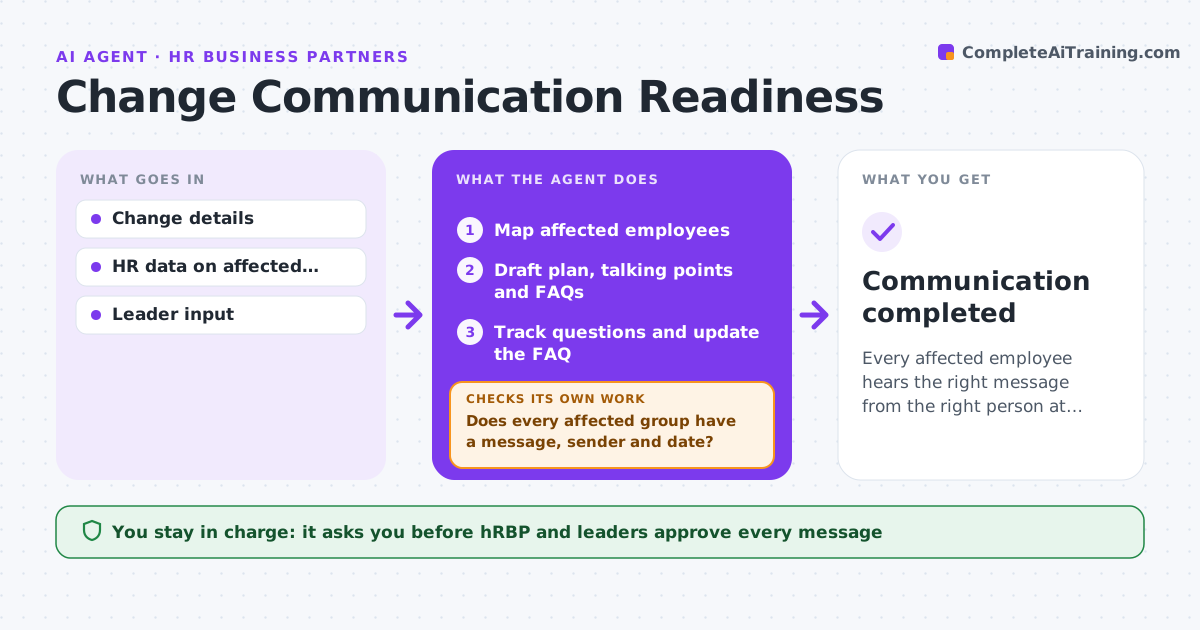
Every affected employee hears the right message from the right person at the right time
What it does
When an organization changes, such as a reorganization, new policy or office move, every affected group needs the right message at the right time. This agent maps affected employees from HR data and drafts a communication plan by audience, with manager talking points and FAQs. It checks that every affected group has a message, a sender and a date, and fills gaps. Job-impact groups are told first and in person, and managers are briefed before teams. The HR business partner and leaders approve every message. After launch, it tracks incoming questions and updates the FAQ weekly, checking that every question has an answer. Edge case: employees affected by job loss are told in person before any broad announcement.
How it works
Follow the arrows from top to bottom. The orange dashed arrow is the loop: when a check fails, the agent goes back and tries again.
Read the steps as a list
- Change approved
- Map affected employees
- Draft plan, talking points and FAQs
- Does every affected group have a message, sender and date?If not: fill the gaps in the plan. Back to step 3.
- HRBP and leaders approve messagesThe agent waits here for your OK.
- Track questions and update the FAQ
- Does every question received have an answer in the FAQ?If not: draft answers for leaders to approve and add them. Back to step 6.
- Summarize questions and open issues for leaders
- Communication completed
How it decides
Each affected group needs a message, sender and timing. Job-impact groups come first and in person.
- Job-impact groups first and in person
- Managers briefed before teams
- FAQ updated weekly
Make it yours
Every agent is a starting point. You choose these settings for your own situation.
- Audience groups
- Message templates
- FAQ update frequency
- Approval steps
What keeps you in control
It always asks you first
- HRBP and leaders approve every message
Hard limits
- Never sends messages
- Confidential until approved
It stops when
- Done: change completed
- Stop: change canceled
Set it up
We guide you through the set-up, step by step
Members get the full set-up guide for this agent. No technical skills needed: you copy, paste and upload.
- One set of instructions to paste into your AI, with the clicks for ChatGPT, Claude, Microsoft 365 Copilot, Gemini and Grok
- The agent then walks you through connecting your own data, one source at a time
- A downloadable copy with the flow chart, the rules and the full guide