AI agent for insurance claims managers
Claim Fraud Indicator Screening Agent
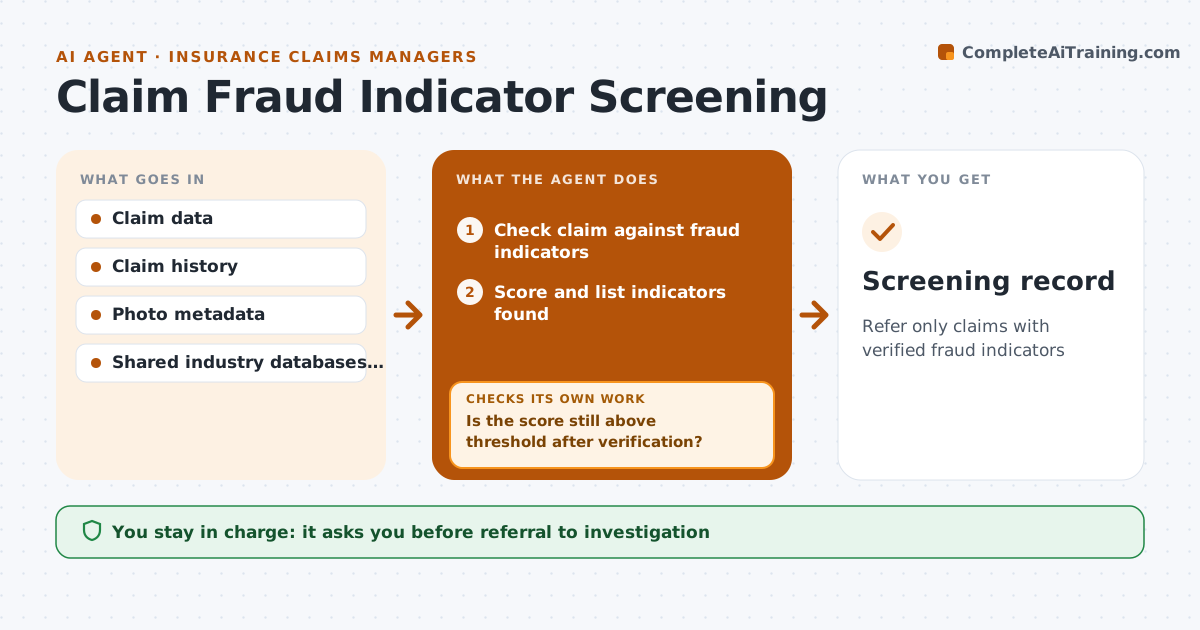
Refer only claims with verified fraud indicators
What it does
Fraud screening should focus investigators' time where it is needed, without delaying honest claimants. For each new claim or update, this agent checks known indicators: a policy started shortly before the loss, repeated claims, mismatched dates, edited photos or links to other suspicious claims. It scores the claim and lists each indicator found. It then verifies each indicator with source data to remove false matches, such as two different people sharing a common name. If the verified score drops below the threshold, the claim is cleared for normal handling. If it stays above, the agent prepares a referral with the evidence. A low-value claim with one weak indicator is not referred. The special investigation team decides any referral and any action. Reasons are always listed. Edge case: photo metadata missing because of a messaging app is not counted as an indicator.
How it works
Follow the arrows from top to bottom. The orange dashed arrow is the loop: when a check fails, the agent goes back and tries again.
Read the steps as a list
- New claim or update
- Check claim against fraud indicators
- Score and list indicators found
- Verify each indicator with source data
- Remove false matches and rescore
- Is the score still above threshold after verification?If not: clear the claim for normal handling. Back to step 3.
- Prepare referral with evidence and reasons
- Special investigation team decides on referralThe agent waits here for your OK.
- Screening record
How it decides
It refers a claim only if verified indicators score above the threshold.
- Verified indicators only
- Low-value single indicators not referred
- Reasons always listed
Make it yours
Every agent is a starting point. You choose these settings for your own situation.
- Indicators and weights
- Threshold
- Data sources
- Referral route
What keeps you in control
It always asks you first
- Referral to investigation
- Any action against a claimant
Hard limits
- Never denies claims
- Never accuses claimants
It stops when
- Done: cleared or referred
- Stop: data access unavailable
Set it up
We guide you through the set-up, step by step
Members get the full set-up guide for this agent. No technical skills needed: you copy, paste and upload.
- One set of instructions to paste into your AI, with the clicks for ChatGPT, Claude, Microsoft 365 Copilot, Gemini and Grok
- The agent then walks you through connecting your own data, one source at a time
- A downloadable copy with the flow chart, the rules and the full guide