AI agent for insurance claims managers
Claims Fraud Referral Review Agent
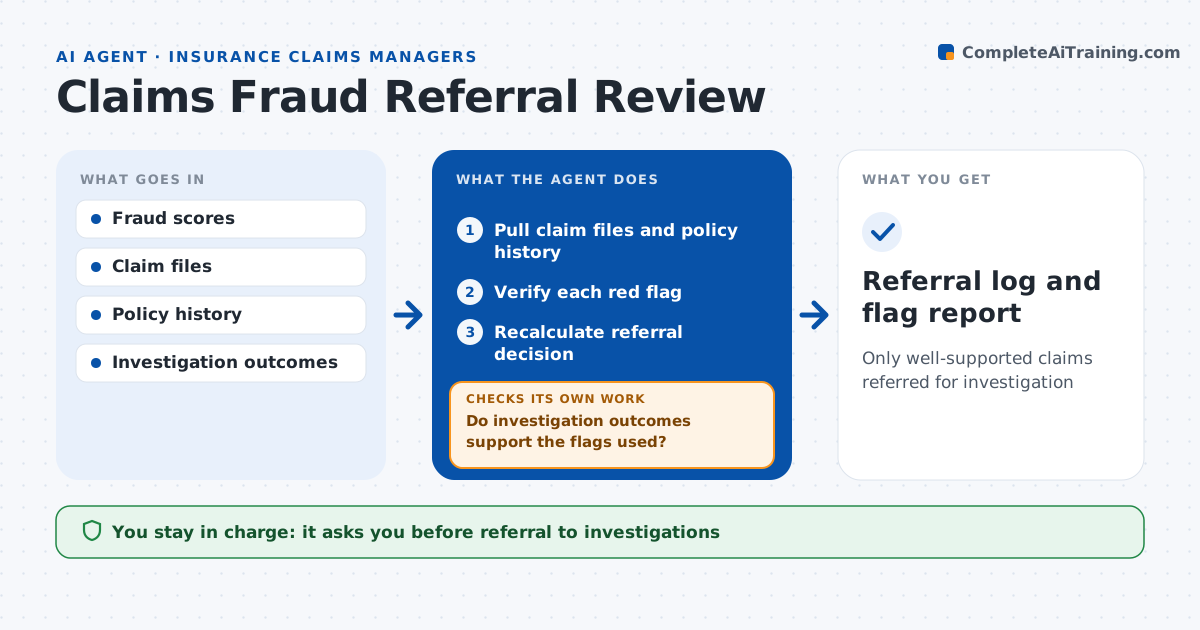
Only well-supported claims referred for investigation
What it does
Fraud scores flag many claims for the wrong reasons, so honest customers get delayed and investigators waste time. This agent reviews claims flagged by the fraud score before referral. For each one it pulls the claim file and policy history and checks each red flag that drove the score, such as a recent policy start, prior claims, repeat providers or inconsistent dates. It verifies each flag is real, since data errors often cause false flags, and removes those. Claims with two or more confirmed flags are recommended for referral with a written reason. Adjusters or the special investigations unit decide. Each month it checks investigator outcomes against the flags used and proposes a review of flags with a low hit rate. Edge case: a policy looked new because it was rewritten with a new number, so the agent removes that flag.
How it works
Follow the arrows from top to bottom. The orange dashed arrow is the loop: when a check fails, the agent goes back and tries again.
Read the steps as a list
- Claims flagged
- Pull claim files and policy history
- Verify each red flag
- Recalculate referral decision
- Adjuster or investigations unit decides referralThe agent waits here for your OK.
- Do investigation outcomes support the flags used?If not: propose changes to the flag rules and recheck open referrals. Back to step 3.
- Referral log and flag report
How it decides
It confirms each red flag against the claim file and refers only claims with confirmed flags above the threshold.
- Flag from data error: remove
- Two or more confirmed flags: refer
- Flag with under 10% fraud rate over 6 months: review
Make it yours
Every agent is a starting point. You choose these settings for your own situation.
- Flags in scope
- Referral threshold
- Outcome review frequency
- Reason format
What keeps you in control
It always asks you first
- Referral to investigations
Hard limits
- Never denies claims
- Never contacts claimants
It stops when
- Done: daily referrals decided
- Stop: claim file missing
Set it up
We guide you through the set-up, step by step
Members get the full set-up guide for this agent. No technical skills needed: you copy, paste and upload.
- One set of instructions to paste into your AI, with the clicks for ChatGPT, Claude, Microsoft 365 Copilot, Gemini and Grok
- The agent then walks you through connecting your own data, one source at a time
- A downloadable copy with the flow chart, the rules and the full guide