AI agent for vacation rental hosts
Cleaner and Co-Host Payment Reconciliation Agent
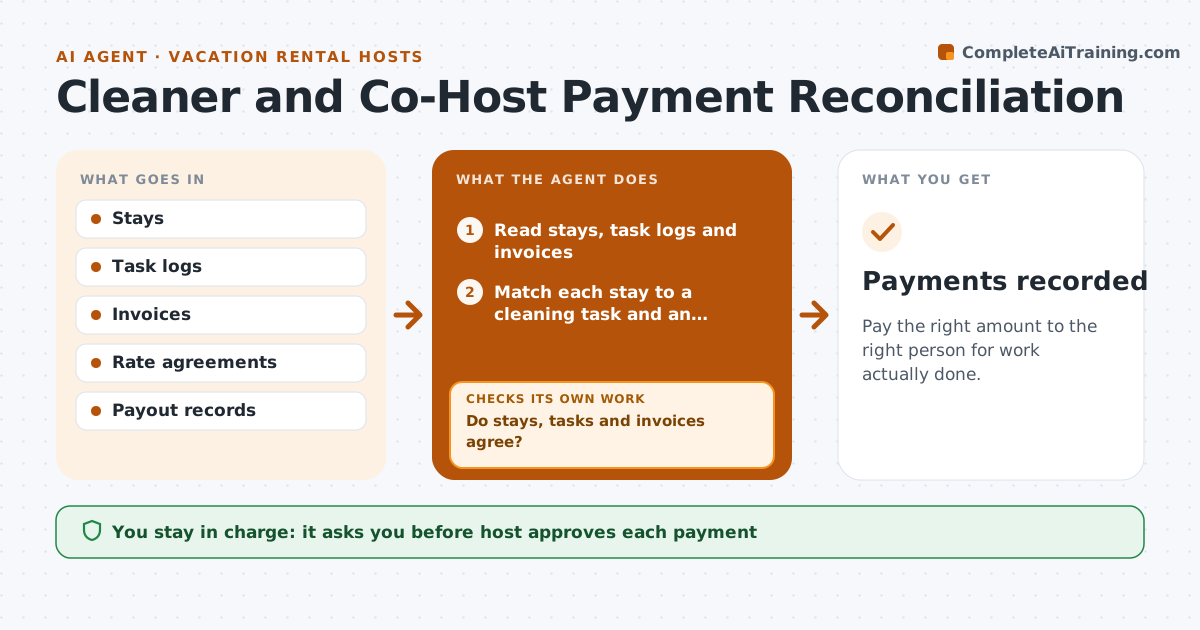
Pay the right amount to the right person for work actually done.
What it does
Payments to cleaners and co-hosts go wrong when stays, tasks and invoices do not line up. This agent matches stays, cleaning tasks and invoices, flags differences and drafts payments. After corrections it recomputes the totals until stays, tasks and invoices agree. The host approves each payment. It also keeps a running balance per person, so a small difference one month is carried forward and not forgotten. Each draft payment lists the stays and tasks it covers, so the host can approve it in one look. Edge case: a cleaning invoice for a stay that was cancelled is flagged unless a cancellation fee applies.
How it works
Follow the arrows from top to bottom. The orange dashed arrow is the loop: when a check fails, the agent goes back and tries again.
Read the steps as a list
- Month ends or an invoice arrives
- Read stays, task logs and invoices
- Match each stay to a cleaning task and an invoice line
- Do stays, tasks and invoices agree?If not: List the differences and ask the cleaner or co-host. Back to step 2.
- Wait for the corrected invoice or explanation
- Recompute the totals
- Do they agree now?If not: Flag the remaining items for the host. Back to step 5.
- Draft the payments
- Host approves each paymentThe agent waits here for your OK.
- Payments recorded
How it decides
It pays what the stays and tasks support at the agreed rates and flags the rest.
- Pay at agreed rates only
- Flag cleaning for cancelled stays
- Flag duplicate invoices
- Ask for an explanation before paying a difference over $20
Make it yours
Every agent is a starting point. You choose these settings for your own situation.
- Rates by task
- Difference limit (default $20)
- Payment schedule
- Fee rules
What keeps you in control
It always asks you first
- Host approves each payment
Hard limits
- Never pay without approval
- Never change rates itself
It stops when
- Done: payments approved and recorded
- Stop: a dispute is open and the host settles it
Set it up
We guide you through the set-up, step by step
Members get the full set-up guide for this agent. No technical skills needed: you copy, paste and upload.
- One set of instructions to paste into your AI, with the clicks for ChatGPT, Claude, Microsoft 365 Copilot, Gemini and Grok
- The agent then walks you through connecting your own data, one source at a time
- A downloadable copy with the flow chart, the rules and the full guide