AI agent for it consultants
Client Network Health Check Agent
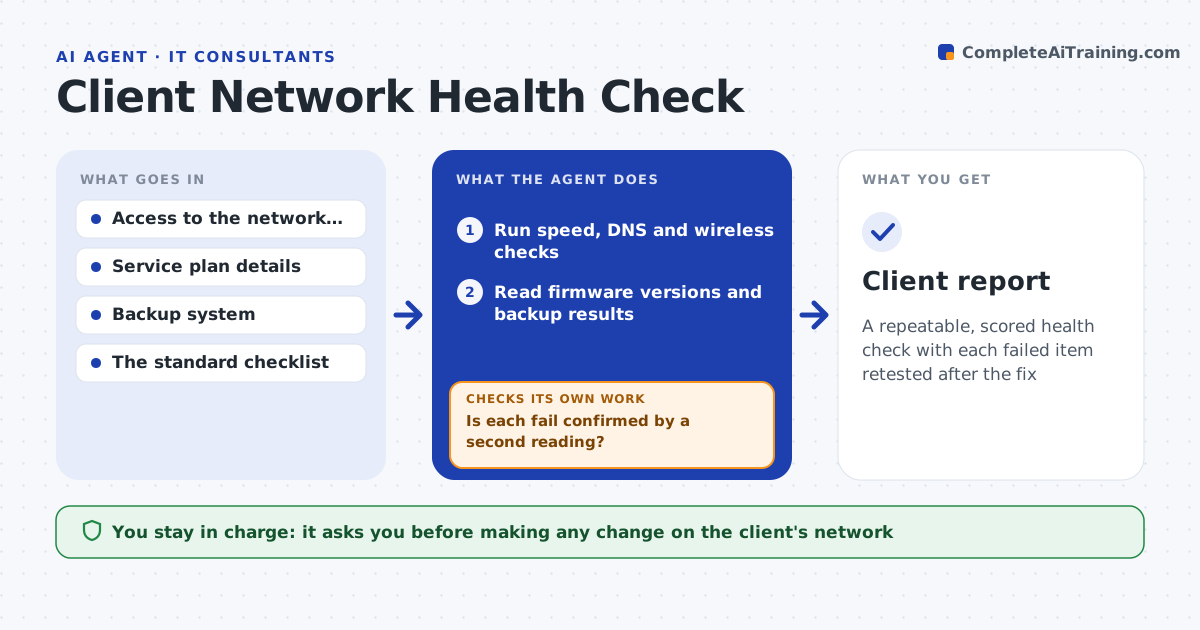
A repeatable, scored health check with each failed item retested after the fix
What it does
Two consultants checking the same office produce two different reports. This agent runs a fixed set of checks every time: internet speed against the plan, DNS response times, firmware versions on routers and access points, wireless signal and channel use, and whether backups ran and can be restored. It compares each result to a standard and scores the office. After the consultant or IT person fixes an item, it retests that check and updates the score. Items that cannot be fixed immediately are listed with the cost and risk. It then drafts a scored report with plain language. The consultant approves it before the client sees it. Edge case: a speed test that fails at midday but passes at night is retested at a quieter time before it is called a fault.
How it works
Follow the arrows from top to bottom. The orange dashed arrow is the loop: when a check fails, the agent goes back and tries again.
Read the steps as a list
- Health check requested
- Run speed, DNS and wireless checks
- Read firmware versions and backup results
- Score each check against the standard
- Is each fail confirmed by a second reading?If not: retest at another time of day and update the score. Back to step 2.
- Consultant approves which fixes to make, with effort and risk listedThe agent waits here for your OK.
- Retest each fixed item
- Did the fixed items now pass?If not: try the next fix or mark it for follow-up. Back to step 6.
- Draft the scored report in plain language
- Consultant approves before the client sees itThe agent waits here for your OK.
- Client report
How it decides
Each check scores pass, warning or fail against the standard thresholds. A fail is confirmed by a second reading before it is reported.
- Confirm any failed check with a second reading
- Treat firmware more than 12 months behind as a warning
- Fail a backup that has not run in 7 days or cannot be restored
- Rate speed against the contracted plan, with a 20 percent tolerance
Make it yours
Every agent is a starting point. You choose these settings for your own situation.
- Checks and thresholds
- Speed tolerance (default 20 percent)
- Retest times
- Report style and scoring scale
What keeps you in control
It always asks you first
- Making any change on the client's network
- Releasing the report to the client
Hard limits
- Never changes equipment settings without approval
- Never shares the report with the client before approval
It stops when
- Done: all checks scored and the report approved
- Stop: no access to the network equipment
Set it up
We guide you through the set-up, step by step
Members get the full set-up guide for this agent. No technical skills needed: you copy, paste and upload.
- One set of instructions to paste into your AI, with the clicks for ChatGPT, Claude, Microsoft 365 Copilot, Gemini and Grok
- The agent then walks you through connecting your own data, one source at a time
- A downloadable copy with the flow chart, the rules and the full guide