AI agent for video editors
Color Match Across Cameras Agent
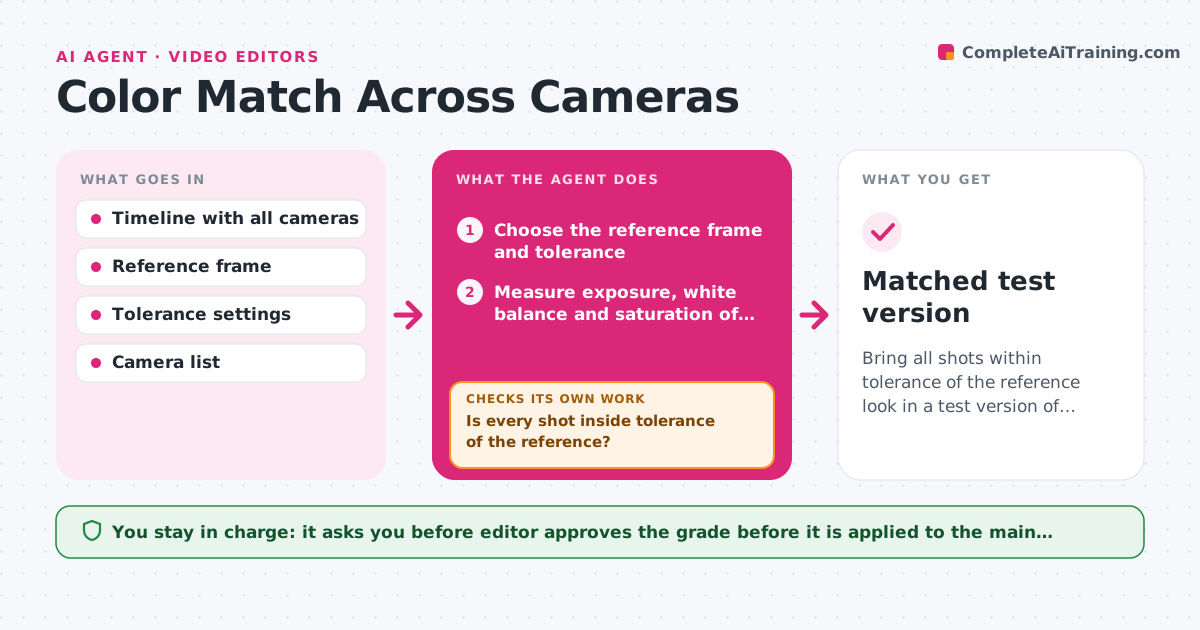
Bring all shots within tolerance of the reference look in a test version of the edit.
What it does
A wedding was shot on three cameras, and the skin tones look orange on one and green on another when cut together. This agent samples each shot in the timeline and measures its exposure, white balance and saturation. It compares each against a reference frame you choose, such as the main camera. It then proposes a correction for each shot or camera group and applies it to a test version of the timeline, never the original. After applying, it measures every shot again and checks whether the values are within tolerance of the reference. If a shot is still outside, it adjusts and measures again. The editor reviews the test version and approves the grade. Edge case: a shot has mixed lighting, so the agent matches skin tones first and flags it for a manual look.
How it works
Follow the arrows from top to bottom. The orange dashed arrow is the loop: when a check fails, the agent goes back and tries again.
Read the steps as a list
- Edit is ready for matching
- Choose the reference frame and tolerance
- Measure exposure, white balance and saturation of each shot
- Group shots by camera and lighting
- Propose a correction for each group
- Apply corrections to a test version of the timeline
- Measure every shot again
- Is every shot inside tolerance of the reference?If not: adjust the correction for the shots still outside and measure again. Back to step 5.
- Do skin tones look natural in mixed lighting shots?If not: flag the shot for manual grading and match skin tone only. Back to step 4.
- Editor approves the gradeThe agent waits here for your OK.
- Matched test version
How it decides
It compares measured values of each shot with the reference and corrects the largest difference first, usually white balance, then exposure. It stops when all values are inside tolerance.
- Correct white balance first, then exposure, then saturation
- Accept shots within 3% of the reference exposure and 200K of white balance
- Match skin tone first in mixed lighting
- Stop after four correction passes on one shot and flag it
Make it yours
Every agent is a starting point. You choose these settings for your own situation.
- Reference camera or frame
- Tolerance for exposure and white balance
- Camera groups
- Maximum correction passes (default 4)
- Shots excluded from matching
What keeps you in control
It always asks you first
- Editor approves the grade before it is applied to the main version
Hard limits
- Never apply changes to the original timeline
- Never change the creative look chosen by the editor
It stops when
- Done: all shots inside tolerance and the editor approves
- Stop: a shot cannot be matched after four passes
Set it up
We guide you through the set-up, step by step
Members get the full set-up guide for this agent. No technical skills needed: you copy, paste and upload.
- One set of instructions to paste into your AI, with the clicks for ChatGPT, Claude, Microsoft 365 Copilot, Gemini and Grok
- The agent then walks you through connecting your own data, one source at a time
- A downloadable copy with the flow chart, the rules and the full guide