AI agent for community moderators
Comment and Post Moderation Queue Agent
Keep discussions clean while answering real members quickly
What it does
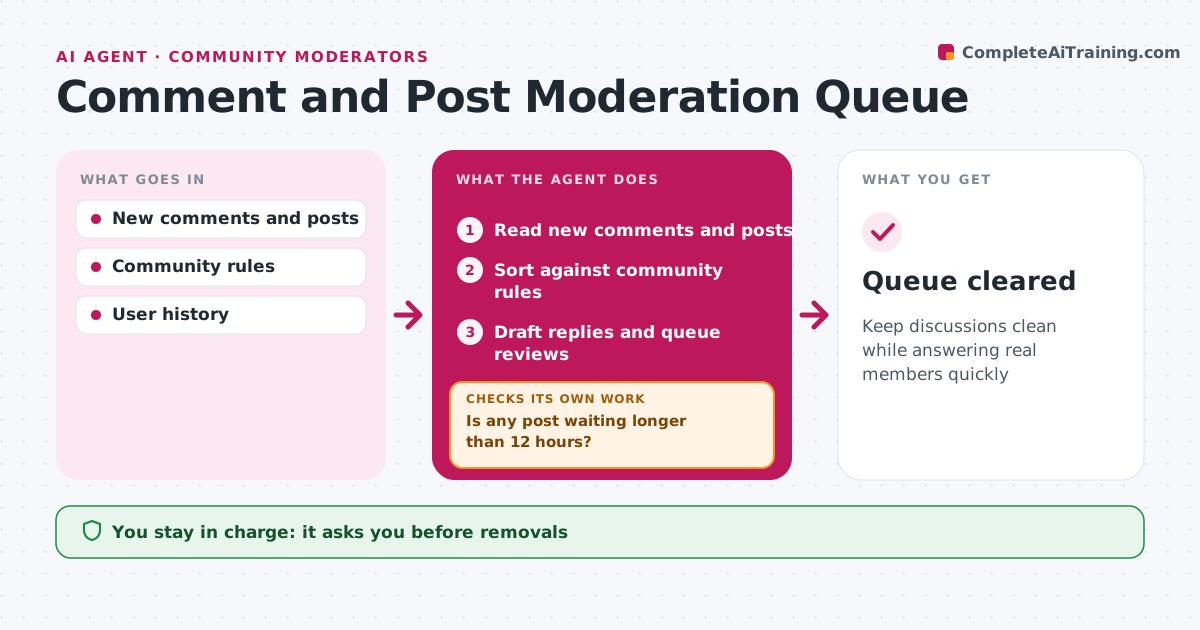
Moderation takes time every day, and a full queue lets spam or rule breaks sit in public. Every hour this agent reads new comments and posts and checks them against the community rules. It looks at the user's history, any links and the tone, then sorts each item: approve, spam, needs review or rule break. Clear spam with links is held. New users posting links go to review. Possible rule breaks are queued with the rule and the text quoted, so the moderator can decide quickly. It drafts replies for questions that need an answer. It then checks how long items have waited, and anything older than 12 hours is raised to the moderator. The moderator decides on every removal and ban. Edge case: a frustrated customer complaint is not removed as negativity; it is routed to support with the post linked.
How it works
Follow the arrows from top to bottom. The orange dashed arrow is the loop: when a check fails, the agent goes back and tries again.
Read the steps as a list
- Hourly moderation check
- Read new comments and posts
- Sort against community rules
- Draft replies and queue reviews
- Moderator approves removals and bansThe agent waits here for your OK.
- Is any post waiting longer than 12 hours?If not: raise it to the top and alert the moderator. Back to step 3.
- Queue cleared
How it decides
Posts are sorted by rule match, links, user history and tone.
- Complaints route to support
- Spam with links held
- New users with links get review
Make it yours
Every agent is a starting point. You choose these settings for your own situation.
- Rules list
- Queue age limit
- Spam rules
What keeps you in control
It always asks you first
- Removals
- Bans
Hard limits
- Never bans users itself
- Never deletes complaints
It stops when
- Done: queue empty
- Stop: platform down
Set it up
We guide you through the set-up, step by step
Members get the full set-up guide for this agent. No technical skills needed: you copy, paste and upload.
- One set of instructions to paste into your AI, with the clicks for ChatGPT, Claude, Microsoft 365 Copilot, Gemini and Grok
- The agent then walks you through connecting your own data, one source at a time
- A downloadable copy with the flow chart, the rules and the full guide