AI agent for community managers
Community Event Run Agent
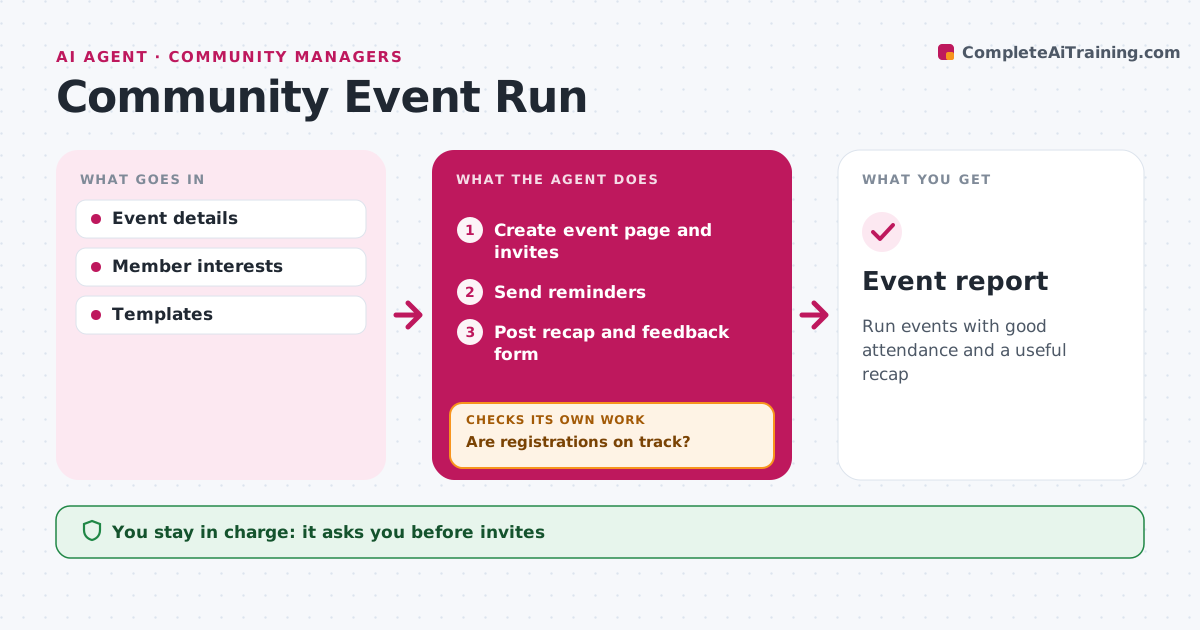
Run events with good attendance and a useful recap
What it does
Events keep members engaged, but each one takes setup, promotion and follow-up work. Once an event is planned, this agent creates the event page from a template and drafts invites to members whose interests match the topic. The community manager approves the invites before they go out. It then tracks registrations against the goal. If registrations fall behind, it drafts posts for relevant groups and asks speakers to share, then checks again. It sends reminders before the event. Afterward, it posts a recap with the recording within 48 hours and collects feedback, and the community manager approves the recap. It finishes with an event report showing registrations, attendance and feedback. Edge case: an event with fewer than 10 registrations 48 hours before start is flagged for the manager to consider postponing.
How it works
Follow the arrows from top to bottom. The orange dashed arrow is the loop: when a check fails, the agent goes back and tries again.
Read the steps as a list
- Event planned
- Create event page and invites
- Community manager approves invitesThe agent waits here for your OK.
- Are registrations on track?If not: post in groups and ask speakers to share. Back to step 2.
- Send reminders
- Post recap and feedback form
- Event report
How it decides
Registrations are compared with the goal. Behind triggers more promotion.
- Under 10 registrations 48 hours before means review
- Invite members by topic
- Recap within 48 hours
Make it yours
Every agent is a starting point. You choose these settings for your own situation.
- Registration goal
- Reminder timing
- Recap format
What keeps you in control
It always asks you first
- Invites
- Recap
Hard limits
- Never cancels events itself
- Never invites opted-out members
It stops when
- Done: recap posted
- Stop: event cancelled
Set it up
We guide you through the set-up, step by step
Members get the full set-up guide for this agent. No technical skills needed: you copy, paste and upload.
- One set of instructions to paste into your AI, with the clicks for ChatGPT, Claude, Microsoft 365 Copilot, Gemini and Grok
- The agent then walks you through connecting your own data, one source at a time
- A downloadable copy with the flow chart, the rules and the full guide