AI agent for contract administrators
Contract Closeout Agent
No open obligations remain when a contract is archived, and surviving duties are recorded
What it does
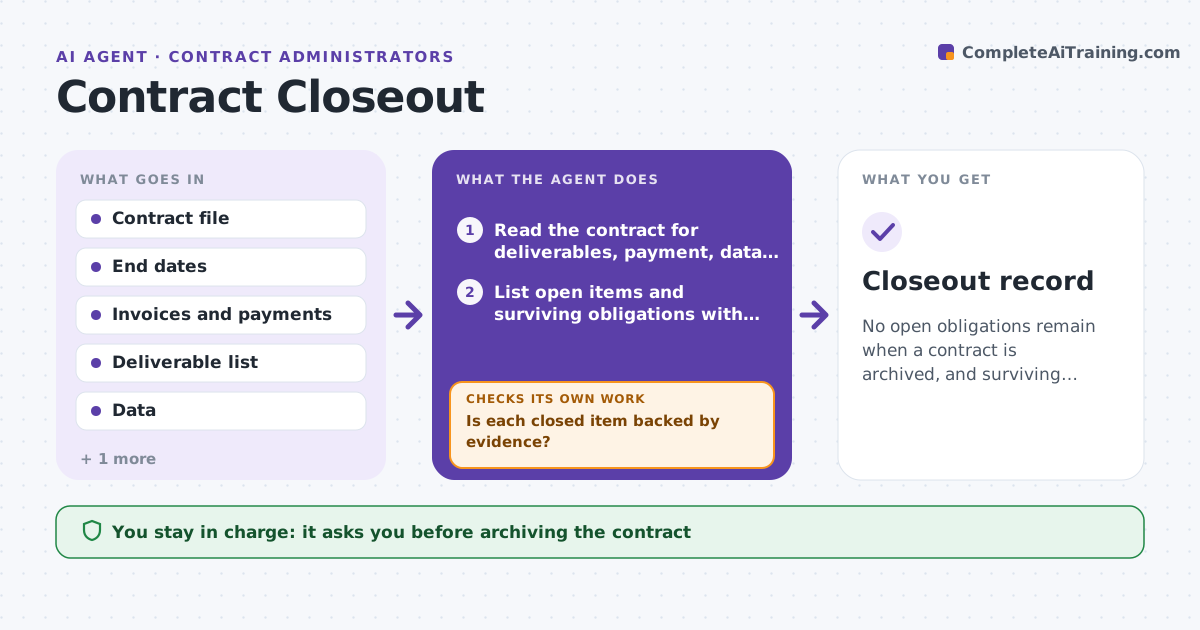
When a contract ends, payments, data returns and sign-offs can be left half-done for months. This agent watches end dates and, as each contract approaches its end, lists everything still open: final deliverables, last invoice and payment, return or deletion of data, return of equipment, release letters and any survival clauses. It assigns each item to its owner and sets a due date. It tracks progress each week and reminds owners. As items close, it checks the evidence, such as a payment record or a deletion certificate. If evidence is missing, it reopens the item. When all items are closed, it prepares the archive of the contract file and a closeout note. The administrator approves archiving. Edge case: a confidentiality clause survives for five years.
How it works
Follow the arrows from top to bottom. The orange dashed arrow is the loop: when a check fails, the agent goes back and tries again.
Read the steps as a list
- Contract is 30 days from its end date
- Read the contract for deliverables, payment, data and return terms
- List open items and surviving obligations with owners and dates
- Check payments, deliverables and data records weekly
- Is each closed item backed by evidence?If not: reopen the item and ask the owner for proof. Back to step 3.
- Remind owners of overdue items
- Are all items closed and evidenced?If not: escalate overdue items to the administrator and keep tracking. Back to step 4.
- Prepare the closeout note and the archive package
- Administrator approves archivingThe agent waits here for your OK.
- Move the file to the archive and set reminders for surviving obligations
- Closeout record
How it decides
An item is closed only with evidence. Surviving obligations are tracked after archiving with their own dates.
- Accept payment only with a payment record
- Accept data return only with a deletion or return certificate
- Escalate an item overdue by over 7 days
- Set reminders for surviving clauses
Make it yours
Every agent is a starting point. You choose these settings for your own situation.
- Lead time before end (default 30 days)
- Evidence required per item type
- Escalation limit (default 7 days)
- Archive location
What keeps you in control
It always asks you first
- Archiving the contract
Hard limits
- Never archives with open items
- Never contacts the vendor without approval
It stops when
- Done: all items closed with evidence and archived
- Stop: a dispute is open and the file must stay active
Set it up
We guide you through the set-up, step by step
Members get the full set-up guide for this agent. No technical skills needed: you copy, paste and upload.
- One set of instructions to paste into your AI, with the clicks for ChatGPT, Claude, Microsoft 365 Copilot, Gemini and Grok
- The agent then walks you through connecting your own data, one source at a time
- A downloadable copy with the flow chart, the rules and the full guide