AI agent for illustrators
Creative File Recovery Agent
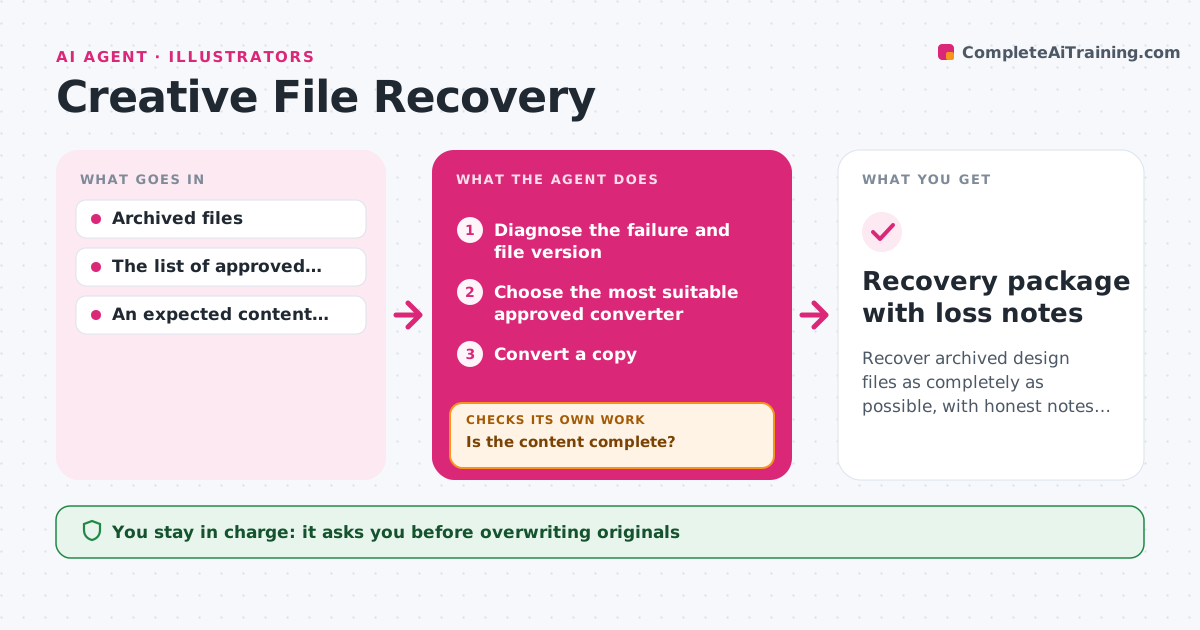
Recover archived design files as completely as possible, with honest notes on anything lost.
What it does
When studios move to new software versions, old files sometimes fail to open or lose layers, transparency or effects. Recovering them by trial and error takes days. This agent diagnoses why an archived file fails, reads its version, and picks the most suitable approved conversion route. It converts a copy, never the original, and compares the recovered content with the expected inventory of layers, effects and linked assets. If recovery is partial, it tries the next approved route. When every route has been tried, it records the missing elements as explicit gaps so nobody assumes the file is complete. The production lead decides whether to accept the recovery or any loss. Edge case: a file that opens but silently drops a mask is caught by the inventory comparison, not by the open test.
How it works
Follow the arrows from top to bottom. The orange dashed arrow is the loop: when a check fails, the agent goes back and tries again.
Read the steps as a list
- File fails to open or migrate
- Diagnose the failure and file version
- Choose the most suitable approved converter
- Convert a copy
- Compare recovered content with the inventory
- Is the content complete?If not: try the next approved route. Back to step 3.
- Record unrecoverable elements as gaps
- Production lead accepts the recovery or any lossThe agent waits here for your OK.
- Recovery package with loss notes
How it decides
It reads the failure evidence (error message, file version) to choose the first converter, then compares the result with the inventory; missing elements trigger the next converter route until all routes are tried.
- Which converter first: based on the error and file version.
- Keep trying or stop: stop when all approved routes are tried.
- Accept loss: only a person can accept permanent loss.
Make it yours
Every agent is a starting point. You choose these settings for your own situation.
- Approved conversion routes and their order per file type
- Inventory items that must be compared (default layers, masks, effects, linked files)
- Whether originals are copied to a quarantine folder before conversion (default yes)
- Maximum routes tried before reporting (default all approved routes)
- Who can accept permanent loss (default the production lead)
What keeps you in control
It always asks you first
- Overwriting originals
- Accepting content loss
Hard limits
- Originals are never overwritten.
It stops when
- Done: content complete.
- All routes tried: report gaps.
Set it up
We guide you through the set-up, step by step
Members get the full set-up guide for this agent. No technical skills needed: you copy, paste and upload.
- One set of instructions to paste into your AI, with the clicks for ChatGPT, Claude, Microsoft 365 Copilot, Gemini and Grok
- The agent then walks you through connecting your own data, one source at a time
- A downloadable copy with the flow chart, the rules and the full guide