AI agent for crisis communications managers
Crisis Drill Scenario Agent
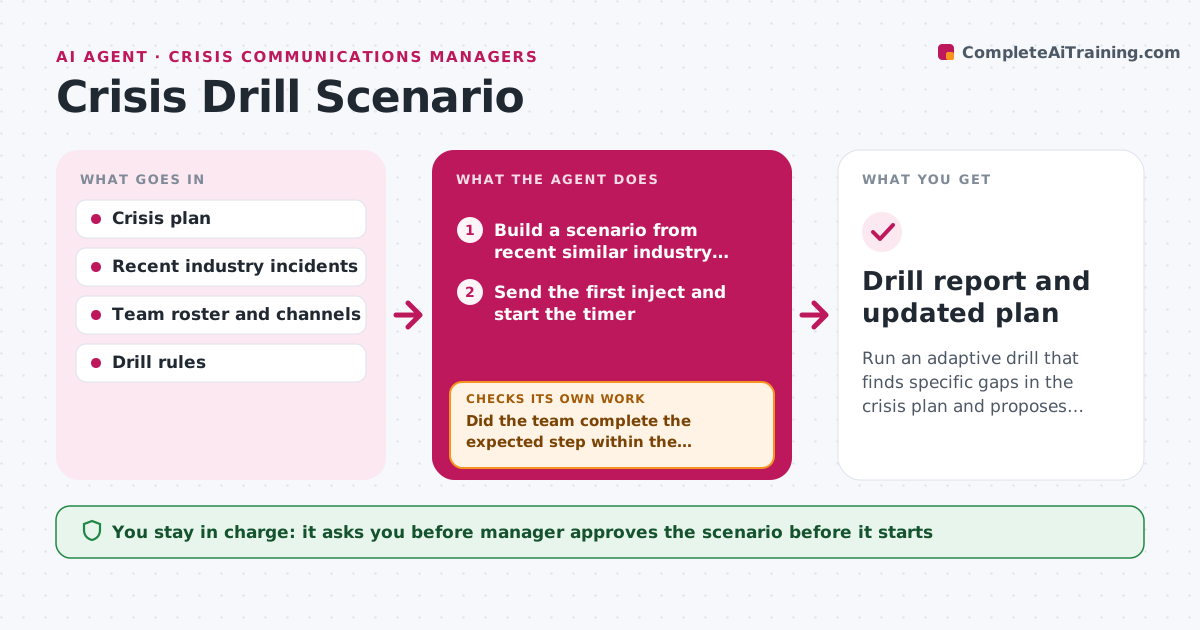
Run an adaptive drill that finds specific gaps in the crisis plan and proposes fixes.
What it does
Teams read their crisis plan once and hope for the best. The agent builds a realistic drill from recent incidents in the industry, then runs it in stages. It sends timed injects to the team, such as a journalist call, a viral post or a regulator email, and records when each person responds and what they do. It compares each action with the plan and notes missed steps like skipping legal review. Based on what the team did, it changes the next inject, for example escalating the story if the first reply was slow. When the drill ends it drafts fixes to the plan. Edge case: a participant solves a step in a way the plan does not cover but that works. The agent notes it as a possible plan improvement. The manager approves plan changes.
How it works
Follow the arrows from top to bottom. The orange dashed arrow is the loop: when a check fails, the agent goes back and tries again.
Read the steps as a list
- Drill date is set
- Build a scenario from recent similar industry incidents, with a timeline of injects
- Manager approves the scenario and participantsThe agent waits here for your OK.
- Send the first inject and start the timer
- Record each response and compare it with the plan step
- Did the team complete the expected step within the target time?If not: send a follow-up inject that raises pressure and records the gap. Back to step 4.
- Choose the next inject from what the team did
- Have all plan steps been tested?If not: send injects for the untested steps. Back to step 4.
- Draft a results report and plan fixes
- Manager approves plan changesThe agent waits here for your OK.
- Drill report and updated plan
How it decides
The next inject depends on the team's last response: slow or missing steps raise the pressure, and correct fast steps move the scenario forward.
- Target time for the first public statement is 60 minutes
- Escalate the next inject when a step is late by more than 50 percent
- Note any step skipped as a gap, even if the outcome was fine
- Mark clearly that each message is a drill
Make it yours
Every agent is a starting point. You choose these settings for your own situation.
- Scenario type
- Target response times
- Participants and channels
- Drill length (default 2 hours)
- Report format
What keeps you in control
It always asks you first
- Manager approves the scenario before it starts
- Manager approves any plan change
Hard limits
- Label every drill message as a drill
- Never contact real journalists or customers
It stops when
- Done: drill ends and report approved
- Stop: a real incident starts, end the drill at once
Set it up
We guide you through the set-up, step by step
Members get the full set-up guide for this agent. No technical skills needed: you copy, paste and upload.
- One set of instructions to paste into your AI, with the clicks for ChatGPT, Claude, Microsoft 365 Copilot, Gemini and Grok
- The agent then walks you through connecting your own data, one source at a time
- A downloadable copy with the flow chart, the rules and the full guide