
AI agent for communication managers
Crisis Stakeholder Notification Sequencing Agent
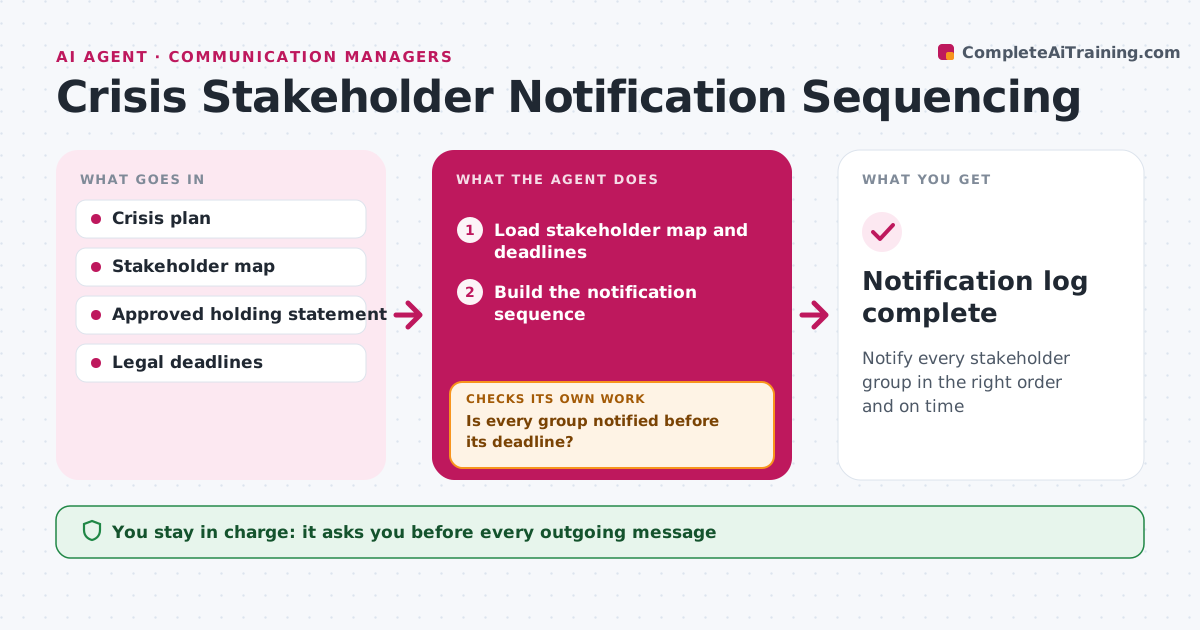
Notify every stakeholder group in the right order and on time
What it does
During a crisis, the order of notifications matters: regulators may have legal deadlines, employees should not learn from the news, and key customers expect a call. When the crisis plan is activated, this agent loads the stakeholder map and deadlines for the crisis type. It builds a sequence: legal deadlines first, then employees, then key customers and partners, then the public. It drafts messages for each group from the approved holding statement. The crisis lead approves every message. It tracks each notification as sent, received or acknowledged. If a deadline is near and a group is not notified, it alerts the crisis lead and moves the group up. If the facts change, it puts all unsent drafts on hold for review. Edge case: a data breach with a legal reporting deadline puts the regulator first.
How it works
Follow the arrows from top to bottom. The orange dashed arrow is the loop: when a check fails, the agent goes back and tries again.
Read the steps as a list
- Crisis plan activated
- Load stakeholder map and deadlines
- Build the notification sequence
- Draft messages from the holding statement
- Crisis lead approves each messageThe agent waits here for your OK.
- Track each notification as sent, received or acknowledged
- Is every group notified before its deadline?If not: alert the crisis lead and move the group up. Back to step 6.
- Are the facts in the drafts still current?If not: hold unsent drafts and redraft for approval. Back to step 4.
- Notification log complete
How it decides
Order follows legal deadlines first, then employees, then key customers and partners, then the public.
- Legal deadlines first
- Employees before public statements
- Fact changes put all drafts on hold
Make it yours
Every agent is a starting point. You choose these settings for your own situation.
- Stakeholder groups
- Deadline rules
- Message channels
What keeps you in control
It always asks you first
- Every outgoing message
Hard limits
- Never sends messages itself
- Never changes approved statements
It stops when
- Done: all groups notified
- Stop: crisis team stands down
Set it up
We guide you through the set-up, step by step
Members get the full set-up guide for this agent. No technical skills needed: you copy, paste and upload.
- One set of instructions to paste into your AI, with the clicks for ChatGPT, Claude, Microsoft 365 Copilot, Gemini and Grok
- The agent then walks you through connecting your own data, one source at a time
- A downloadable copy with the flow chart, the rules and the full guide



