AI agent for chief digital officers
Data Access Request Review Agent
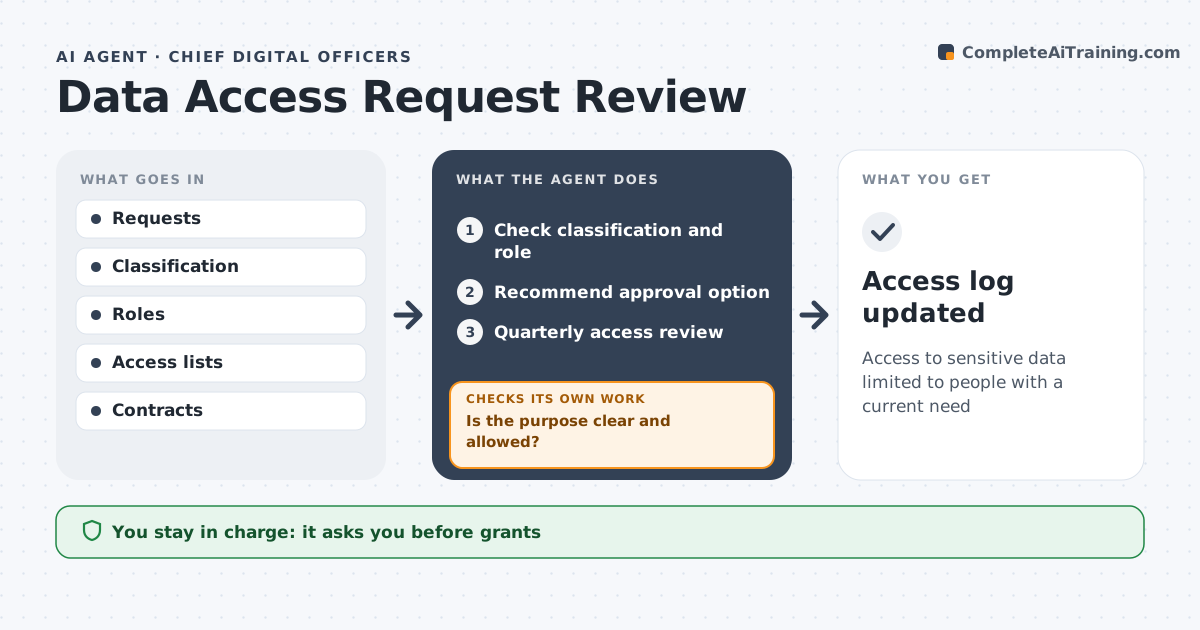
Access to sensitive data limited to people with a current need
What it does
People request access to data for projects, and saying yes too easily exposes sensitive data while saying no slows the business. For each request, this agent checks the data classification, the requester's role and the stated purpose. If the purpose is vague or not allowed, it asks for more detail before going further. It then recommends one of three options: approve, approve with sensitive fields masked, or decline. Sensitive data is masked by default. The data owner approves every grant. Each quarter, the agent also reviews existing access and finds people who no longer seem to need it, such as those who changed teams. It checks those results with managers before suggesting removal, and the data owner approves removals. Edge case: when a contractor's contract has ended, the agent recommends immediate removal instead of waiting for the quarterly review.
How it works
Follow the arrows from top to bottom. The orange dashed arrow is the loop: when a check fails, the agent goes back and tries again.
Read the steps as a list
- Request or review due
- Check classification and role
- Is the purpose clear and allowed?If not: ask requester for detail. Back to step 2.
- Recommend approval option
- Data owner approvesThe agent waits here for your OK.
- Quarterly access review
- Access log updated
How it decides
It matches purpose and role with classification rules.
- Sensitive data masked by default
- No access without a purpose
- Ended contracts removed
Make it yours
Every agent is a starting point. You choose these settings for your own situation.
- Classification rules
- Review frequency
- Masking defaults
- Approvers
What keeps you in control
It always asks you first
- Grants
- Removals
Hard limits
- Never grants access itself
- Logs all decisions
It stops when
- Done: request closed
- Stop: security incident
Set it up
We guide you through the set-up, step by step
Members get the full set-up guide for this agent. No technical skills needed: you copy, paste and upload.
- One set of instructions to paste into your AI, with the clicks for ChatGPT, Claude, Microsoft 365 Copilot, Gemini and Grok
- The agent then walks you through connecting your own data, one source at a time
- A downloadable copy with the flow chart, the rules and the full guide