AI agent for ai consultants
Data Readiness Assessment Agent
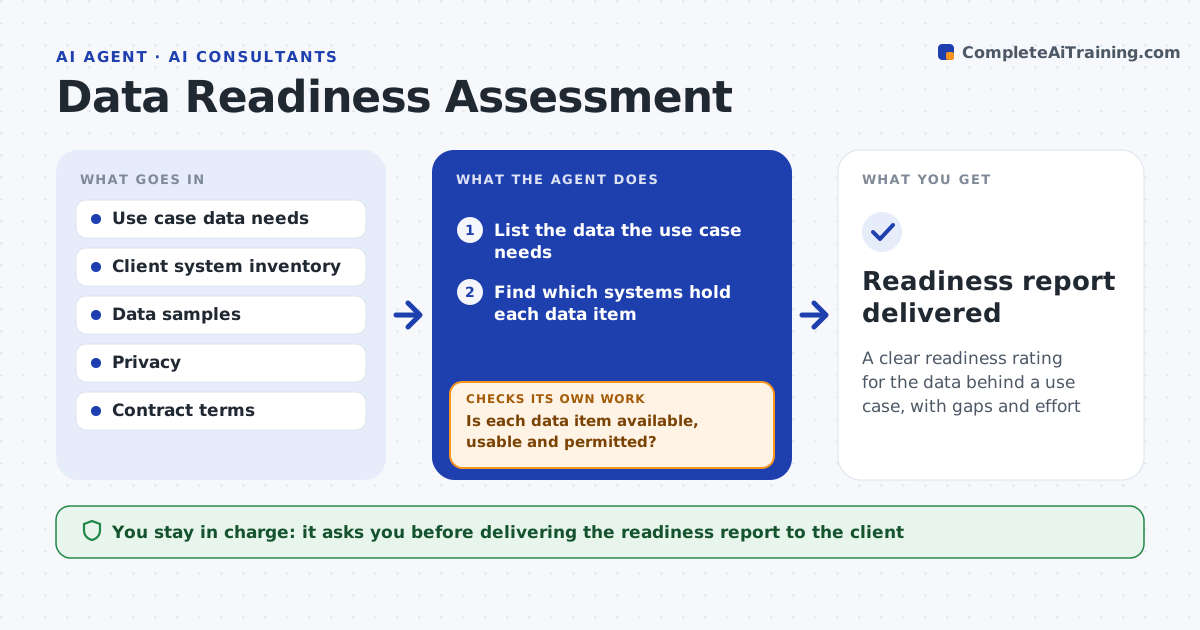
A clear readiness rating for the data behind a use case, with gaps and effort
What it does
AI projects often fail late because the data turns out to be incomplete, scattered or not allowed to be used. For a proposed use case, this agent lists the data it would need, then checks what the client actually has: which systems hold it, how complete and clean it is, how far back it goes, and whether privacy rules or contracts allow this use. Where access is given, it samples the data and measures completeness and quality. Each data item gets a status: ready, needs work or blocked. Where data is missing or not permitted, it records the gap and what it would take to close it. It then rates overall readiness and the pre-work needed. You approve the report. Edge case: data under a contract that forbids this use is marked blocked, not treated as a cleaning gap.
How it works
Follow the arrows from top to bottom. The orange dashed arrow is the loop: when a check fails, the agent goes back and tries again.
Read the steps as a list
- Use case selected for assessment
- List the data the use case needs
- Find which systems hold each data item
- Sample the data and measure completeness and history depth
- Check privacy rules and contracts for permitted use
- Is each data item available, usable and permitted?If not: record each gap and what it would take to close it. Back to step 3.
- Rate overall readiness and pre-work needed
- Consultant approves the readiness reportThe agent waits here for your OK.
- Readiness report delivered
How it decides
It rates readiness on availability, quality and permission, and marks a use case blocked when data use is not permitted regardless of quality.
- Mark use cases blocked when data use is not permitted
- Rate quality from the sample, not assumptions
- Separate missing data from poor-quality data
Make it yours
Every agent is a starting point. You choose these settings for your own situation.
- Readiness rating scale
- Quality thresholds
- Privacy and contract checks
- Report format
What keeps you in control
It always asks you first
- Delivering the readiness report to the client
Hard limits
- Does not copy client data out of their systems
- Respects contract and privacy limits
It stops when
- Done: readiness rated with gaps
- Stop: no access to assess the data
Set it up
We guide you through the set-up, step by step
Members get the full set-up guide for this agent. No technical skills needed: you copy, paste and upload.
- One set of instructions to paste into your AI, with the clicks for ChatGPT, Claude, Microsoft 365 Copilot, Gemini and Grok
- The agent then walks you through connecting your own data, one source at a time
- A downloadable copy with the flow chart, the rules and the full guide