AI agent for editors
Data Story Number Check Agent
Every figure in the story verified against the data
What it does
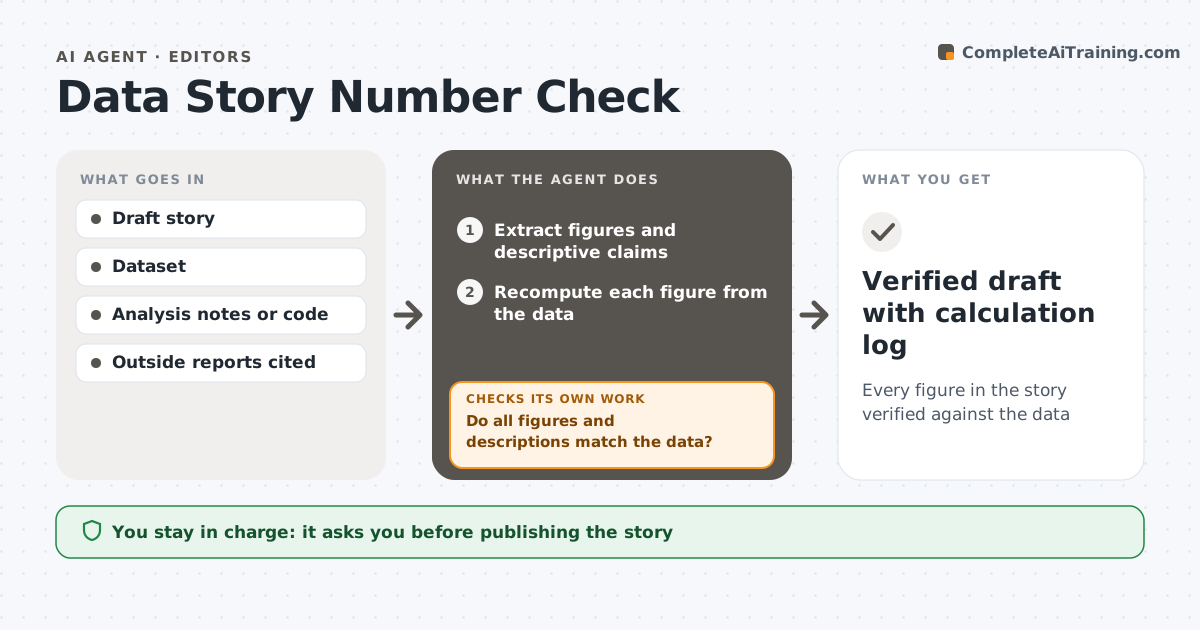
A data story can have dozens of figures, and each one is a chance for a correction. This agent reads the draft and lists every number, comparison and descriptive word such as 'doubled', 'record' or 'most'. It recomputes each figure from the dataset and the analysis notes. It checks percent against percentage points, rounding, time periods and whether comparisons use the same base. Figures from outside reports are checked against those reports and the source is marked. Each mismatch is listed with the correct figure and the calculation. After the reporter fixes the draft, it runs again. It then checks that charts and captions match the corrected text. The editor approves before publication. Edge case: a chart comparing 11 months with 12 is flagged even when every number in it is correct.
How it works
Follow the arrows from top to bottom. The orange dashed arrow is the loop: when a check fails, the agent goes back and tries again.
Read the steps as a list
- Draft sent to editor
- Extract figures and descriptive claims
- Recompute each figure from the data
- Compare wording, periods and bases
- Do all figures and descriptions match the data?If not: list mismatches with correct values for the reporter. Back to step 3.
- Check charts and captions against the corrected text
- Do charts use the same periods and figures as the text?If not: list chart fixes for the graphics desk. Back to step 6.
- Editor approves for publicationThe agent waits here for your OK.
- Verified draft with calculation log
How it decides
A figure passes when the recomputed value matches within the agreed rounding and the wording fits the size of the change.
- Flag percent versus percentage point confusion
- Flag words like doubled when the change is not close to 100%
- Check that compared periods have the same length
Make it yours
Every agent is a starting point. You choose these settings for your own situation.
- Rounding rule
- Words to watch
- When to run
- Log format
What keeps you in control
It always asks you first
- Publishing the story
Hard limits
- Never edits the story itself
- Keeps a log of every calculation
It stops when
- Done: all figures verified
- Stop: dataset or notes missing; ask the reporter
Set it up
We guide you through the set-up, step by step
Members get the full set-up guide for this agent. No technical skills needed: you copy, paste and upload.
- One set of instructions to paste into your AI, with the clicks for ChatGPT, Claude, Microsoft 365 Copilot, Gemini and Grok
- The agent then walks you through connecting your own data, one source at a time
- A downloadable copy with the flow chart, the rules and the full guide