AI agent for database administrators
Database Schema Change Rehearsal Agent
A schema migration proven safe on production-like data with a rollback plan
What it does
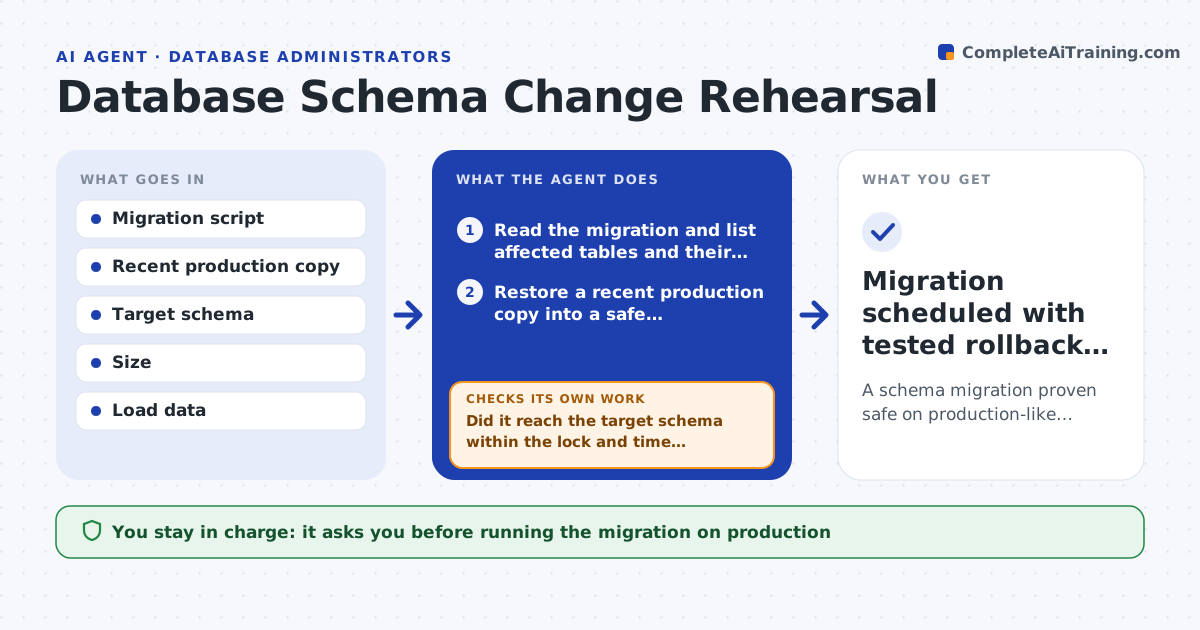
A schema migration that runs fine on a small development database can lock or break the real one. This agent reads the proposed migration and restores a recent copy of production into a safe environment. It runs the migration there while measuring time, locks and row counts. It checks that the result matches the intended schema and that no data was dropped. If the migration is too slow or locks a busy table, it proposes a safer approach, such as adding a column as nullable first and backfilling in batches, and runs it again. It then drafts a rollback, tests it on the copy, and writes a timed run plan. You approve running it on production. Edge case: a migration that would rewrite a huge table is split into batches with a progress check.
How it works
Follow the arrows from top to bottom. The orange dashed arrow is the loop: when a check fails, the agent goes back and tries again.
Read the steps as a list
- Migration proposed for review
- Read the migration and list affected tables and their sizes
- Restore a recent production copy into a safe environment
- Run the migration and measure time, locks and row counts
- Did it reach the target schema within the lock and time limits with no data loss?If not: propose a safer or batched approach, such as nullable first and backfill, then rerun. Back to step 4.
- Draft a rollback script and run it on the copy
- Does the rollback restore the original schema and row counts?If not: fix the rollback script and test it again. Back to step 6.
- Write a timed run plan with a low-traffic window
- DBA approves running it on productionThe agent waits here for your OK.
- Migration scheduled with tested rollback ready
How it decides
A migration passes only when it reaches the target schema, keeps all expected rows, and stays within the lock and time limits.
- Fail a migration that locks a busy table beyond the limit
- Batch large table rewrites
- Require a rollback for every change
Make it yours
Every agent is a starting point. You choose these settings for your own situation.
- Lock and time limits
- Environment for rehearsal
- Batch size for large tables
- Approval roles
What keeps you in control
It always asks you first
- Running the migration on production
Hard limits
- Never runs on production without approval
- Always tests on a copy first
It stops when
- Done: migration proven and scheduled
- Stop: no recent production copy available
Set it up
We guide you through the set-up, step by step
Members get the full set-up guide for this agent. No technical skills needed: you copy, paste and upload.
- One set of instructions to paste into your AI, with the clicks for ChatGPT, Claude, Microsoft 365 Copilot, Gemini and Grok
- The agent then walks you through connecting your own data, one source at a time
- A downloadable copy with the flow chart, the rules and the full guide