AI agent for nurses
Discharge Follow-up Call Agent
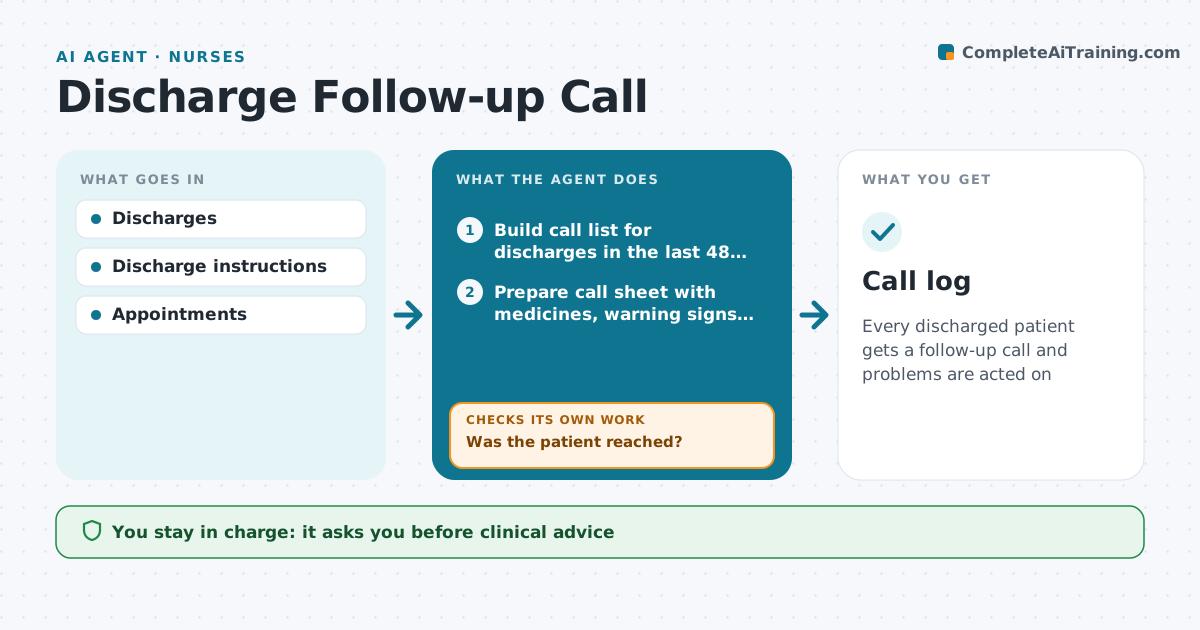
Every discharged patient gets a follow-up call and problems are acted on
What it does
Calls in the first days after discharge catch problems with medicines, symptoms and follow-up appointments before they turn into readmissions. Each day this agent builds the call list from discharges so every patient is called within 48 hours. It prepares a call sheet with the discharge medicines, warning signs to ask about and booked appointments. The nurse makes the call and records answers. Patients not reached are retried the next day, up to three attempts, and then sent a letter. After each call, the agent flags problems such as a prescription not filled, a new or worsening symptom, or no follow-up visit booked, and creates a task for each. It then checks that every task is closed. If a patient describes urgent symptoms during the call, the unit's escalation protocol is shown to the nurse at once. Edge case: urgent symptoms override the call script.
How it works
Follow the arrows from top to bottom. The orange dashed arrow is the loop: when a check fails, the agent goes back and tries again.
Read the steps as a list
- Daily discharge list
- Build call list for discharges in the last 48 hours
- Prepare call sheet with medicines, warning signs and appointments
- Nurse makes calls and records answersThe agent waits here for your OK.
- Was the patient reached?If not: retry next day, send a letter after three attempts. Back to step 2.
- Flag unfilled prescriptions, symptoms and missing appointments
- Create a task for each problem
- Is every task closed?If not: remind the task owner and recheck. Back to step 7.
- Call log
How it decides
Problems are flagged by type.
- Call every discharged patient within 48 hours
- Retry up to 3 attempts, then send a letter
- No follow-up appointment booked triggers a booking task
- Urgent symptoms during a call show the escalation protocol at once
Make it yours
Every agent is a starting point. You choose these settings for your own situation.
- Call timing
- Attempts
- Questions
- Patient groups
What keeps you in control
It always asks you first
- Clinical advice
Hard limits
- No clinical advice by the agent
It stops when
- Done: call complete
- Stop: unreachable after 3 tries
Set it up
We guide you through the set-up, step by step
Members get the full set-up guide for this agent. No technical skills needed: you copy, paste and upload.
- One set of instructions to paste into your AI, with the clicks for ChatGPT, Claude, Microsoft 365 Copilot, Gemini and Grok
- The agent then walks you through connecting your own data, one source at a time
- A downloadable copy with the flow chart, the rules and the full guide