AI agent for penetration testers
Engagement Readiness Checklist Agent
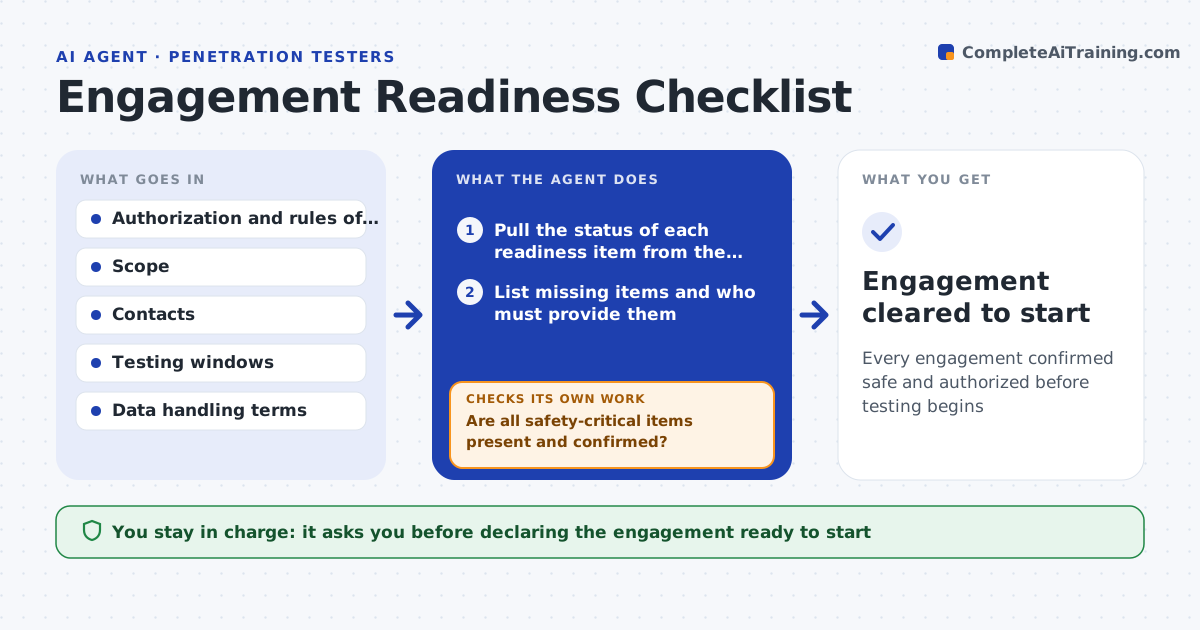
Every engagement confirmed safe and authorized before testing begins
What it does
Starting a security engagement unprepared causes delays or, worse, testing without the right safeguards. Before kickoff this agent runs the readiness checklist: signed authorization and rules of engagement, confirmed scope, emergency contacts and escalation path, testing windows, out-of-scope and do-not-touch systems, and data handling terms. It pulls the real status of each item from the engagement record instead of assuming, and lists what is missing with who must provide it. It will not mark the engagement ready while a safety-critical item, like authorization or an emergency contact, is missing. It also checks that any production systems in scope have agreed safe-testing limits. It drafts a kickoff summary. You approve declaring the engagement ready. Edge case: production systems without agreed limits are held.
How it works
Follow the arrows from top to bottom. The orange dashed arrow is the loop: when a check fails, the agent goes back and tries again.
Read the steps as a list
- Engagement nearing kickoff
- Pull the status of each readiness item from the engagement record
- List missing items and who must provide them
- Are all safety-critical items present and confirmed?If not: hold kickoff and chase the missing items. Back to step 2.
- Review production systems in scope
- Does every production system have agreed safe-testing limits?If not: hold those systems until limits are set. Back to step 5.
- Draft the kickoff summary
- Lead approves declaring the engagement readyThe agent waits here for your OK.
- Engagement cleared to start
How it decides
It marks an engagement ready only when every safety-critical item is present and confirmed, not assumed.
- Block readiness without authorization or emergency contacts
- Hold production scope lacking safe-testing constraints
- Confirm each item from the record, not assumption
Make it yours
Every agent is a starting point. You choose these settings for your own situation.
- Checklist items
- Which items are safety-critical
- Owners by item
- Kickoff summary format
What keeps you in control
It always asks you first
- Declaring the engagement ready to start
Hard limits
- Never clears an engagement missing authorization
- Treats safety items as blocking
It stops when
- Done: engagement confirmed ready
- Stop: authorization is not signed
Set it up
We guide you through the set-up, step by step
Members get the full set-up guide for this agent. No technical skills needed: you copy, paste and upload.
- One set of instructions to paste into your AI, with the clicks for ChatGPT, Claude, Microsoft 365 Copilot, Gemini and Grok
- The agent then walks you through connecting your own data, one source at a time
- A downloadable copy with the flow chart, the rules and the full guide