AI agent for it consultants
Engagement Scope Change Agent
Every extra request recorded, priced and approved before work starts, with the plan kept current
What it does
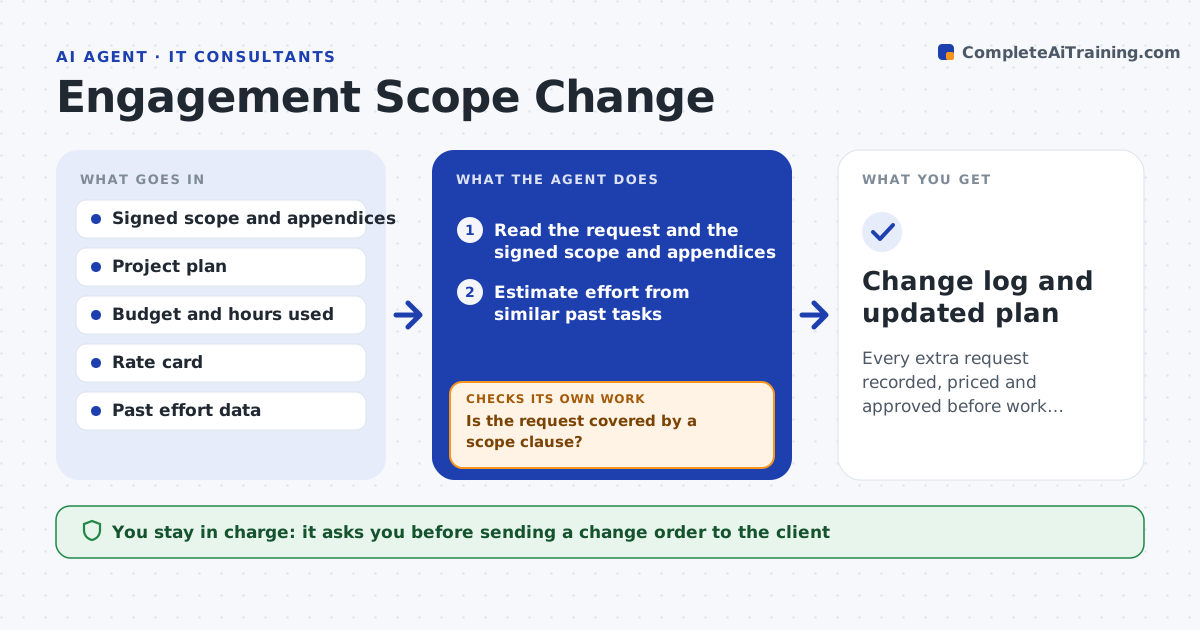
A client asks for just one more report, then another, and weeks later the project is over budget. This agent compares each new request, from email or the ticket tracker, with the signed scope and the work already agreed. It decides whether the request is inside the scope, a clarification or new work. For new work, it estimates effort from similar past tasks and checks the budget and time that remain. It drafts a change order with the description, hours, cost and schedule effect. After the client signs, it updates the plan and tracks the extra hours against the order. The consultant approves the change order before it goes to the client. Edge case: a request that sounds new but is already listed in an appendix of the scope is marked in scope, with the clause quoted.
How it works
Follow the arrows from top to bottom. The orange dashed arrow is the loop: when a check fails, the agent goes back and tries again.
Read the steps as a list
- New client request arrives
- Read the request and the signed scope and appendices
- Is the request covered by a scope clause?If not: quote the clause and mark the request in scope. Back to step 2.
- Estimate effort from similar past tasks
- Check remaining budget and schedule
- Draft a change order with hours, cost and schedule effect
- Consultant approves sending the change orderThe agent waits here for your OK.
- Track the client's approval and send reminders
- Update the project plan when it is signed
- Are hours on the work within the order after 1 week?If not: flag the overrun and draft an update to the order. Back to step 8.
- Change log and updated plan
How it decides
Work is in scope only if a scope clause covers it. Otherwise an estimate and a change order are prepared, and work waits for approval.
- Treat anything not named in the scope or appendices as new work
- Add a 15 percent contingency to estimates from past tasks
- Do not begin work before signed approval
- Flag any order that has used 80 percent of its hours
Make it yours
Every agent is a starting point. You choose these settings for your own situation.
- Contingency on estimates (default 15 percent)
- Rate card
- Hours alert level (default 80 percent)
- Approval path for small changes
What keeps you in control
It always asks you first
- Sending a change order to the client
- Starting work before signature, if the consultant allows it
Hard limits
- Never commits to extra work in the client's name
- Never changes the signed scope
It stops when
- Done: request resolved as in scope or signed change
- Stop: the scope document is missing
Set it up
We guide you through the set-up, step by step
Members get the full set-up guide for this agent. No technical skills needed: you copy, paste and upload.
- One set of instructions to paste into your AI, with the clicks for ChatGPT, Claude, Microsoft 365 Copilot, Gemini and Grok
- The agent then walks you through connecting your own data, one source at a time
- A downloadable copy with the flow chart, the rules and the full guide