AI agent for biochemists
Enzyme Kinetics Fitting Agent
Reliable kinetic parameters with checked fits
What it does
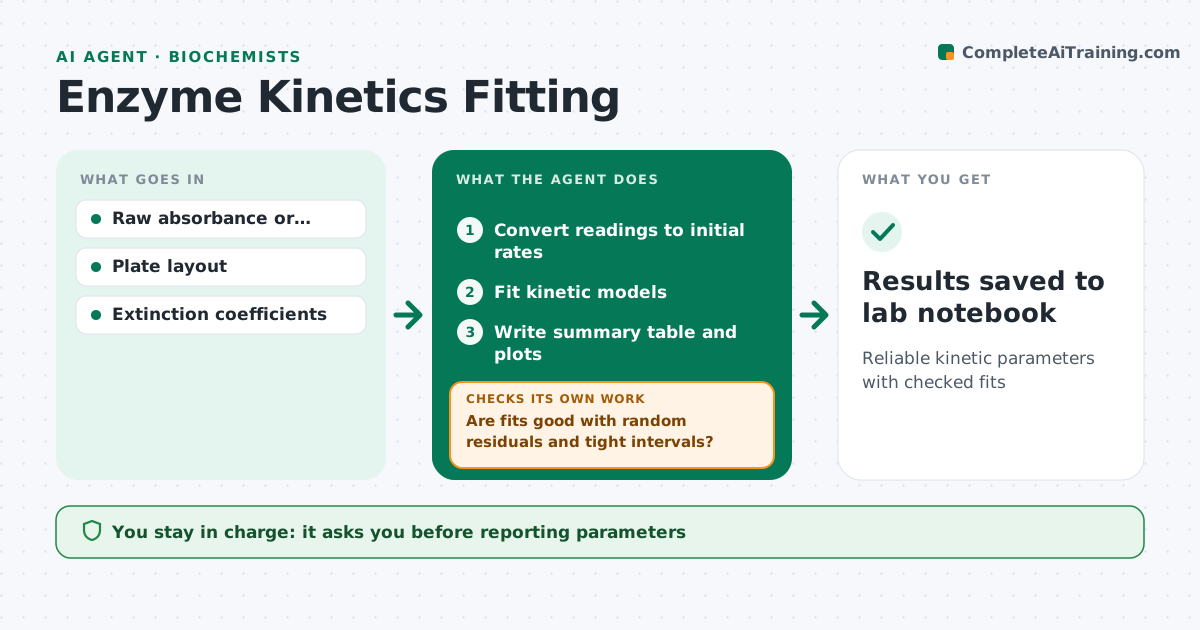
Kinetics experiments produce many curves that must each be fitted to the right model, and doing it by hand invites mistakes. When data is exported, this agent imports the plate reader or spectrophotometer readings, converts them to initial rates and fits Michaelis-Menten or inhibition models. It checks each fit: overall quality, whether residuals look random and whether parameter confidence intervals are tight. If a fit is poor, it tries other models, removes clear outliers with a note for each, or flags that the substrate range does not cover the concentrations needed. It then fits again and rechecks. It writes a summary table with parameters and plots. The biochemist approves the reported values before they go into the lab notebook. Edge case: when rates fall at high substrate concentrations, the agent flags substrate inhibition instead of forcing a simple model.
How it works
Follow the arrows from top to bottom. The orange dashed arrow is the loop: when a check fails, the agent goes back and tries again.
Read the steps as a list
- Kinetics data exported
- Convert readings to initial rates
- Fit kinetic models
- Are fits good with random residuals and tight intervals?If not: try other models or flag substrate range issues. Back to step 3.
- Write summary table and plots
- Biochemist approves reported valuesThe agent waits here for your OK.
- Results saved to lab notebook
How it decides
It picks the model with the best fit and acceptable residual pattern, and flags parameters with wide confidence intervals.
- Try inhibition models when residuals show a pattern
- Flag wide confidence intervals
- Note every excluded point
Make it yours
Every agent is a starting point. You choose these settings for your own situation.
- Models to try
- Fit quality limits
- Plot style
- Notebook format
What keeps you in control
It always asks you first
- Reporting parameters
- Excluding data points
Hard limits
- Never deletes raw data
It stops when
- Done: results saved
- Stop: data unusable; suggest repeating the run
Set it up
We guide you through the set-up, step by step
Members get the full set-up guide for this agent. No technical skills needed: you copy, paste and upload.
- One set of instructions to paste into your AI, with the clicks for ChatGPT, Claude, Microsoft 365 Copilot, Gemini and Grok
- The agent then walks you through connecting your own data, one source at a time
- A downloadable copy with the flow chart, the rules and the full guide