AI agent for podcasters
Episode Recording Checklist and Backup Agent
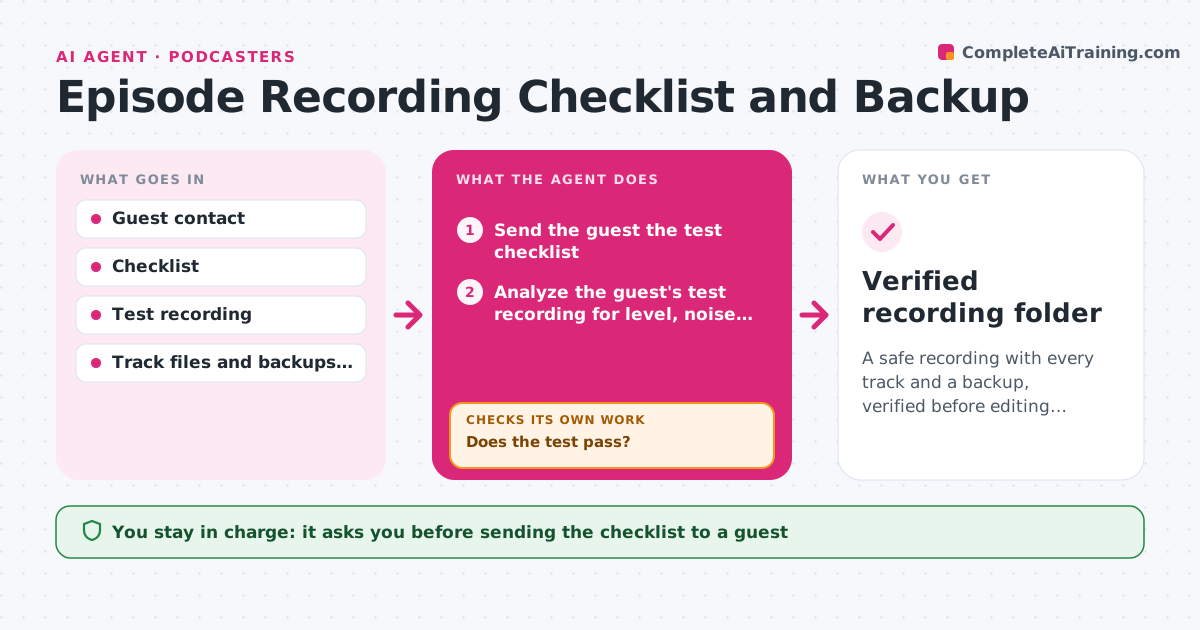
A safe recording with every track and a backup, verified before editing starts
What it does
Recordings fail or one side is lost, and the guest is not available again. Before the call, this agent sends the guest a test checklist covering headphones, microphone, a quiet room and a local recording app. It checks the guest's test recording for level, noise and drops, advises fixes and checks again. After the call, it verifies that every track and backup file exists, plays and has the right length, and it compares track lengths with each other. The host approves moving to editing. Edge case: if the guest's local file is missing, it checks the backup recording and tells the host before the guest signs off.
How it works
Follow the arrows from top to bottom. The orange dashed arrow is the loop: when a check fails, the agent goes back and tries again.
Read the steps as a list
- Recording scheduled
- Send the guest the test checklist
- Analyze the guest's test recording for level, noise and drops
- Does the test pass?If not: advise a specific fix and request a new test. Back to step 3.
- Remind the host to start all recordings and the backup
- After the call, check that every track and backup file exists
- Test that each file plays and compare lengths
- Do all files exist, play and match in length?If not: tell the host at once and use the backup or plan a pickup recording. Back to step 6.
- Host approves moving to editingThe agent waits here for your OK.
- Verified recording folder
How it decides
A test recording passes when level, noise and connection meet the limits. After the call, every track must exist, play and match the length of the others within a few seconds.
- Require the noise floor under -50 dB
- Require peaks under -3 dB
- Require every track length within 5 seconds of the others
- Check the backup before the guest leaves the call
Make it yours
Every agent is a starting point. You choose these settings for your own situation.
- Noise limit (default -50 dB)
- Recording tools
- When to send the checklist (default 2 days before)
- Backup method
What keeps you in control
It always asks you first
- Sending the checklist to a guest
- Moving to editing
Hard limits
- Never edits the recordings
- Never sends messages to a guest without approval
It stops when
- Done: all tracks verified and the host approved
- Stop: no usable recording and no backup
Set it up
We guide you through the set-up, step by step
Members get the full set-up guide for this agent. No technical skills needed: you copy, paste and upload.
- One set of instructions to paste into your AI, with the clicks for ChatGPT, Claude, Microsoft 365 Copilot, Gemini and Grok
- The agent then walks you through connecting your own data, one source at a time
- A downloadable copy with the flow chart, the rules and the full guide